(II) BASIC PROGRAMMING
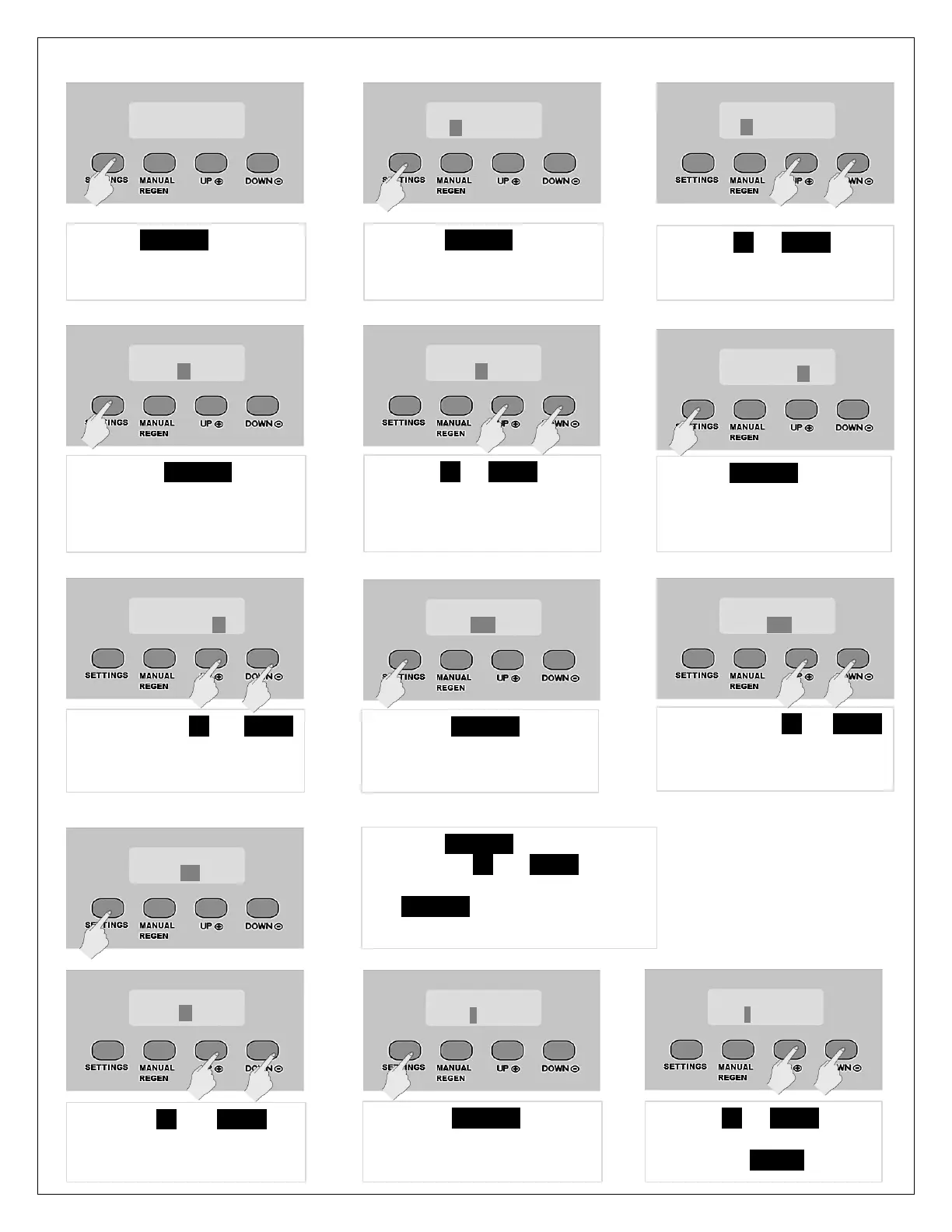
1. Press SETTINGS for 3 sec.
2. After 3 seconds the display
will beep confirming unlock
4. Press UP or DOWN key to
change the hour value to
current time
5. Press SETTINGS again.
Hour value will be
accepted and minute
value will be highlighted
3. Press SETTINGS again and
the hour value becomes
highlighted
6. Press UP or DOWN key to
change minute value to
current minutes
7. Press SETTINGS key again
and AM/PM will be
highlighted.
8. Now press UP or DOWN
key to change AM/PM
value to current time
9. Press SETTINGS button
again and YEAR will be
highlighted
10. Now press UP or DOWN
key to change YEAR to
current year
11. Press SETTINGS again to highlight
and use UP or DOWN keys to
select current month. Then press
SETTINGS again to advance to
DATE
13. Press SETTINGS again to
advance to “REGEN DAYS”
12. Press UP or DOWN to
enter CURRENT DATE.
14. Press UP or DOWN key to
change value. Do not exceed
4 days. Press SETTINGS to advance



 To Next Page