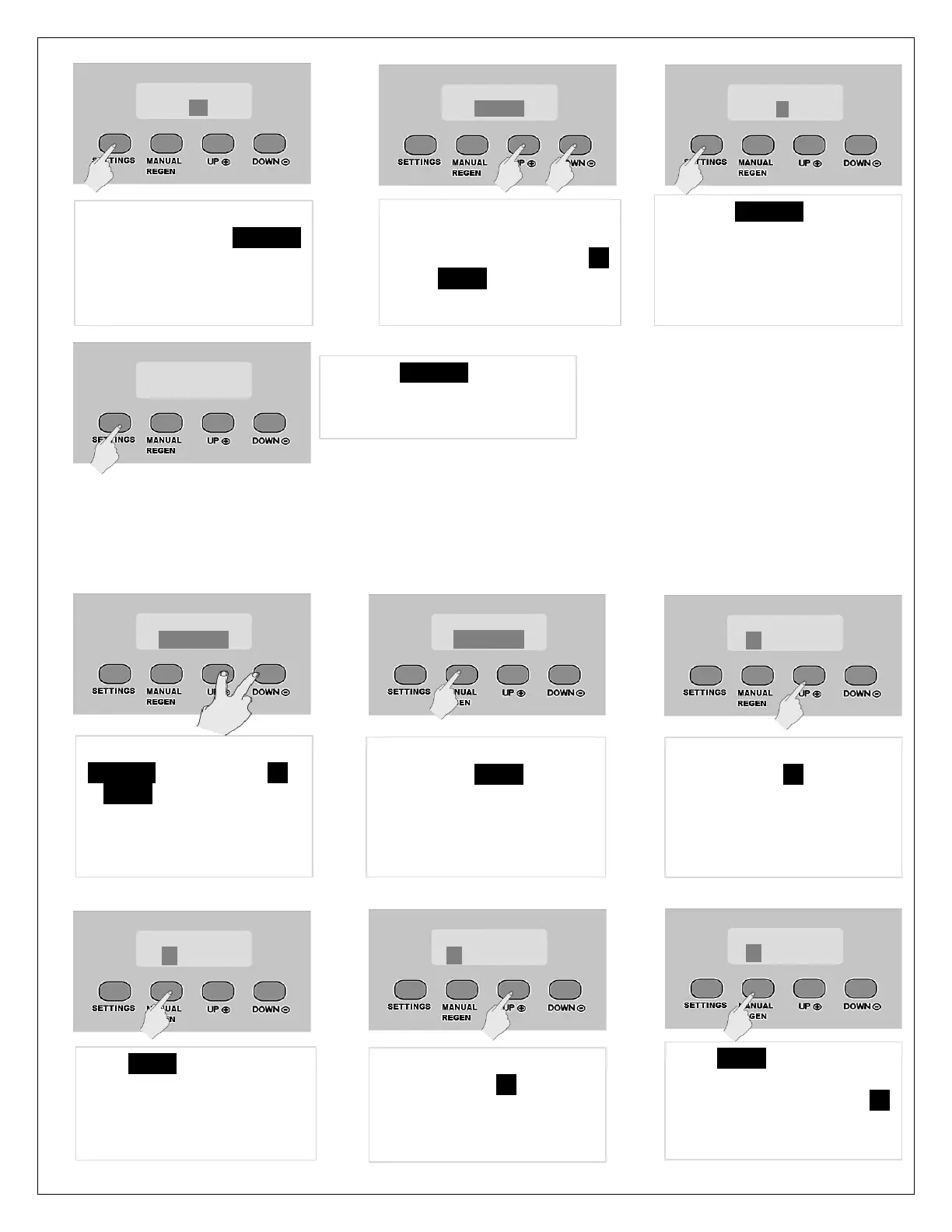
(III) ADVANCED PROGRAMMING
In the advanced programming, you can change individual regeneration cycle times. DO NOT change these without
confirming with Rainfresh technical support. By changing these values your unit can malfunction.
15. Leave at default OFF
setting. Press SETTINGS
again to advance to
“REGEN TIME”
16. This is the time when the
unit will regenerate. Leave
at default setting or use UP
or DOWN keys to change
per your choice
17. Press SETTINGS to advance
to “LOAD DEFAULT”. Do not
change this setting unless
you want to go back to
factory settings
18. Press SETTINGS again and
this completes the
programming
Unlock display by pressing
SETTINGS for 3 sec. Press UP
& DOWN keys together for 3
seconds until unit beeps and
display changes to VALVE
MODE.
Leave VALVE MODE at default
setting. Press REGEN button to
advance to “BACKWASH”.
Default BACKWASH is set for
10 min. Press UP to increase
this setting if you prefer a
more thorough wash
Press REGEN button to
advance to “CHEM-DRAW”
Default CHEM_DRAW setting
is 60 min. Press UP arrow to
increase to 70 but decreasing
is not recommended.
advance to “RINSE”. Default
setting is 10 minutes. Press UP
to increase but do not



 To Next Page