244 STARTING AND OPERATING
available gears. Tapping the ERS (-) switch will
activate ERS mode, display the current gear in
the instrument cluster, and set that gear as the
top available gear. Once in ERS mode, tapping
the ERS (-) or (+) switch will change the top
available gear.
Electronic Range Select
To exit ERS mode, simply push and hold the ERS
(+) switch until the gear limit display disappears
from the instrument cluster.
NOTE:
To select the proper gear position for maximum
deceleration (engine braking), simply push and
hold the ERS (-) switch. The transmission will
shift to the range from which the vehicle can
best be slowed down.
Overdrive Operation
The automatic transmission includes an
electronically controlled Overdrive (fifth and
sixth gears). The transmission will automatically
shift into Overdrive if the following conditions
are present:
The gear selector is in the DRIVE position.
The transmission fluid has reached an
adequate temperature.
The engine coolant has reached an adequate
temperature.
The vehicle speed is sufficiently high.
The driver is not heavily pressing the acceler-
ator.
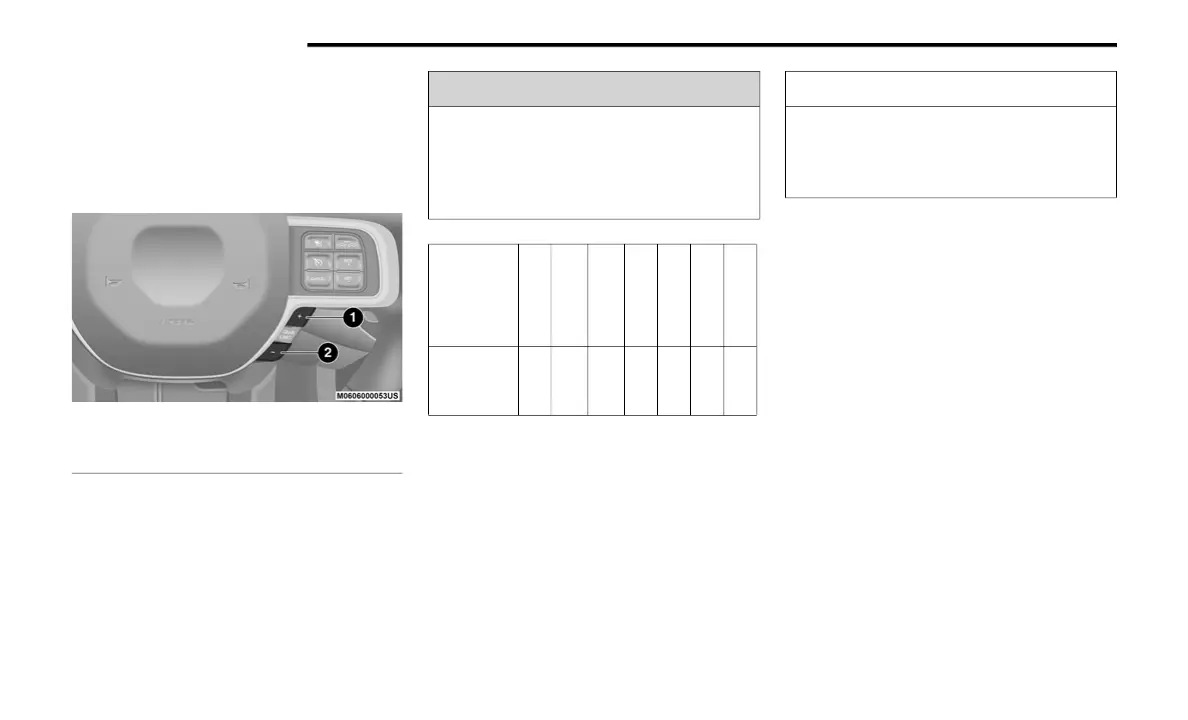
1 — GEAR + Switch
2 — GEAR – Switch
WARNING!
Do not downshift for additional engine
braking on a slippery surface. The drive
wheels could lose their grip and the vehicle
could skid, causing a collision or personal
injury.
Transmis-
sion Gear
Limit
Display
1 2 3 4 5 6 D
Actual
Gear(s)
Allowed
1 1-2 1-3 1-4 1-5 1-6 1-6
CAUTION!
When using ERS for engine braking while
descending steep grades, be careful not to
overspeed the engine. Apply the brakes as
needed to prevent engine overspeed.
20_DJD2_OM_EN_USC_t.book Page 244



 To Next Page