At the end of the re-arming period the base station will return to the
home screen unless any system warnings have been received during
the re alarm or re-arm period
System Warnings
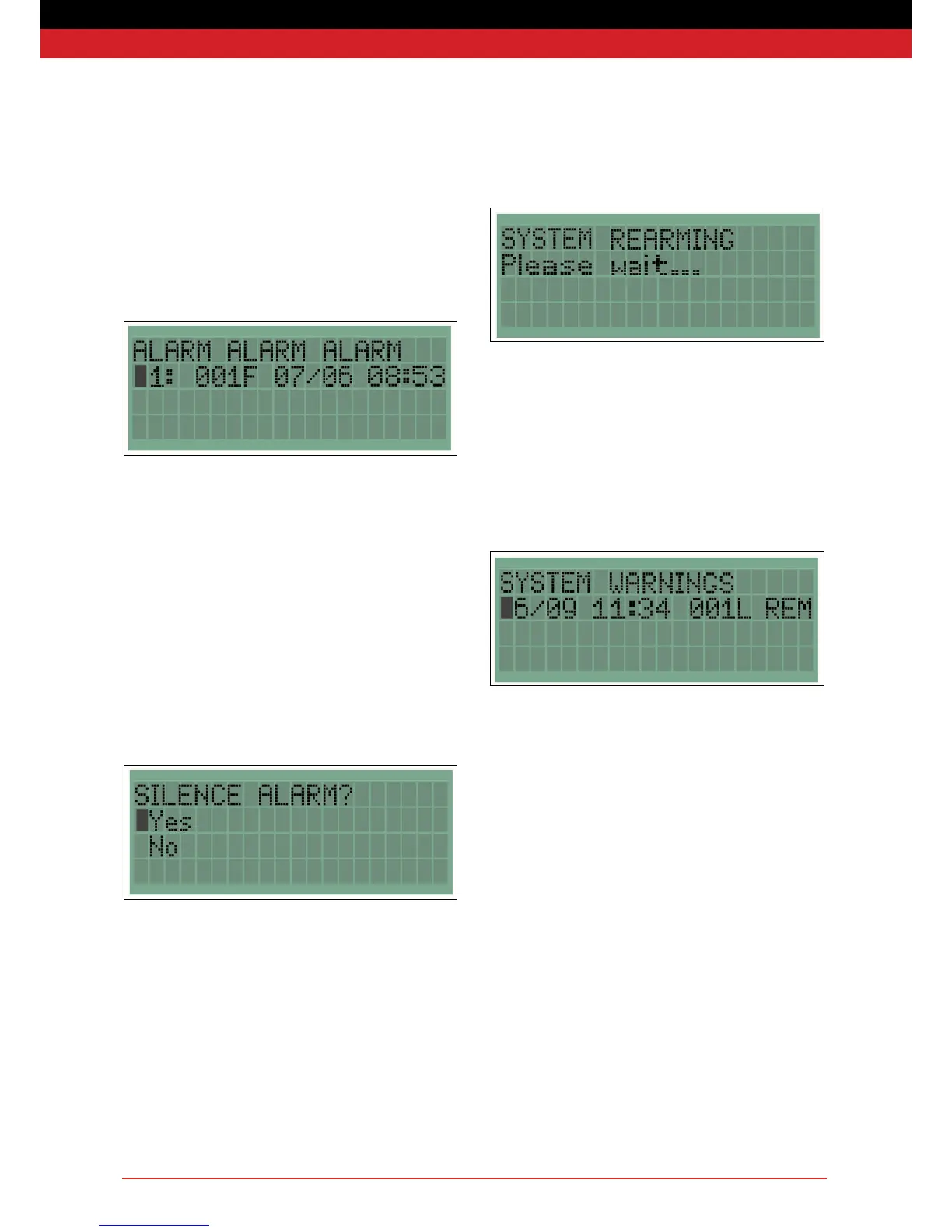
The base station will indicate warnings from itself or any other system
unit. When a warning is received the LCD will ash and the unit will
beep periodically.
Warnings are displayed in the format: date, time, unit number and type,
warning type. Some warnings, for example EXT, will self-clear if the
fault is resolved.
When an alarm has been raised by a re point or detector, the base
station will ash the LCD display, beep and display ALARM ALARM
ALARM together with which units raised the alarm. The newest event
will be at the top of the list.
Units are identied by unit number and unit type. F indicates a re
point, I an Interface and D a detector. For example, the above shows
that a Fire Point with the number 001 was activated at 08:53 on the
8th October.
An alarm can be silenced in three ways:
i) Resetting a call point
ii) Waiting 30 minutes after the last activation
iii) Using your access code to silence the alarm from the base station
To silence the alarm from the base station, press enter during the re
alarm. This will take you to the Silence Alarm screen.
Select ‘Yes’, and enter your access code when requested. During
the re-arming period the following message will be displayed for two
minutes.
Alarm


 To Next Page