It is not possible to exit the warning screen until all warnings have
either been resolved or acknowledged by an authorised user.
To acknowledge a warning, select it with the navigation pad and press
enter. You will need to enter your access code for the rst warning you
acknowledge.
Base Station Controls
The navigation pad, shown below, is used to move between menus,
change characters and select entries.
Menu items can be selected using the up and down arrows and then
pressing enter (middle arrow button).
Change characters using the up and down arrows while the character
is highlighted.
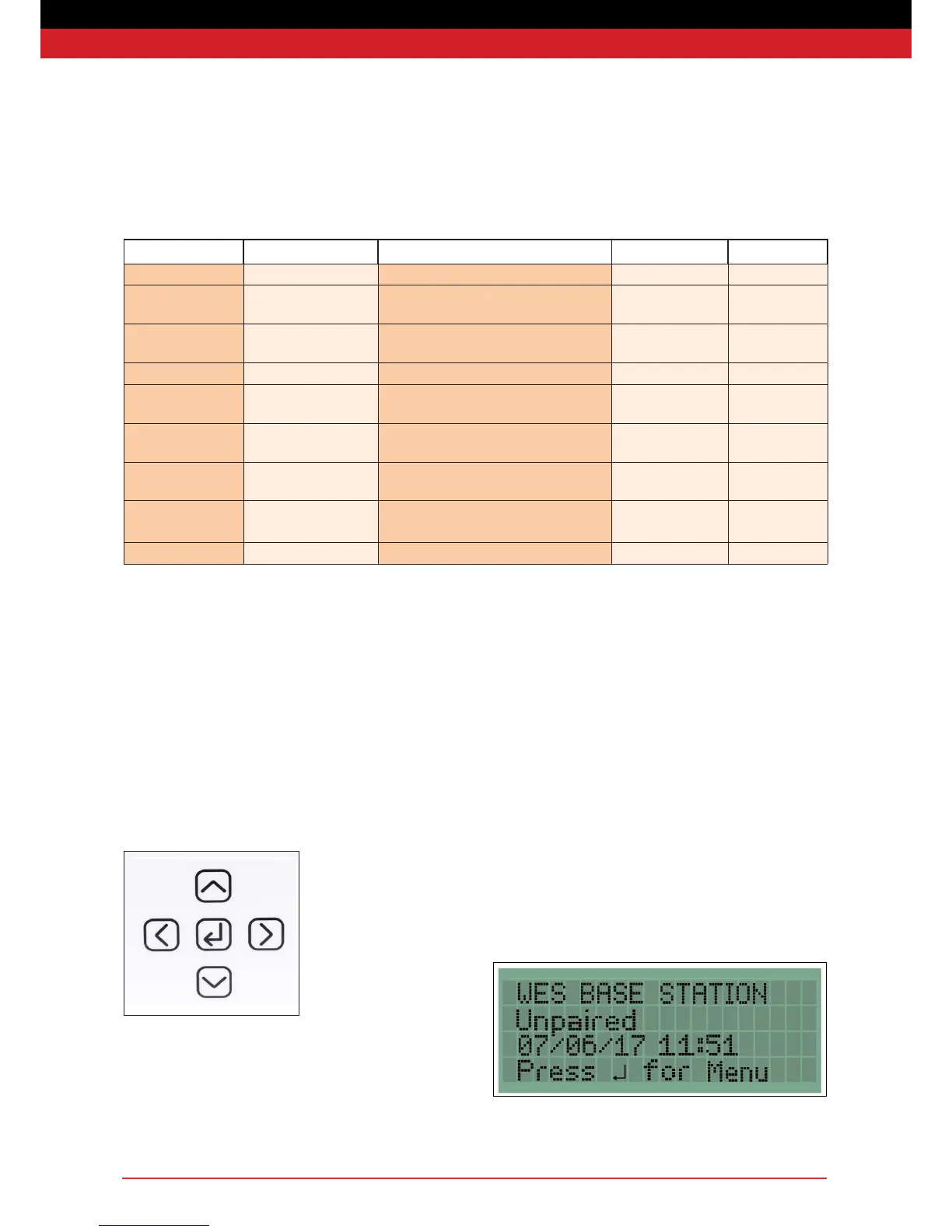
WES Warning Code Guide
Warning Code Warning Description Self-Cleaning SMS setting
BAT Low Battery Unit NNN has a low battery No 5
DET Detector Tamper Detector unit NNN has had its detector head
removed
Yes 3
EXT External Tamper Unit NNN has been removed from the wall/
ceiling
Yes 4
FLT Flat Unit NNN has turned off, its battery is at No 8
INT Internal Tamper Unit NNN has been opened up and potentially
tampered with or damaged
No 2
LAT Latched The call point on unit NNN is still latched in
after the alarm has been reset
Yes 10
REM Removed Unit NNN has been deactivated and removed
from the re alarm system
No 9
SIG Low Signal Unit NNN has a low radio signal Yes 6
TST Silent Test Unit NNN initiated a Silent Test Yes 7
Scroll through characters by holding down the up or down arrows.
Move to the next character or eld using the right arrow.
Use the left arrow button to move to a previous character.
To exit a menu, move to the left-most character and press the left
arrow key again.
Home Screen
Pressing enter on the home screen opens the main menu, giving
access to the System Log Menu and the Settings Menu. The settings
are only available to authorised users with an access code.
If the base station has not yet been paired, it will display ‘Unpaired’
instead of the site name.


 To Next Page