10
Truck GPS
>
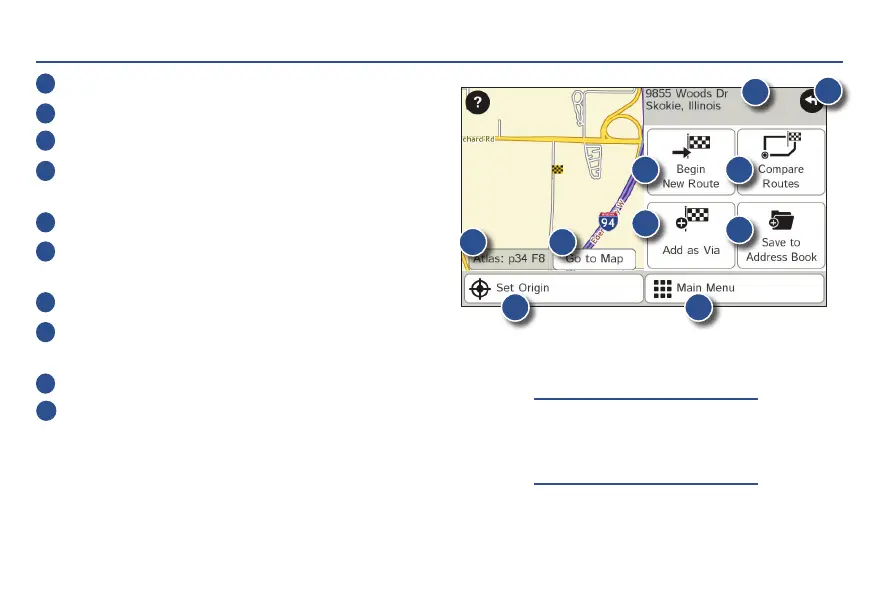
Confirm Destination Window
1
Destination address.
2
Begin route to destination.
3
Compare a primary and alternate route and choose one.
4
Add the location as a via point on the way to
a previously entered destination.*
5
Save the location to the Address Book.
6
Cross reference to printed Rand McNally
Motor Carriers’ Road Atlas.
7
View the map.
8
Change the starting location for a route to the
location displayed here.
9
Return to Main Menu.
10
Return to previous window.
*To manage via points, Tap Choose Destination > Multi-
Stop Trips. You can add up to 50 destinations in a multi-stop
trip, and optimize routing for trips of up to 10 stops.
NOTE: This window may include
additional buttons based on the
type of destination selected.
1
3
5
6 7
9
8
10
2
4
For Sales Information Please Contact RoadTrucker Inc (www.RoadTrucker.com)
8312 Sidbury Rd.; Wilmington, NC 28411 - (800) 507-0482 / (910) 686-4281














 To Next Page