15
Truck GPS
>
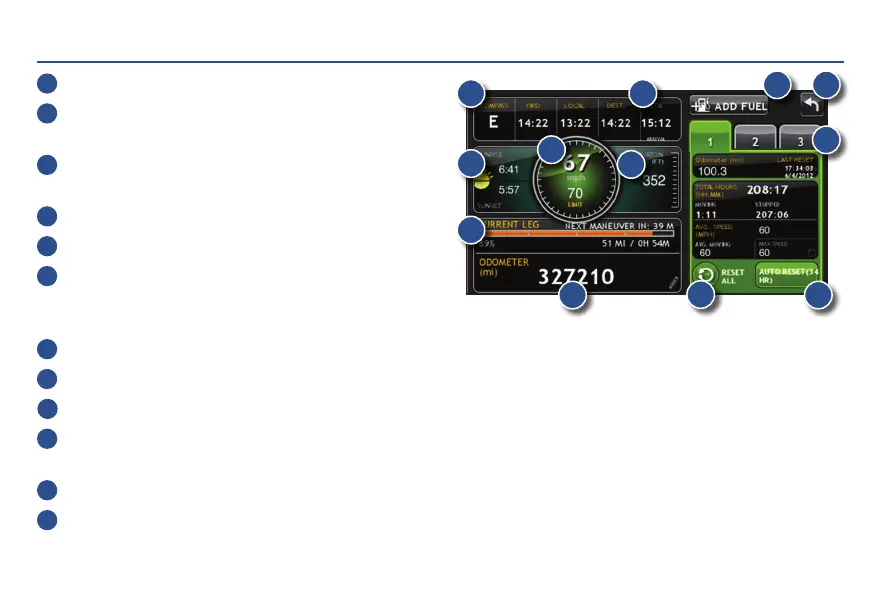
Virtual Dashboard
1
Current direction of travel.
2
Displays current time at the yard, current location
and your destination.
3
Sunrise and sunset times based on vehicle location
(latitude/longitude) and day.
4
Current speed (above) and posted speed limit (below).
5
Elevation at current location.
6
Percentage of current trip completed, distance to next
maneuver, and the number of miles and time spent
on the trip to this point.
7
Return to the Route Map Window.
8
Gather trip information for up to three trips. Includes odometer settings, hours, and speeds.
9
Reset trip information for the selected trip (Tab 1, Tab 2 or Tab 3).
10
Select to automatically reset the information in each tab after the vehicle has remained stationary
for the specified number of hours.
11
View fuel logs and add fuel purchase information.
12
Match with truck's odometer to automatically update new fuel logs.
Tap the pencil to edit.
1
3
4
5
6
7
9
10
11
8
2
12
For Sales Information Please Contact RoadTrucker Inc (www.RoadTrucker.com)
8312 Sidbury Rd.; Wilmington, NC 28411 - (800) 507-0482 / (910) 686-4281














 To Next Page