9
Truck GPS
>
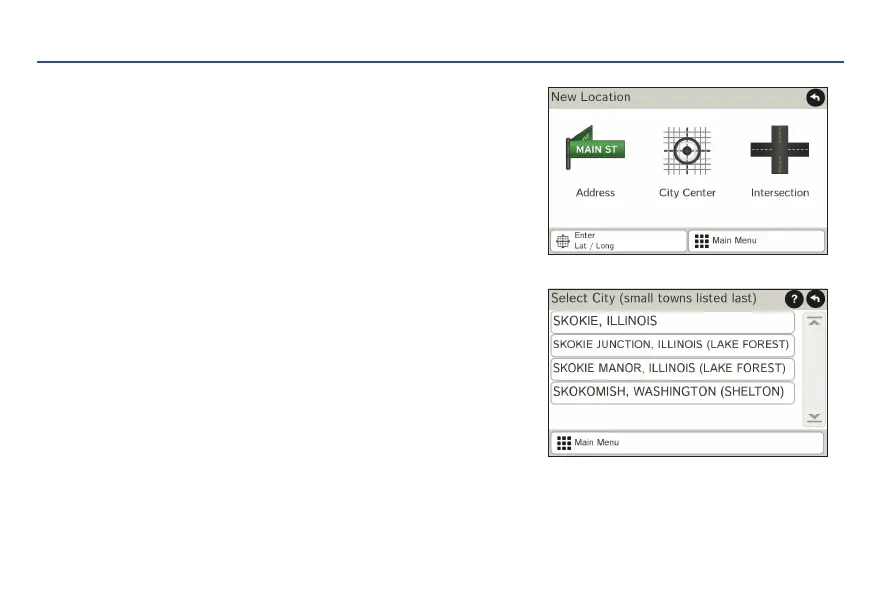
New Location
1. Tap Choose Destination > New Location.
2. Tap Address.
3. Enter the name of the city. (NOTE: As you type, the
keyboard displays only the next possible letter.)
4. Prompts appear in the top bar. Tap the city to select. Or,
tap List to view cities beginning with the letter(s)
you entered.
5. Enter the street name. (NOTE: If the letters you need do
not appear, tap Expand Search.)
6. Enter the house number. (NOTE: To enter the house
number before the street, tap the house number
button in the previous step.)
See Confirm Destination Window (page 8.)
Tips
• You can also route to a new location by City Center,
Intersection, or Latitude/Longitude, or choose
Address > Zip Code Search.
• View recent destinations by tapping Choose Destination > History. View recent cities by tapping Choose
Destination > New Location > Address > History.
• View saved locations by tapping Choose Destination > Address Book.
For Sales Information Please Contact RoadTrucker Inc (www.RoadTrucker.com)
8312 Sidbury Rd.; Wilmington, NC 28411 - (800) 507-0482 / (910) 686-4281














 To Next Page