17
Truck GPS
>
Trails and Fuel
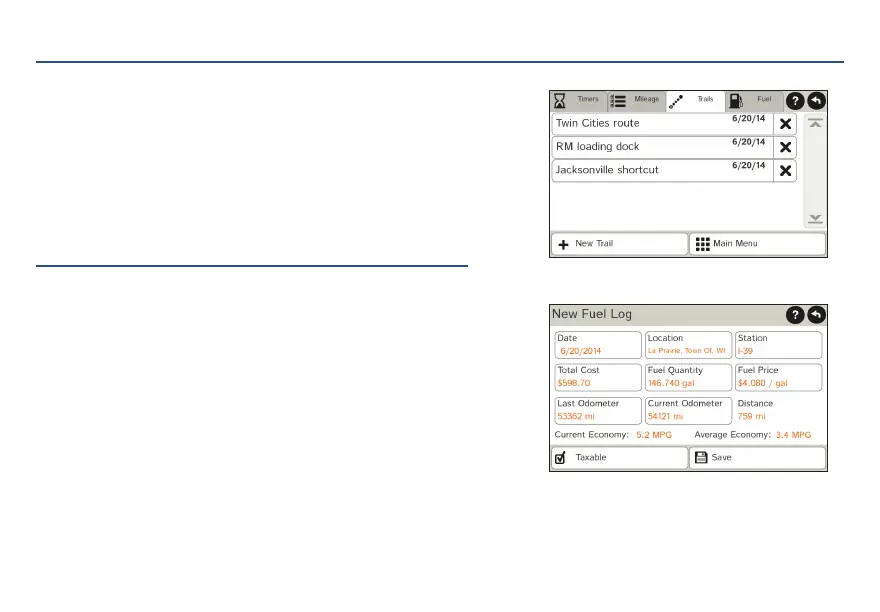
1. Tap Truck Tools > Timers, Logs, Trails, Fuel.
2. Tap Trails to record a “bread-crumb” path of GPS
coordinates where your truck has traveled.
3. Tap any record to view the trail, edit the name
or set the color.
4. Tap Show on Map to display the trail on the
Route Map Window.
5. Tap Fuel to view a list of fuel logs by quarter.
6. Tap on a quarter to view individual logs by state.
7. Tap Add Fuel to record the date, location and cost
of fuel purchase.
8. Tap on a field to make changes.
9. Check Taxable to include the purchase in the fuel log.
10. Tap Save.
For Sales Information Please Contact RoadTrucker Inc (www.RoadTrucker.com)
8312 Sidbury Rd.; Wilmington, NC 28411 - (800) 507-0482 / (910) 686-4281














 To Next Page