To integrate an SL 3 unit into a typical DJ setup,
connect it to your turntables (or CD players) and
mixer, as follows:
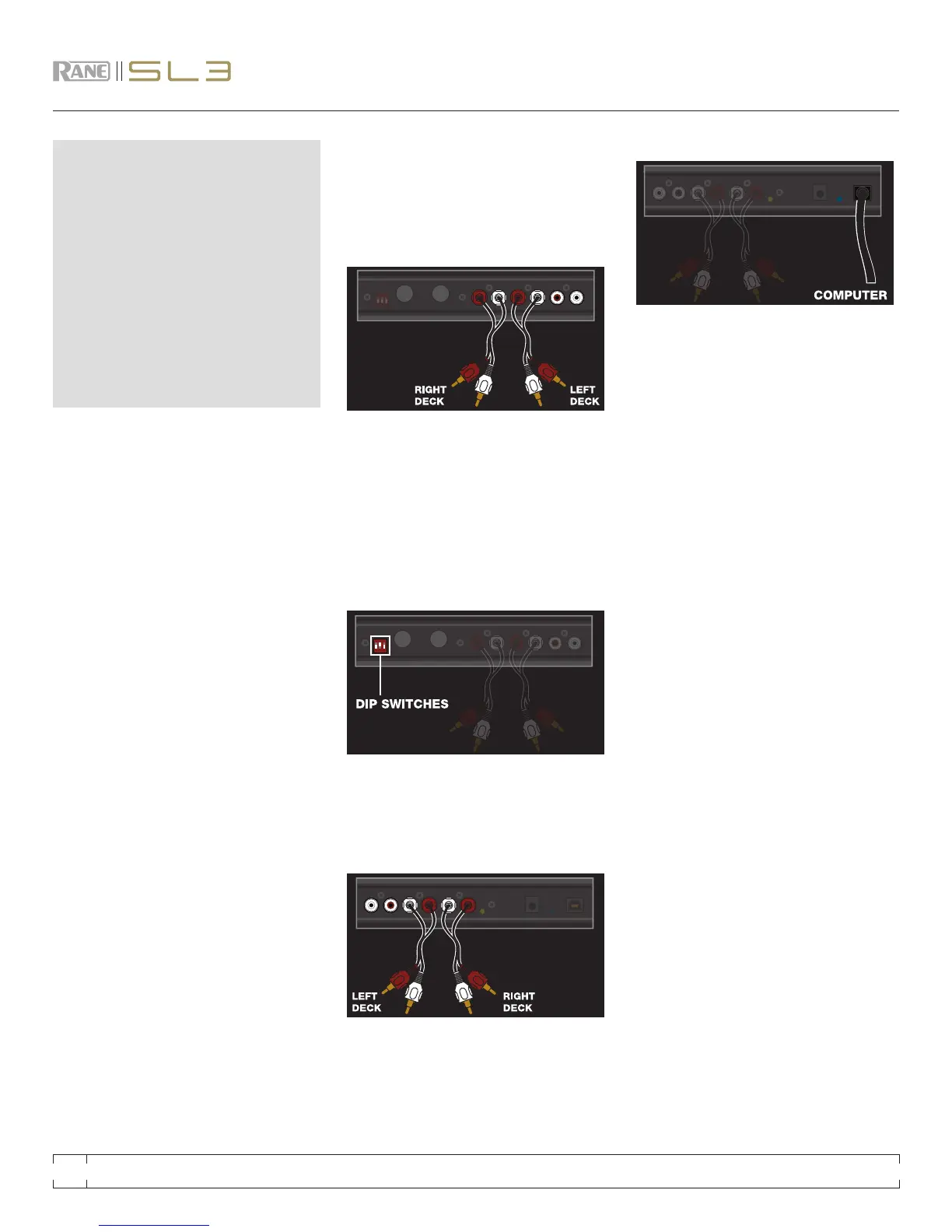
Connect your CD players or Turntables to the
DECK INPUTS on the Rane SL 3.
Optional Step: Connect an additional output
from your mixer to the AUX INPUTS on the SL 3
to record your set in Scratch Live.
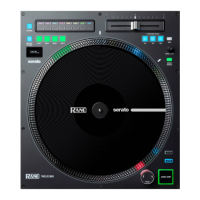
Set each input to the correct input level using
the dip switches. Set the switches UP for Phono
(turntables) or DOWN for Line (CD players).
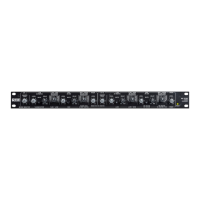
Connect the OUTPUTS of the SL 3 to line inputs
on your mixer. Connect the AUX output to an
additional line input or AUX input on your mixer
to output the sample player.
4
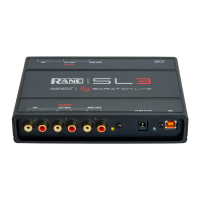
Using the provided USB cable, connect your SL 3
to an available USB 2.0 port on your computer.
Make sure you connect it directly to your
computer and not through a hub or splitter.
Set the tone arms to the specic
recommendations of the cartridge used, so
that the needle never leaves the record, but
not heavy enough that it heats up signicantly.
Both produce poor tracking.
Grounding is extremely important when
using Scratch Live. Make sure you have good
connections from the ground wires of your
turntables to the grounding post of your SL 3.
If you do not ground your turntables properly,
the control signal will be noisy and the tracking
of the record position will be erratic.
Ensure the SL 3 is set to receive a phono level
signal – See step 2 of .
cd pLayeR Setup
Disable all built-in effects on the CD player,
including keylock/master tempo.
Ensure the SL 3 is set to receive a LINE level
signal – See step 2 of
gettIng StaRted
cOnnectIng yOuR haRdWaRe
The Scratch Live control records and CDs
are pressed with an audible tone specically
developed for controlling the Scratch Live
software application.
The Scratch Live audio hardware converts
the control signal coming from each deck into
digital audio, to be sent via USB to the Scratch
Live software, which decodes that signal into a
stream of information on what the DJ is doing
with the control disc. A virtual ‘deck’ replicates
the movements of the control disc. Audio les
loaded onto the virtual decks are then played
back through the outputs of the hardware, with
any manipulation of the control discs reproduced
on the audio, effectively emulating vinyl control
of the les loaded in software.
RANE SL 3 FOR SERATO SCRATCH LIVE • OPERATOR’S MANUAL 1.8.4
6


 To Next Page