13
3. 3-button clock
The clock must be set to the time of day before the oven
will work.
Using the clock
You can use the clock to turn the programmable oven on and
o. The clock must be set to the time of day before the
oven will work.
NOTE: When using the timer functions, rst set the clock as
required before setting the oven temperature.
The oven can be switched on when the cook symbol [
] is
displayed.
Setting the clock
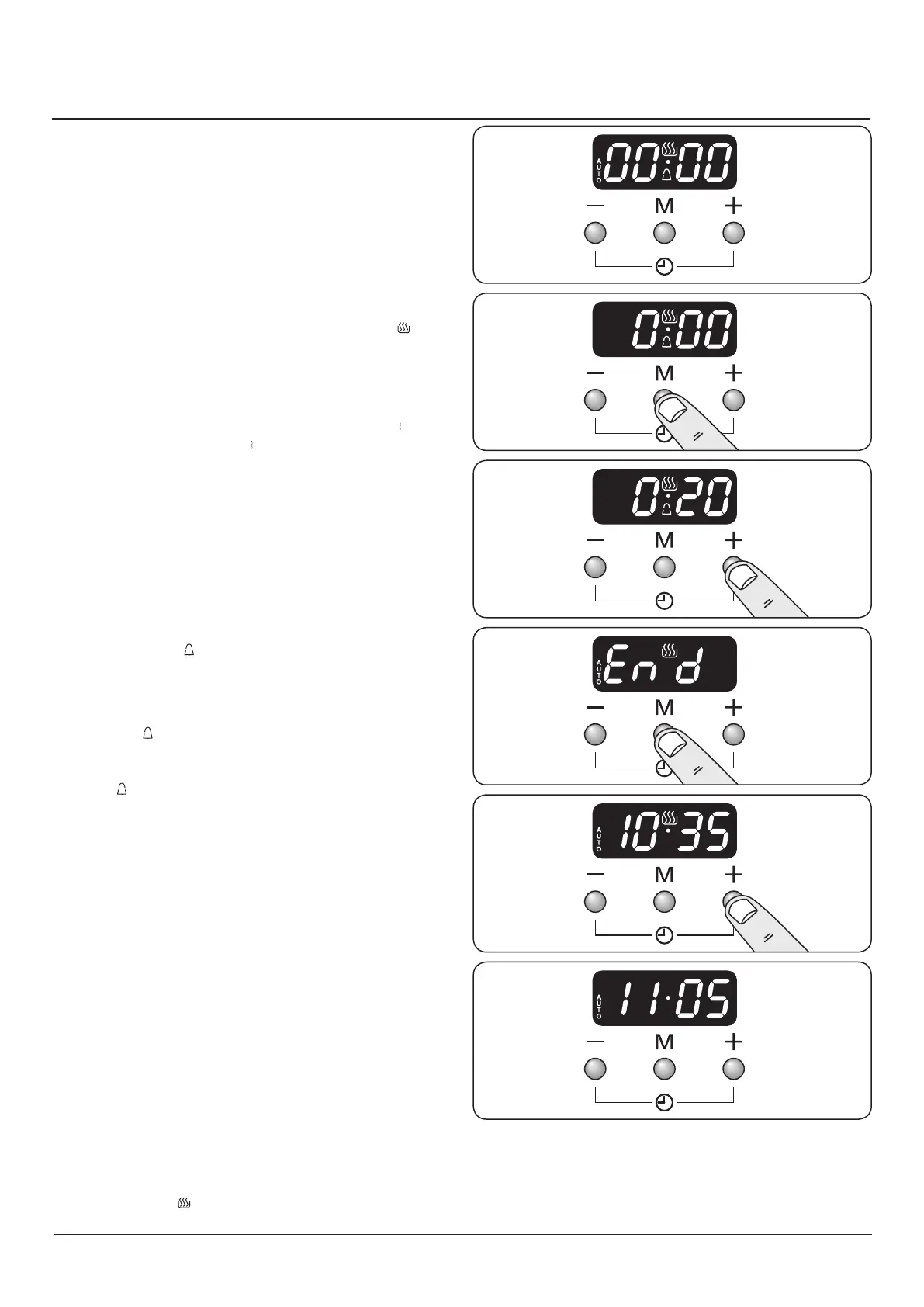
1. The LCD clock is shown in (Fig. 3.1). Once the cooker is
connected and switched on, the display ashes (00.00 )
and the time starts from (00.00 ).
2. To set the clock press the [+] and [-] buttons
simultaneously, the point between hours and minutes
will start to ash for 5 seconds. Whilst the point is
ashing press either the [+] or [-] button to set the
correct time.
IMPORTANT: The timed oven will not operate unless the
clock has been set.
Program selection - Setting the minute minder
The minute minder [
] provides the ability to set a
countdown from 00:01h to 23:59h, at the end of which an
alarm will sound.
1. Press the mode [M] button once (Fig. 3.2). The bell
symbol [ ] will ash on the display. Select the desired
countdown from 00:01h to 23:59h using the [+] button
(Fig. 3.3). The countdown will automatically begin and
the [ ] symbol will show in the display.
2. Once the specied time has elapsed an alarm will
sound.
3. To stop the alarm press any button.
Re-set the minute minder
To re-set the minute minder, rst select the minute minder
program by pressing the mode [M] button. Then press the
[+] and [-] buttons simultaneously.
• The ‘cook period’, which is the length of time you want
the oven to cook for (dur).
• The ‘stop time’, which is the time of day you want the
oven to stop cooking (End).
To stop the programmable oven at a specific time of day
1. Press the mode [M] button 3 times, until the display
ashes ‘End’ (Fig. 3.4).
2. Select the ‘stop time’ using the [+] or [-] buttons. The
display will show the current time along with the ‘AUTO’
and Cooking [ ] symbols (Fig. 3.5).
ArtNo.306-0001 - 3-button clock
ArtNo.306-0001 - 3-button clock
ArtNo.306-0001 - 3-button clock
ArtNo.306-0001 - 3-button clock
ArtNo.306-0001 - 3-button clock
ArtNo.306-0001 - 3-button clock
Fig. 3.1
Fig. 3.2
Fig. 3.3
Fig. 3.4
Fig. 3.5
Fig. 3.6



 To Next Page