DST30P Wheel Balancer 24 P/N 5900163 — Rev. C1 — March 2020
The Control Panel
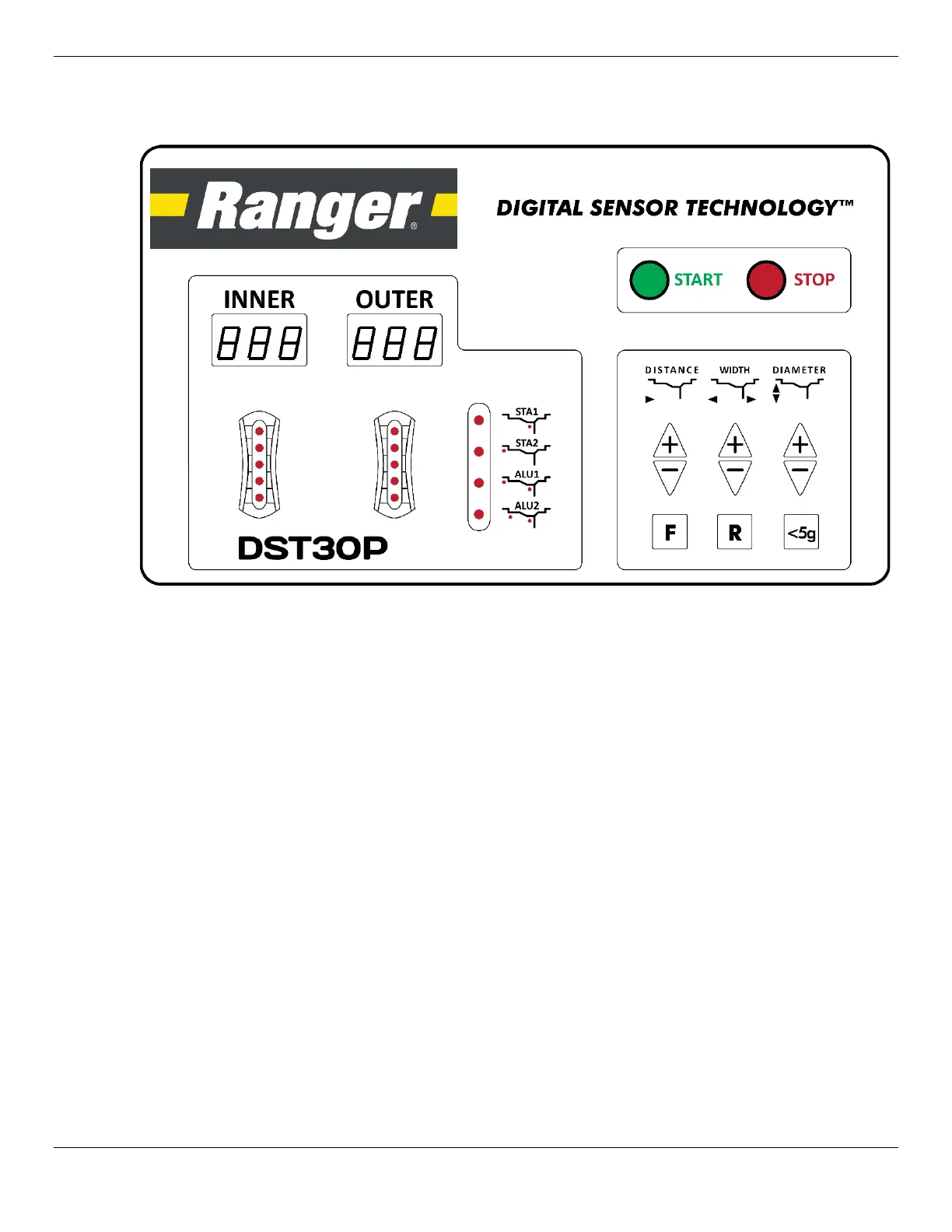
The Control Panel lets you enter data for the Wheel being balanced and displays information.
The parts of the Control Panel include:
• Inner Window. During the Measurements phase—before spinning the Wheel—this Window
indicates which measurement needs to be entered. During the Weights phase—after spinning the
Wheel—it shows the weight that needs to be added to the inner side of the Wheel, if any.
The three measurements that need to be entered are:
– Distance. Indicated by –A– on the Inner Window.
– Width. Indicated by –L– on the Inner Window.
– Diameter. Indicated by –d– on the Inner Window.
• Outer Window. During the Measurements phase, this Window shows the value you are entering.
During the Weights phase, it shows the weight to be added to the outer side of the Wheel.
• Indicators under Inner and Outer. When Weight needs to be added to a Wheel, you turn the
Wheel and watch the indicators under Inner or Outer, whichever side you are adding weight to.
When all of the indicators are lit, press the Brake to hold the Wheel and then add the specified
weight to Top Dead Center (also known as 12 o’clock high) on the Wheel.


 To Next Page