DST30P Wheel Balancer 34 P/N 5900163 — Rev. C1 — March 2020
Aluminum Alloy Balancing
ALU Modes are for balancing Aluminum Alloy Wheels using Adhesive Weight.
The Balancer supports two ALU Modes:
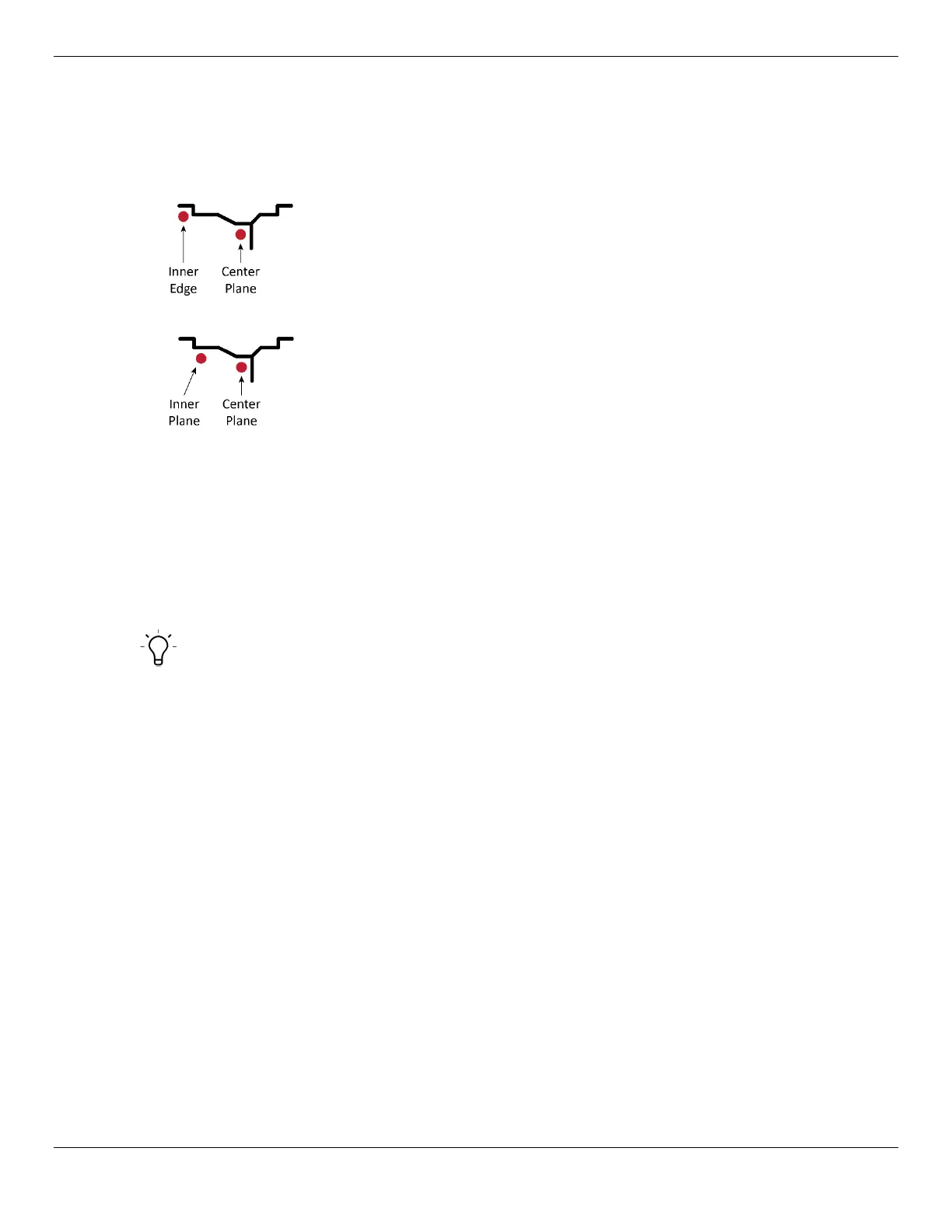
• ALU1. If the Wheel is out of balance, Weight goes on the Inner Edge and/or the Center Plane.
• ALU2. If the Wheel is out of balance, Weight goes on the Inner Plane and/or the Center Plane.
To balance a Wheel using ALU1 or ALU2:
1. Make sure you are dressed appropriately: leather gloves, steel-toed work boots, back belts,
hearing protection, and ANSI-approved eye protection: safety glasses, face shield, or goggles.
2. Visually inspect the Balancer to make sure everything is in place. The Hood should be
up
.
If you find any issues, fix them. If there are issues you cannot fix, refer to Troubleshooting.
3. Make sure the Wheel you want to balance is both clean and free of any weights that may have
been put on previously. If it is dirty, clean it. Remove any existing weights.
Tip When using Adhesive Weight, it is extremely important to
clean the Wheel
; the
cleaner the Wheel, the longer the Adhesive Weight stays in place.
4. Mount the Wheel on the Balancer.
Refer to Mounting a Wheel for mounting instructions, if needed.
5. Turn the Balancer Off and then back On, to reset it.
On power up, USA | 516 will appear in the Inner and Outer Windows, followed by default Wheel
dimensions. (The “516” is the software version; this changes from time to time, so there’s no need
to worry if the number is different on your Balancer.)
6. After a few seconds, the Inner and Outer Windows change to –A– | 8.0. (8.0 is the default value
for Distance).
7. On the Control Panel, press the F button until either the ALU1 or the ALU2 Indicator is lit,
depending on which Aluminum Alloy Mode you want to use.
8. Pull out the Inner Arm and place it against the Inner Edge of the Wheel being balanced.
This tells the Balancer the distance from the edge of the Balancer to the edge of the Wheel being
balanced.
9. On the Inner Arm Ruler, note the distance from the Balancer to the Inner Edge.
10. Return the Inner Arm to its normal location.
11. Input the distance you noted on the Inner Arm Ruler using the + and – buttons under Distance.


 To Next Page