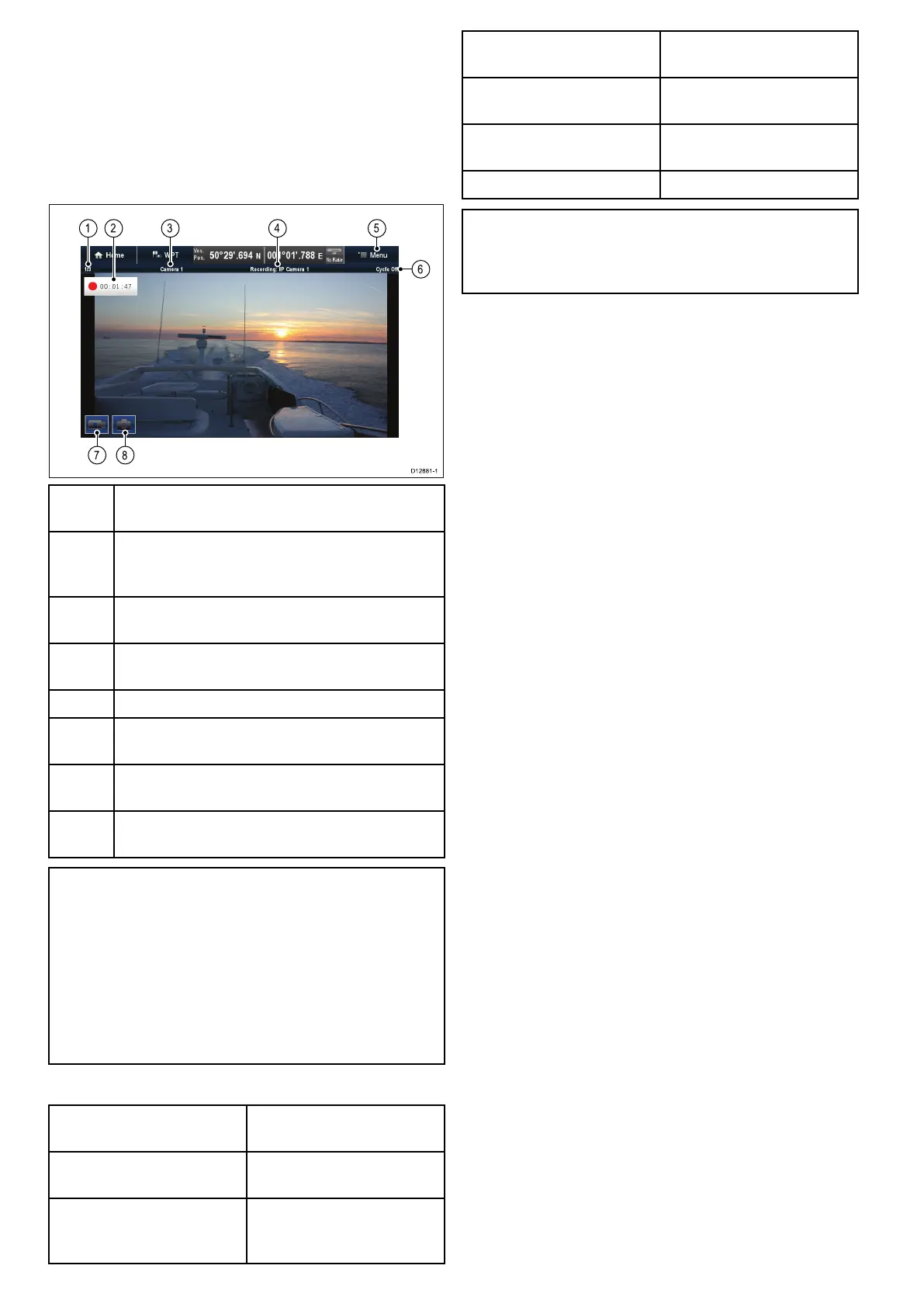
18.1Cameraapplicationoverviewand
features
AnalogandIPcameraandvideofeedscanbe
viewedusingtheCameraapplication.Analogfeeds
mustbeconnecteddirectlytothedisplay,IPfeeds
mustbeavailableontheSeaTalk
hs
network.IP
camerafeedscanberecordedandphotoscanbe
taken.
1
Camerafeednumber–indicatesthecurrentfeed
andnumberofavailablefeeds
2Recordingstatus–indicatesthatthecamera
applicationisrecordingandthecurrentelapsed
recordtime
3
Cameraname–indicatesthenameofthecamera
thatiscurrentlydisplayed
4
Recording–indicatesifthecameraapplicationis
recordingandwhichfeedisbeingrecorded
5
Menu–openstheCameraapplication’smainmenu
6
Cycle–indicatesifthefeedcyclingisturnedOn
orOff
7
Recordvideo–temporaryonscreenicontostart/
stoprecording(Touchscreendisplaysonly)
8Takephoto–temporaryonscreenicontotakea
photo(Touchscreendisplaysonly)
Important:
•Multifunctiondisplaysmustbepoweredup
beforepowerisappliedtonetworkedIP
cameras;thisistoenableyourmultifunction
displaytoassignthecamera(s)avalidIP
address.
•IfIPacamera(s)isnotdetected,trypower
cyclingthecamera(s)whilstleavingthe
multifunctiondisplayturnedon.
Cameraapplicationfeatures
Changingcameraorvideo
feeds.
•18.2Changingthecamera
feed
Cyclingthroughavailable
feeds.
•18.5Cameracycling
Displayingmultiplefeeds
usingQuadView.
•18.4Displayingmultiple
camerafeedsusingQuad
View
RecordingIPcamerafeeds
•18.10Recordand
playback
Playingbackrecorded
footage.
•18.10Recordand
playback
TakingphotosofanIP
camerafeed
•Takingaphoto
Viewingimages.•18.12Viewingphotos
Note:Forinformationonconnectingacamera
/videosourceandcompatiblevideoformats,
refertotheCablesandconnectionssectionofthe
installationinstructionsforyourproduct.
274
LightHouseMFDoperationinstructions



 To Next Page