Need help?
Do you have a question about the Raytools BT240S Series and is the answer not in the manual?
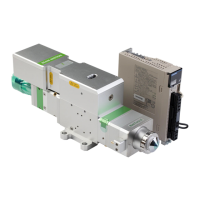
Details the optimized optical configuration, airflow design, fiber interfaces, and calibration features of the BT240S series.
Details the procedure for fixing the BT240S laser head via the installation plate and machine tool connection.
Covers the requirements and connection of water pipes and gas pipes for the BT240S laser head.
Specifies parameters for the water-cooled interface, including flow speed, pressure, temperature, and hardness.
Outlines recommended specifications for auxiliary gas purity and content to prevent lens damage and ensure stable cutting.
Describes compatibility with industrial laser generators and common fiber optic splice types like QBH, QCS, and QD.
Explains the correct method for inserting the QBH fiber splice to prevent dust contamination and ensure proper connection.
Covers beam center-regulating procedures for QCS and QBH interfaces to ensure optimal cutting performance.
Provides steps to adjust the fiber interface position for proper alignment with the laser head's red dot.
Details how to adjust the collimator mirror for centering the laser beam within the nozzle, ensuring cutting quality.
Explains how to use the focusing rotating scale ring to set the optimal focal point for laser cutting.
Provides instructions and tools for regularly cleaning the protective, collimating, and focusing lenses.
Details procedures for removing and installing various lenses, including protective and collimating types.
Step-by-step guide for removing and installing the focusing protective lenses of the laser head.
Instructions for safely removing and installing the collimating protective lenses of the laser head.
Procedure for replacing or cleaning the collimating lenses, including reassembly steps.
Guide on how to remove, clean, or replace focusing lenses and reassemble the lens holder.
Instructions for replacing the ceramic body of the nozzle connector due to potential impact damage.
Steps for unscrewing the old nozzle and screwing in a new one, including post-replacement calibration.
 General
| Brand | Raytools |
|---|---|
| Model | BT240S Series |
| Category | Industrial Equipment |
| Language | English |


 To Next Page