Razer Blade Pro 17″ (2020) Synapse 3
Razer Blade 15″ Studio Edition (2020) Synapse 3
For Synapse 3-supported models:
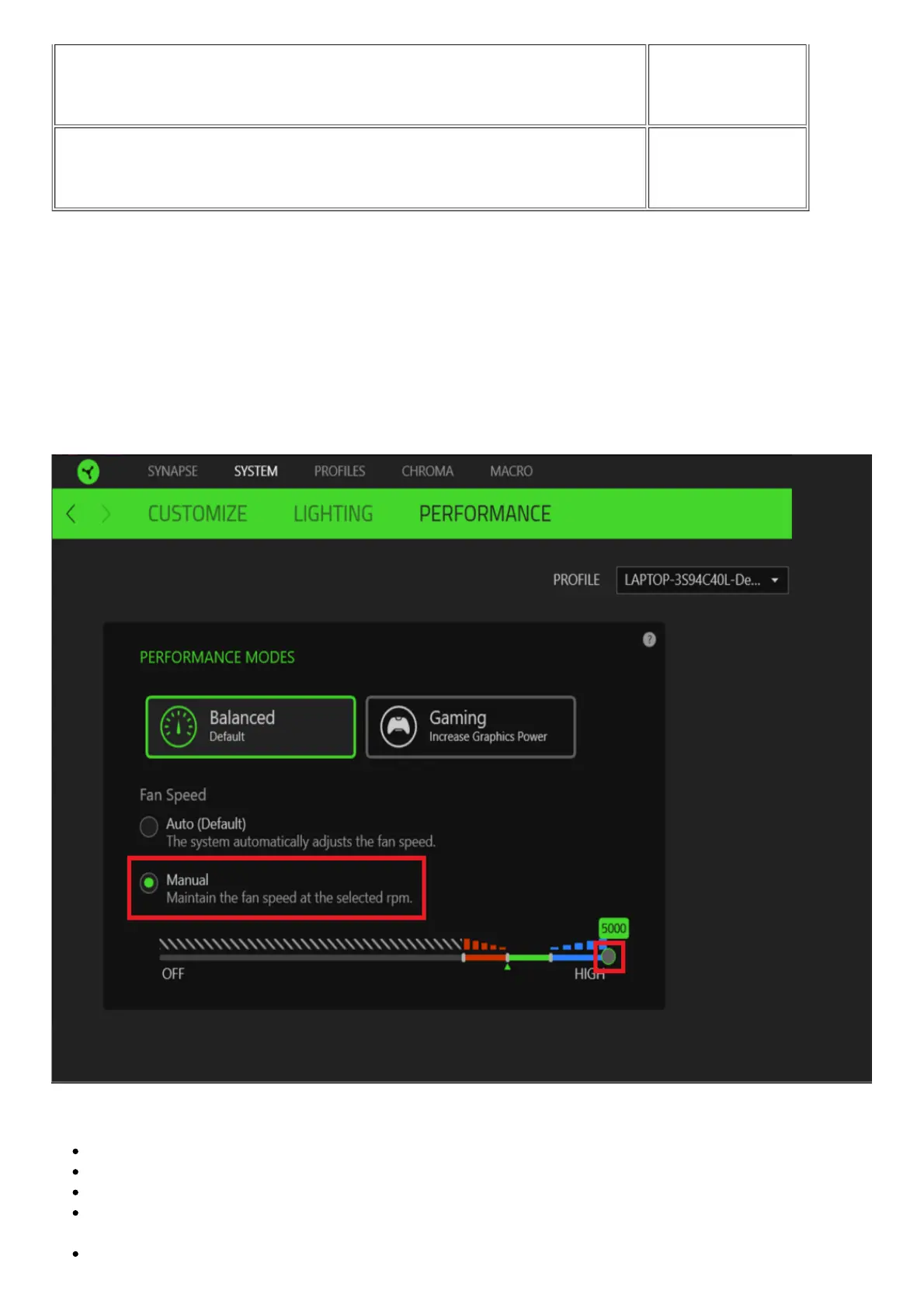
In Synapse 3, the Razer Blade’s fan speed can be manually controlled in both “Balanced Mode” and
“Gaming Mode”.
To adjust the fan speed:
1. Open Synapse 3 and select “SYSTEM” from the top bar.
2. From there, click on “PERFORMANCE”.
3. Select the “MANUAL” option.
4. Click and move the node to your preferred fan speed.
Here are some additional notes when adjusting the fan speed in Synapse 3.
The speed you select will be constantly maintained and no longer be adjusted by the system.
You can only select between 4000-5000 RPMs. (Gaming mode will only allow 4500-5000 RPMs)
Selecting a constant fan speed may result in increased fan noise from your system.
Selecting 5000 RPM will help keep your Razer Blade cooler during intense gaming or other
activities requiring increased GPU or CPU usage.
These settings will be stored and saved as long as Synapse 3 is running.



 To Next Page