Will I overcharge my battery if I leave it plugged in even when it is at 100%?
The Razer Blade series uses a lithium-ion (Li-On) polymer battery. Though this is not exactly a
Windows feature, overcharging Li-ion batteries is not a problem and does not affect the battery life
span. The Blade laptops have an internal circuit to stop charging at full charge to avoid overcharging
and will only start recharging when the battery hits 95%.
Can I use third-party power adapters with the Razer Blade?
We only recommend using Razer power supplies with the Razer Blade. Third-party adapters have not
been tested to meet our standards and may lead to damage to the System. You can purchase
replacement or spare 230 W AC adapters from the RazerStore.
How can I extend the battery life of my Razer Blade when on-the-go?
Most of the battery improvement options are part of the Windows OS. Follow the following tips below
to extend the battery life of your Razer Blade when on-the-go:
Temporarily turn off the keyboard backlighting.
Try dimming the screen brightness.
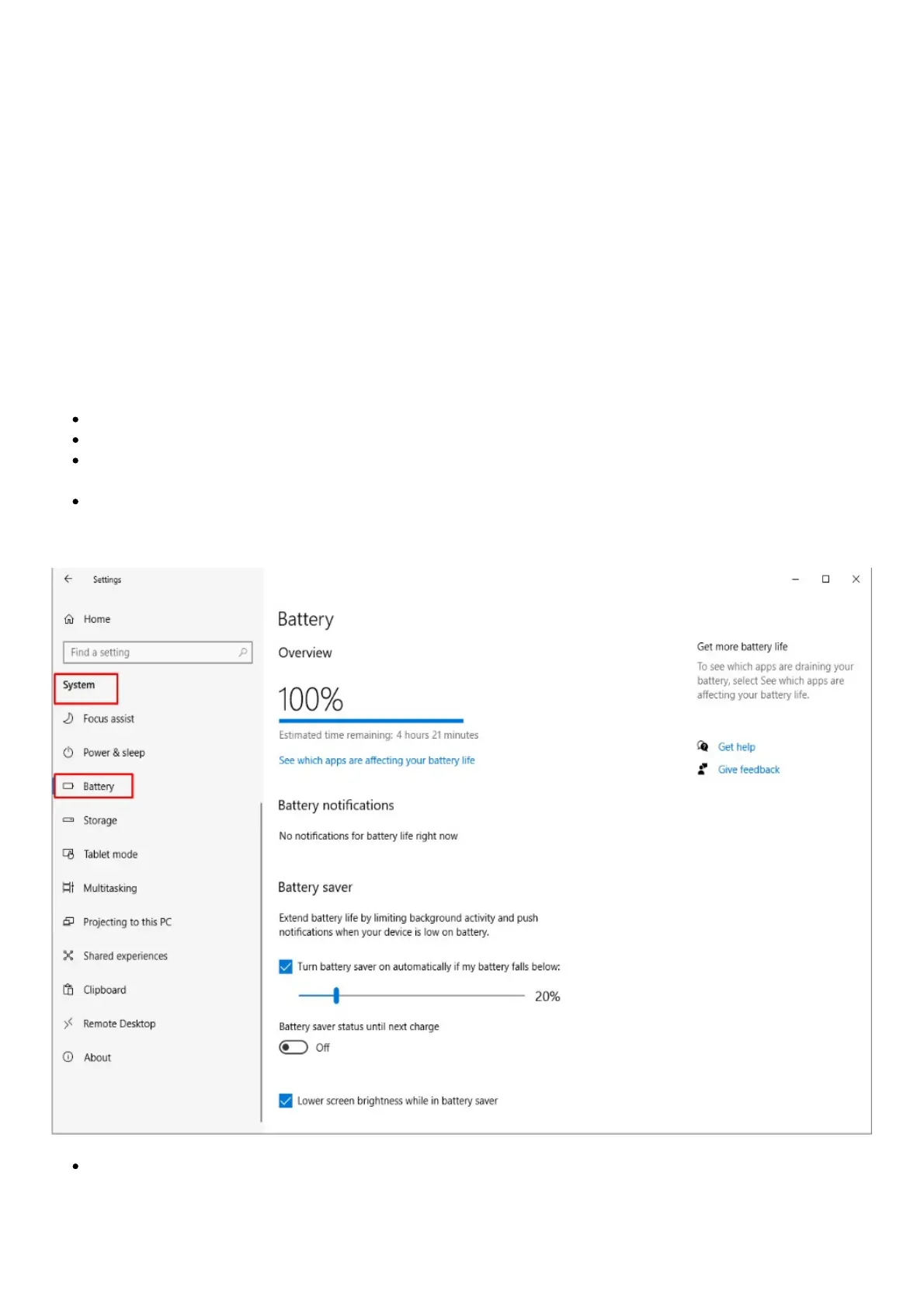
Check the “Battery Saver” settings for the most effective means of conserving battery when on-
the-go.
The battery life may be extended further by turning down the display brightness, adjusting the
power settings in Windows Setting > System > Battery and adjust the power configuration to
your liking.
Changing the performance mode in Synapse 3



 To Next Page