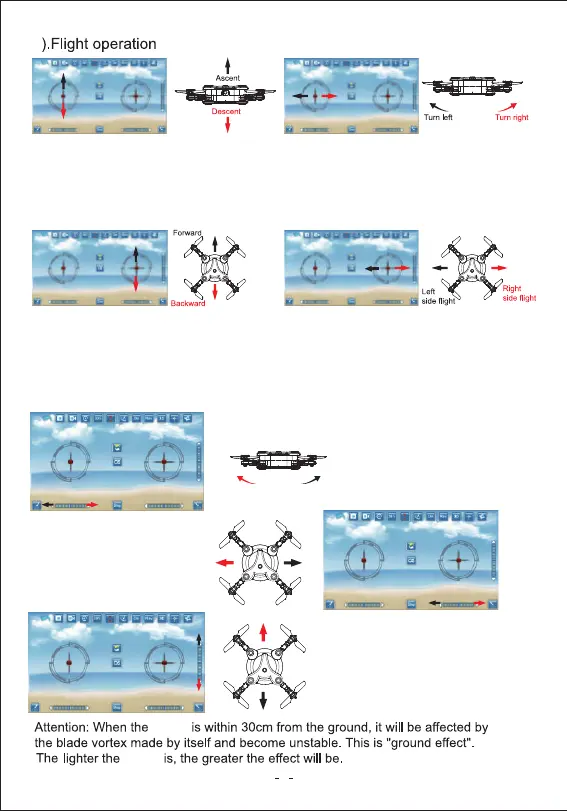
Push up the left lever, the rotating
speed of main blades increase,
the drone will ascend.
Push down the left lever, the rotating
speed of main blades decrease, the
drone will descend.
Push up the right lever, the drone
will fly forward.
Push down the right lever, the drone
will fly backward.
Attention: Push the left lever(slowly) to take off. If the drone is not stable refer to the
trimming instructions or perform calibration.
Push the right lever to the right,
the drone will fly sideways to the right.
Push the right lever to the left,
the drone will fly sideways to the left.
If the drone keeps turning left/right
while hovering, press the right/left
trimming on the bottom left of the
screen to adjust.
If the drone keeps flying left/right
sideways while hovering, press the
right/left sideway trimming on the
bottom right of the screen to adjust.
If the drone keeps flying
forward/backword while hovering,
press the forward/backword
trimming on the far right of the
screen to adjust.
drone
drone
Push the left lever to the left,
the drone will turn left.
Push the left lever to the right,
the drone will turn right.
9
4


 To Next Page