7
EN
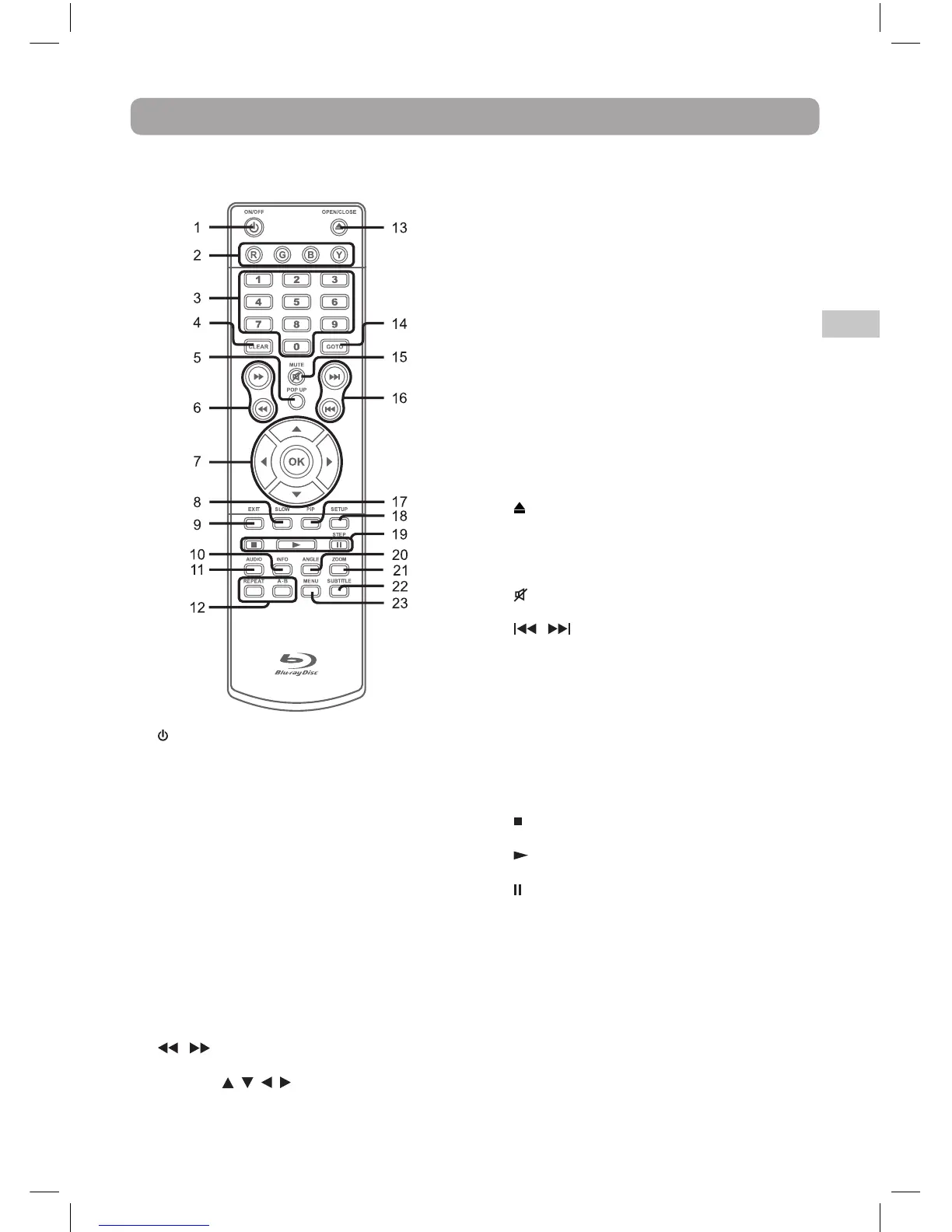
1. ON/OFF Button
Press to turn on the unit or put it in standby
mode.
2. Color (Red, Green, Blue, Yellow) buttons
When playing a Blu-ray Disc that has a Java
application, press to control playback. For
more information, see the documentation
that comes with the Blu-ray Disc.
3. Number (0-9) Buttons
4. CLEAR Button
Clear input selections and cancel certain
playback functions.
5. POP UP Button
During Blu-ray Disc playback, press to open
a menu that lets you control Blu-ray Disc
playback.
During DVD playback, press to open the DVD
title menu (if available).
6. / Buttons
Fast reverse or fast forward playback.
7. CURSOR ( , , , ) Button
Press to highlight selections on a menu screen
and adjust certain settings.
OK Button
Press to confirm selections on a menu screen.
8. SLOW Button
Press to perform slow forward playback of
Blu-ray Discs or DVDs.
9. EXIT Button
10. INFO Button
Accesses the info menu.
11. AUDIO Button
Press to select one of the audio sound tracks
programmed on a Blu-ray Disc or DVD.
12. A-B Button
Press to perform point-to-point repeat
playback on a DVD or CD.
REPEAT Button
Press to repeat chapter or title of a Blu-ray
Disc or DVD. Press to repeat single track or
whole CD.
13. OPEN/CLOSE Button
Press to open and close the disc tray.
14. GOTO Button
Press to skip directly to a specific location on
a Blu-ray Disc or DVD.
15. MUTE Button
Press to turn off the sound.
16. / Skip Buttons
Press to move backwards or forward through
titles, chapters or tracks on a Blu-ray Disc,
DVD or CD.
17. PiP Button
Press to turn PiP (picture in picture) mode
on or off. This function is only available on
certain Blu-ray Discs.
18. SETUP Button
Press to open or close the SETUP menu
screen.
19. STOP Button
Press to stop playback.
PLAY Button
Press to start playback.
PAUSE / STEP Button
Press to pause playback, frame advance.
20. ANGLE Button
Press to switch the camera angle of the video
presentation when scenes with multiple
camera angles are recorded on a Blu-ray Disc
or DVD.
21. ZOOM Button
Zoom in an image.
22. SUBTITLE Button
Press to select one of the subtitle languages
programmed on a Blu-ray Disc or DVD.
23. MENU Button
Press to open or close the Disc’s menu.
Control Reference Guide
Remote Control



 To Next Page