6
Graphics are for representation only. Your unit may differ slightly.
Connections and Setup
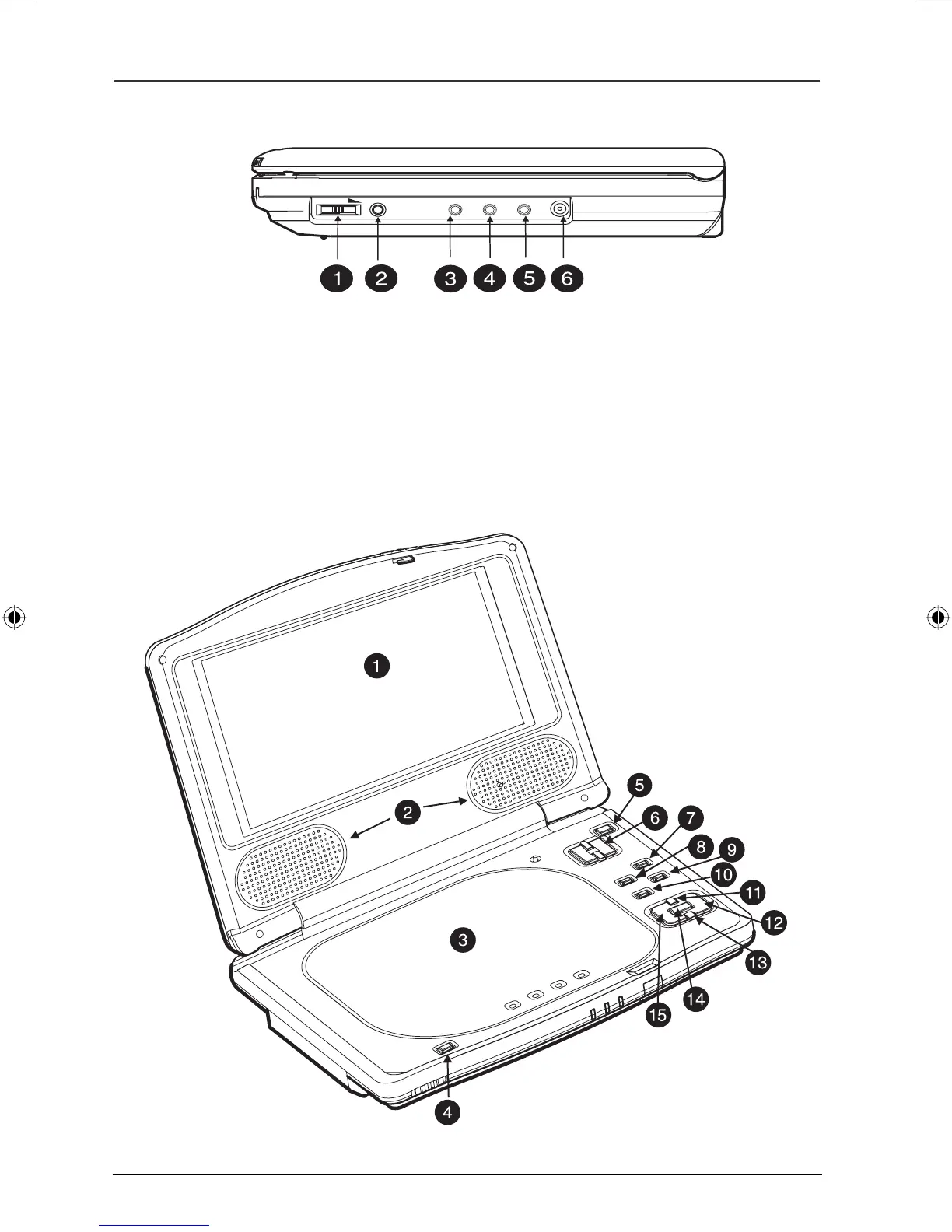
VOLUME PHONES
AUDIO ---- VIDEO S-VIDEO
DC IN
Right Side View (from left to right)
1 VOLUME knob: Increases or decreases the audio.
2 PHONES jack: Plug in your headphones.
3 AUDIO out jack: Used to connect a component with an AUDIO in jack.
4 VIDEO out jack: Used to connect a component with a VIDEO in jack.
5 S-VIDEO out jack: Used to connect a component with an S-VIDEO in jack.
6 DC IN jack: Used to connect the power or car adapter.
Open Expanded View
Book 1.indb 6Book 1.indb 6 4/29/05 10:04:28 AM4/29/05 10:04:28 AM



 To Next Page