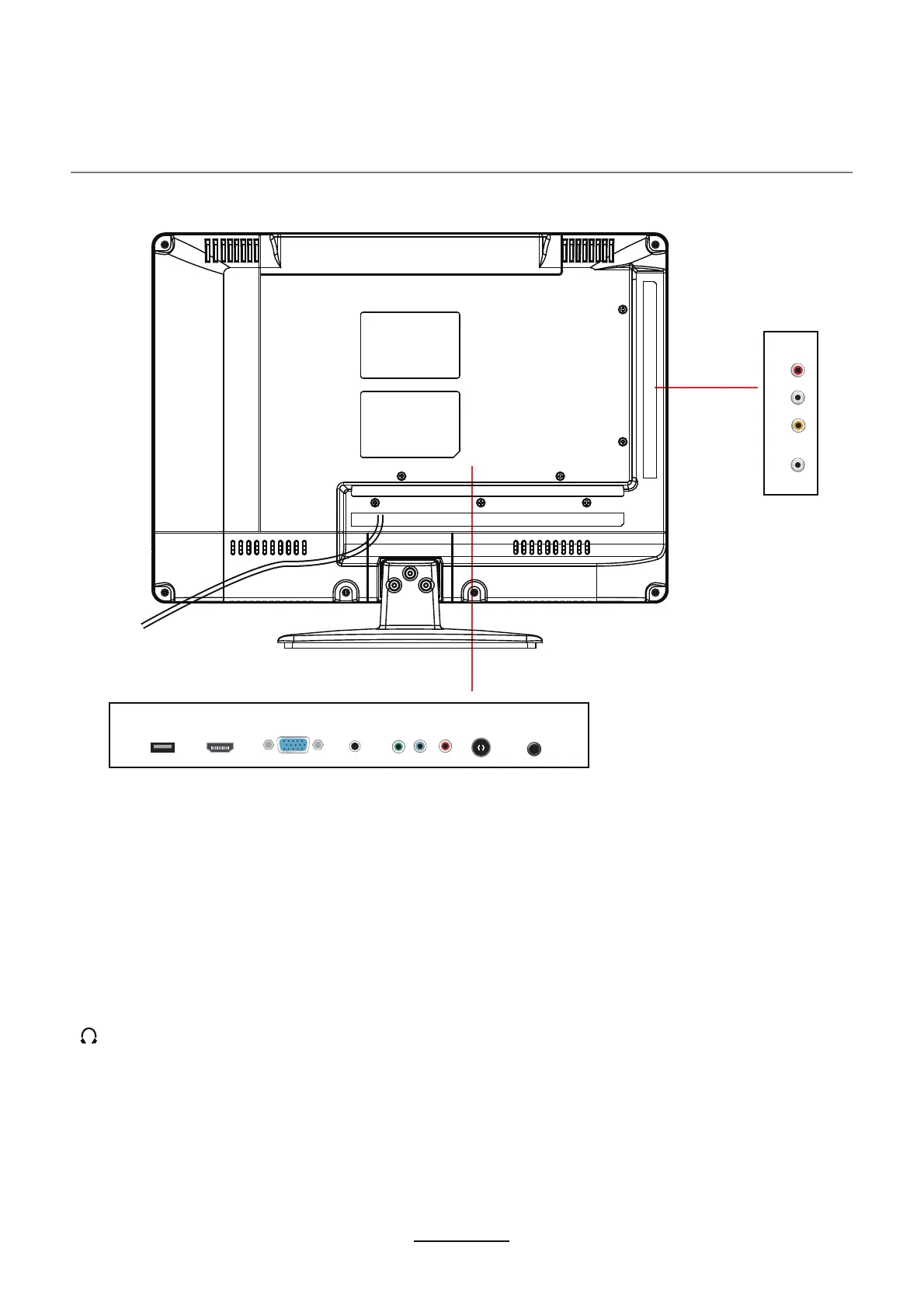
Connections
4
HDMI:
YPbPr:
Connecting of HDMI equipment.
This interface is only used as a software upgrade.
Connect to the component video output terminal of a source device.
VGA: For a PC display. Connect it to the 15 pin D-Sub analog output connector of a PC.
PC AUDIO:
Connect it to the audio output of a PC or other audio equipment. Used with the VGA
video input.
RF: Connect an antenna or 75 Ohm coaxial cable to receive TV signal.
L/R in:
Shared with YPbPr and Video In it is used to get audio from a source device.
VIDEO IN: Connec
COAX: Connect to the coaxial.
t it to a composite video output terminal of a source device.
Headphone: Connect it to your headphone or other audio equipment.
AC POWER IN: Connect to an
grounded 100-240V~ 50/60Hz outlet with the Power Cable.
SERVICE JACK:
L in R inVIDEO IN COAX
AC POWER IN
VGA
PC AUDIO
HDMI
Y Pb Pr
RF HEADPHONE
SERVICE JACK



 To Next Page