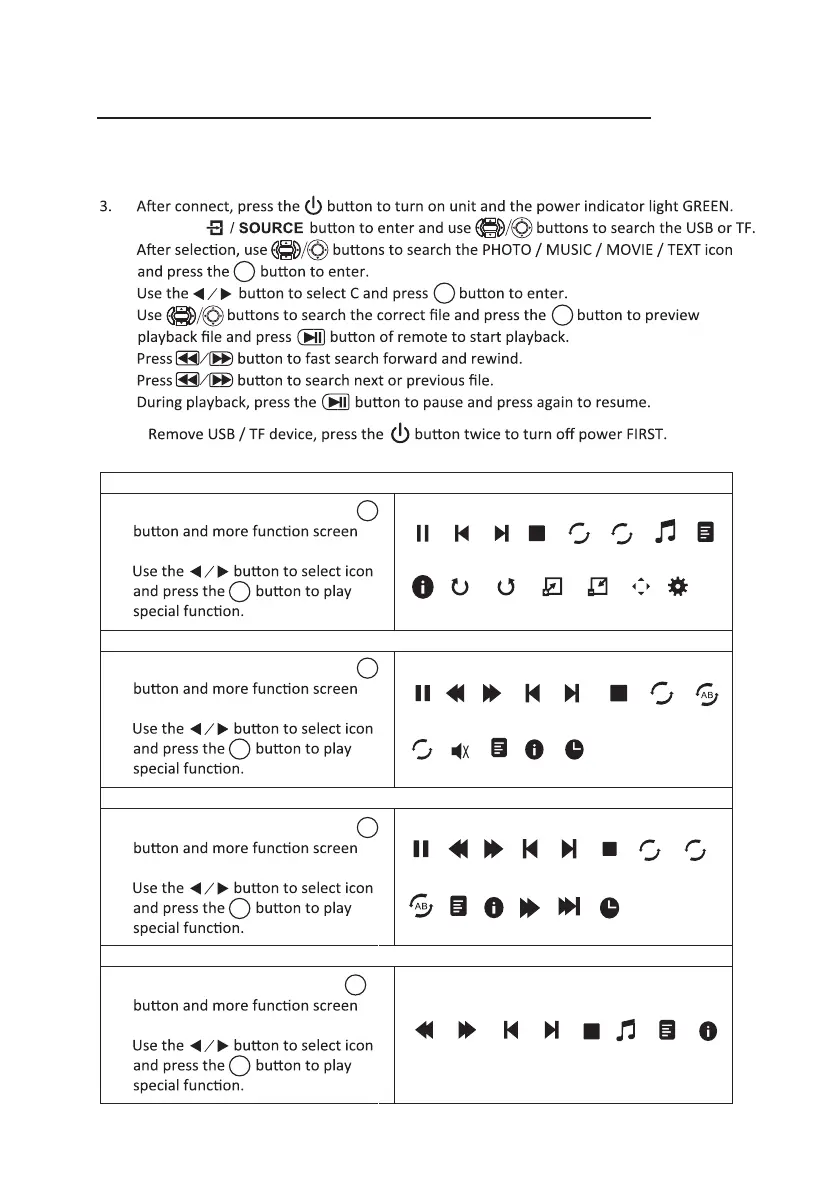
1. When photo playback, press the
show on lower (figure 1).
2.
Install USB / TF device:
1. Turn off the unit before install USB / TF card.
2. Install the USB device into USB port / Install the TF device into TF slot.
4.
Press the
5.
6.
7.
8.
9.
10.
Using TF Card And USB Playback (Media Player)
Sub-Menu on Photo screen
Figure 1.
Sub-Menu on Music screen
Figure 2.
Sub-Menu on Movie screen
Figure 3.
14
Sub-Menu on Text screen
Figure 4.
OK
OK
OK
OK
OK
OK
OK
OK
OK
OK
1. When music playback, press the
show on lower (figure 2).
2.
OK
OK
1. When movie playback, press the
show on lower (figure 3).
2.
OK
OK
1. When text playback, press the
show on lower (figure 4).
2.
OK
OK
OK
NOTE:
Pause F B F F Prev. N ex t St o p
R_ A ll R_ O FF
Set A Play... I n fo Slow... Step... G ot o...
Pause F B F F Pr ev . N e x t Stop R_All Set A
R_OFF
I n f o Goto...MUTE
Play...
Pause Prev. N ext Stop R_ All
Rota...
Zoom...
Mov...
Slid...
Zoom...
I n fo
R_ O FF Play...
Rota...
R
R
R
MUSIC
Prev. ..
Next...
P r e v .
N e x t
S t o p
Play...
I n f o
MUSIC


 To Next Page