M 18 Digital Mixer User’s Manual
SETTINGS view
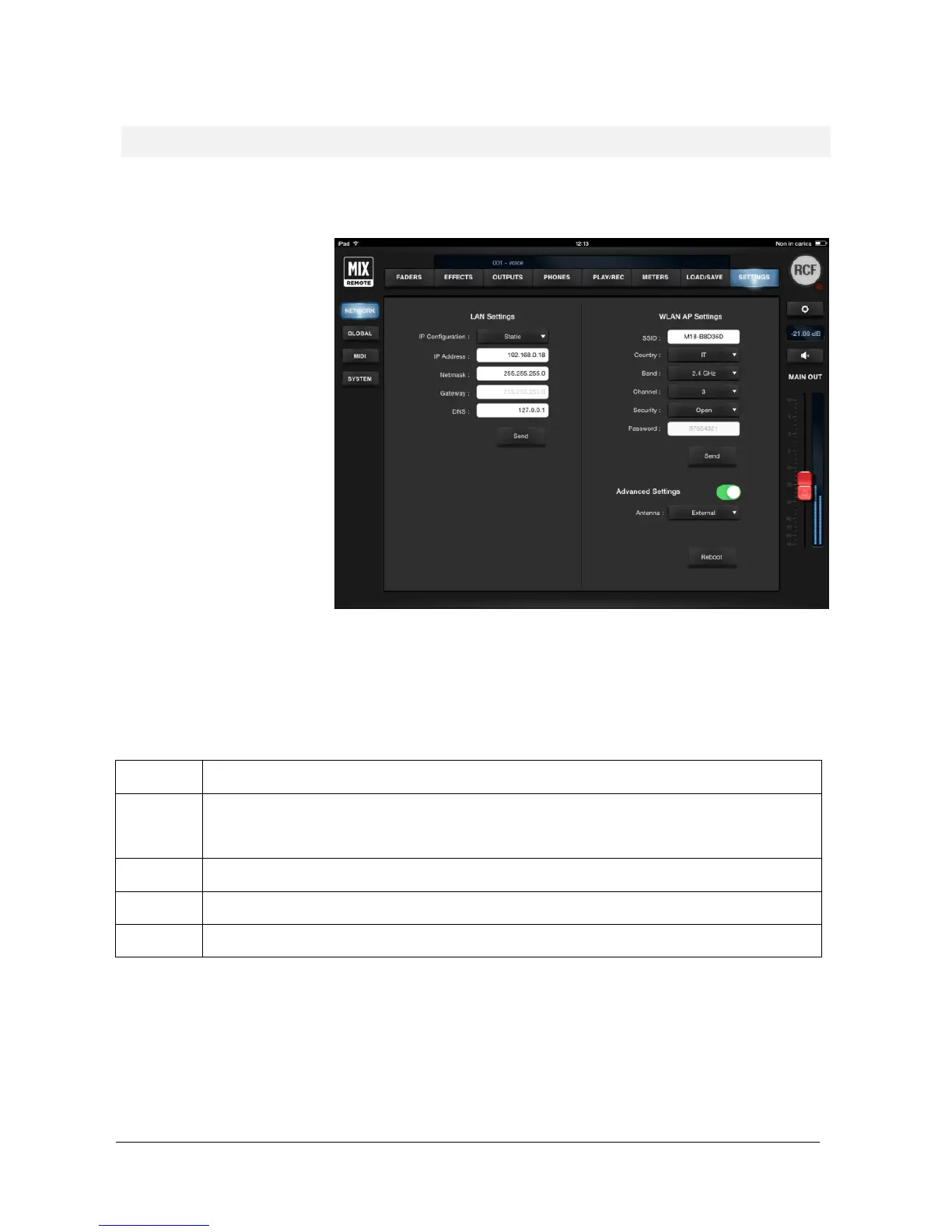
The SETTINGS view allows access to all of the global configuration parameters (see at page 10). Four tabs are
available, on the left column.
Two sections are accessible from
the NETWORK view: on the left
side, for the wired LAN port; on
the right side, for the internal
Wireless LAN Access Point.
LAN Settings: all network-related adjustments can be made, such as IP Address, Netmask, Gateway and DNS. These
settings are usually left at the factory values, but they can be modified for special uses. Standard usage of the M18
Digital Mixer does not require the LAN port.
WLAN Settings: all WiFi-related adjustments can be made, mostly like a standard WiFi Access Point. The parameters
are described in detail here:
You can modify the factory setting to provide a name you can remember. The factory name is in the form M18
XXXXXX where the latter are a combination of letters and numbers.
By selecting the appropriate
country where you are operating the mixer, you can comply with local radio
regulations. Please notice that if you leave to the default value NONE, transmitting power is limited and you will
not obtain the best performance from the M 18 Digital Mixer, including maximum distance and robustness to
interference
You can select between the usual 2.4 GHz band and the less crowded 5 GHz band, depending on your tablet
You can minimize interference from other Access Points by selecting a
channel not being used by others. There
are several scanning software applications that enable you to view which channels are available.
You can either keep the Access Point open, or enable WiFi security (WPA2/PSK). In this case, you will be able
modify the default password.
After you perform all changes to either LAN of WLAN parameters, you must press SEND to modify these settings into
the mixer. A reboot will be required to make these changes effective.
If you enable Advanced Settings, then you can switch between the internal and external antennas. This change is
immediate and does not require a reboot.
The Reboot button is intended for advanced applications, and should be avoided in normal usage.


 To Next Page