Need help?
Do you have a question about the RDL M-101 and is the answer not in the manual?
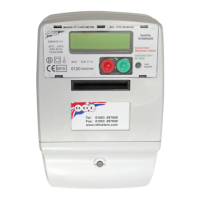
Overview of the M-101 single phase prepayment coin meter and timer for operation in METER MODE.
Details the features and specifications of the M-101 meter in METER MODE, including versions and capabilities.
Provides technical specifications for the M-101 meter, including LED security, contactor, and power supply.
Explains the function of the red LED, pulse rate, and power registration under various conditions.
Details the contactor's current rating, terminal arrangement, dimensions, and construction.
Lists the rated voltage, current range, frequency, and operating voltage range for the meter.
Specifies the meter's accuracy class for active energy measurement.
Defines the temperature operating, storage, and transportation ranges, and ingress protection.
Provides the physical dimensions (height, width, depth) and weight of the meter.
Describes the standard operational procedures and displays in METER MODE.
Details the various displays shown during normal operation in METER MODE and their meanings.
Explains how to sequence through and interpret additional parameters displayed by the meter.
Details how the standing charge is collected by the meter every 24 hours.
Explains how the meter handles up to 2 different rates controlled by an internal time switch.
Describes how the meter disconnects power due to no credit or other conditions.
Explains power disconnection when prepaid credit expires and the meter goes into debt.
Details the detection of reverse energy flow and how it is indicated and reset.
Explains how to invoke, use, and manage emergency credit when pre-paid credit is low.
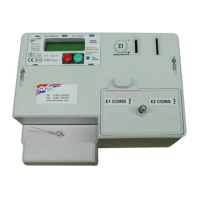
Covers the acceptance of coins, display of credit, and conditions for excess credit.
Describes how valid coins are accepted, credited, and how credit is displayed.
Explains the display message and conditions for 'Excess Credit' when inserting coins.
Details the requirements for inserting coins to repay emergency credit debt.
Guides users on how to access and modify meter settings using private mode switch buttons.
Explains the step-by-step process for navigating and changing parameters using the meter buttons.
Lists and describes key parameters that can be configured via the private mode, such as rates and charges.
Details the process and effects of resetting the meter to its factory default settings.
Explains how to set the meter's date and time parameters.
Describes how to manually reset the meter's debt and credit to zero.
Details how to manually set the credit value within the allowed range.
Explains how to set the value for the emergency credit feature.
Describes how to set the point at which emergency credit becomes available.
Details how to set the electricity cost per unit for Rate 1 and Rate 2.
Explains how to set the standing charge deducted every 24 hours.
Describes how to select between Meter or Timer operating modes.
Provides visual guides for meter wiring and wall mounting.
Overview of the M-101 single phase prepayment coin meter and timer for operation in TIMER MODE.
Details the features and specifications of the M-101 meter in TIMER MODE, including versions and capabilities.
Provides technical specifications for the M-101 meter, including LED security, contactor, and power supply.
Explains the function of the red LED, pulse rate, and power registration under various conditions.
Details the contactor's current rating, terminal arrangement, dimensions, and construction.
Lists the rated voltage, current range, frequency, and operating voltage range for the meter.
Specifies the meter's accuracy class for timer measurement.
Defines the temperature operating, storage, and transportation ranges, and ingress protection.
Provides the physical dimensions (height, width, depth) and weight of the meter.
Describes the standard operational procedures and displays in TIMER MODE.
Details the displays shown during normal operation in TIMER MODE and their meanings.
Explains how to sequence through and interpret additional parameters displayed by the timer.
Explains the Tournament Mode Override functionality for dispensing electricity without coins.
Describes how the timer disconnects power due to no credit or other conditions.
Explains power disconnection when prepaid credit expires and coins are needed to restart.
Details the detection of reverse energy flow and how it is indicated and reset.
Covers the acceptance of coins, display of time credit, and conditions for maximum credit.
Describes how valid coins are accepted and time is credited to the timer.
Explains the display message and conditions for 'Maximum Reached' when inserting coins.
Guides users on how to access and modify timer settings using private mode switch buttons.
Explains the step-by-step process for navigating and changing timer parameters using the buttons.
Lists and describes key parameters that can be configured via the private mode, such as token value and max time.
Details the process and effects of resetting the timer to its factory default settings.
Explains how to set the timer's date and time parameters.
Describes how to manually reset the timer's credit to zero.
Details how to set the amount of time credited for each coin inserted.
Explains how to set the maximum time credit that can be accumulated.
Describes the functionality of the Tournament Mode Override.
Explains how to select between Meter mode and Timer mode operation.
Provides visual guides for timer wiring and wall mounting.
Lists meter compliance with standards and directives, including MID approval.
Details the warranty period, coverage, and conditions that will void the guarantee.
Lists specific actions or conditions that will render the meter's guarantee invalid.
States the meter's conformity with EU Measurement Instrument Directive 2014/32/EU and relevant standards.
States the meter's conformity with UK Measuring Instruments Regulations 2016 and relevant standards.
 General
| Brand | RDL |
|---|---|
| Model | M-101 |
| Category | Measuring Instruments |
| Language | English |

 To Next Page