Need help?
Do you have a question about the RDL MCM-030 and is the answer not in the manual?
Overview of the MCM-030 meter's function and operation in METER MODE.
Details meter specifications including LED, contactor, power supply, metrology, environmental factors, and dimensions.
Explains normal display modes, additional information, standing charge collection, rate switching, and disconnection procedures.
Details the method for programming meter parameters using a command card and button controls.
Contains starting current information and wiring/mounting diagrams for meter installation.
Overview of the MCM-030 meter's function and operation in TIMER MODE.
Details meter specifications including LED, contactor, power supply, metrology, environmental factors, and dimensions.
Explains normal display modes, additional information, and tournament mode override functionality.
Details the method for programming timer parameters using a command card and button controls.
Provides wiring diagrams and wall mounting template for meter installation.
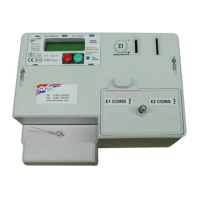
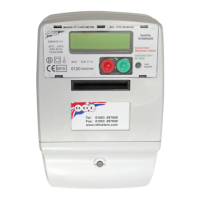
The RDL MCM-030 is a single-phase prepayment magnetic card-operated electronic meter and timer, designed for both electricity metering and timed power supply applications. It operates in two primary modes: METER MODE for electricity consumption and TIMER MODE for timed power dispensing. This device is designed for indoor use and features a solid-state construction with a 2x16 character LCD for displaying information.
In METER MODE, the MCM-030 functions as a prepayment electricity meter. Users insert secure, disposable magnetic token cards to add monetary credit to the meter. The meter then deducts credit based on electricity consumption, which is measured in kWh at user-settable rates (Rate 1 and Rate 2). It supports up to two different tariff rates, controlled by an internal time switch, allowing for variable pricing throughout the day. A standing charge can also be collected every 24 hours at midnight. The meter features an emergency credit facility, which can be invoked by pressing a dedicated RED button when the prepaid credit falls below a certain limit or the meter goes into debt. This provides a temporary power supply, with the debt being repaid from subsequent card insertions. The main contactor disconnects power when prepaid credit and emergency credit are exhausted, and reconnects once sufficient credit is added to clear any outstanding debt. The device also incorporates reverse energy detection, which will display "RED" if reverse power is detected above a pre-determined level, indicating potential tampering or incorrect installation.
In TIMER MODE, the MCM-030 functions as a timed power dispenser. Users insert magnetic token cards to add time credit to the timer, which counts down in hours, minutes, and seconds. The timer dispenses electricity for the credited duration. Similar to the meter mode, the main contactor opens to disconnect power when the time credit expires and reconnects when new time credit is added. A "Tournament Mode Override" allows the timer to dispense electricity continuously without requiring token card insertions, which can be useful for specific events or scenarios. Reverse energy detection is also present in this mode.
The MCM-030 is designed for straightforward user interaction. In both modes, the 2x16 character LCD provides clear feedback on the current status, including remaining credit (monetary or time), current consumption/time countdown, and any debt accumulated.
For adding credit, users simply insert a valid magnetic token card. The meter/timer will display a confirmation message (e.g., "£XX.XX Credited" or "XXXX Token") indicating successful credit transfer. Multiple cards can be entered in a single session, and once a card is used, it is erased and permanently marked. The maximum credit that can be accumulated is limited (£999.99 for meter mode, 1440 minutes for timer mode). If a card insertion would exceed this limit, an "Excess Credit" message is displayed, and the card is not erased, allowing it to be used later. The device also handles "Card Error" messages if a card is inserted too quickly, too slowly, or is invalid, again without erasing the card.
The GREEN button on the meter allows users to sequence through various displayed parameters in both normal operation and programming modes. In normal operation, a momentary press cycles through information such as current credit, emergency credit left, current debt, time, date, total credit inserted, total cards inserted, standing charge, unit costs (Rate 1 and 2), kWh registered (Rate 1 and 2), total kWh registered, and emergency credit availability point. If the GREEN button is not pressed within 10 seconds during a manual sequence, the display reverts to its normal operation.
The RED button serves multiple functions. In meter mode, it is used to invoke emergency credit. In programming mode, both the RED and GREEN buttons are used to navigate and modify settings.
The MCM-030 is designed with minimal user maintenance in mind. It is a sealed unit with no user-serviceable parts or user adjustments other than the Landlord/Meter Owner settings of the metering functions and tariffs. Maintenance and repair are exclusively handled by RDL Meters Ltd.
The device features non-volatile memory for power registration, which is updated every 24 hours and in the event of a power failure, ensuring data integrity. No battery replacement is required, contributing to its low maintenance profile.
The device includes a programming command card system, which simplifies the process of changing settings. After inserting a valid COMMAND CARD, specific parameters can be viewed and modified using the RED and GREEN buttons. These programmable parameters include:
The programming interface allows for incremental changes to values using the GREEN button and cursor movement/storage of values using the RED button. If no buttons are pressed for 10 seconds during programming, the device reverts to normal operation without saving changes.
The device is guaranteed for three years from the date of purchase, covering parts and labor, provided certain conditions are met, such as proper installation by a qualified electrician and no tampering or excessive load. For returns, an RMA (Return Merchandise Authorisation) number must be obtained from RDL Meters Ltd.
 General
| Input Channels | 1 |
|---|---|
| Power Supply | 24 VDC |
| Frequency Response | 20 Hz to 20 kHz (+/- 0.5 dB) |
| Meter Type | LED VU Meter |
| Meter Ballistics | VU |
| Meter Illumination | LED |

 To Next Page