METER MODE (cont.)
3.6 Emergency Credit
If the prepaid credit is below a given limit or the meter has gone into debt, an
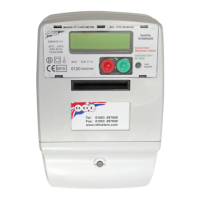
“Emergency Credit” facility may be invoked by pressing the RED button marked
emergency credit. The meter operation whilst in emergency credit is explained in the
following subsections.
3.6.1 Invocation
Emergency credit is a pre-set reserve that can be selected by pressing the
RED “Emergency Credit“ button when the pre-paid credit has fallen below a
given level. The display will change to £XXX.XX Emer to indicate the amount of
emergency credit left to the consumer. The debt is to be repaid before the
meter is back into prepaid credit. (Emer Credit Left £XXX.XX) may be viewed by
pressing the display button.
3.6.2 Reduction
The amount of emergency credit remaining (Displayed as £XXX.XX Emer) will be
reduced as electricity is consumed and any Standing Charge collected. The
Debt will also be increased by the same amount. (Emer Credit Left £XXX.XX)
and (Current Debt £XXX.XX) may be viewed by pressing the display button.
3.6.3 Expiry
When the emergency credit has fallen to zero the supply will be disconnected
and the display will show £XXX.XX Debt, where £XXX.XX Debt represents the
total amount owed by the customer including any Standing Charge collected.
(Current Debt £XXX.XX) may be viewed by pressing the display button.
3.7 Prepayment Card Tokens
3.7.1 Valid Cards
When a valid token card is inserted its total monetary value is credited to the
meter and its acceptance is indicated by the message “£XX.XX Credited” being
displayed momentarily. On removal the card is erased and visibly marked. The
maximum credit is limited to £999.99 at which point the display will change to
Excess Credit. Three examples are given below:
Example 1:
Example 2:
DISPLAY ACTION
Rate - Credit £121.99 Insert £5 value Card.
£5.00 Credited
Rate - Credit £126.99
DISPLAY ACTION
Debt £10.99 Insert £5 value Card.
£5.00 Credited
Rate - Debt £5.99
5


 To Next Page