15
15
Servicing (continued):
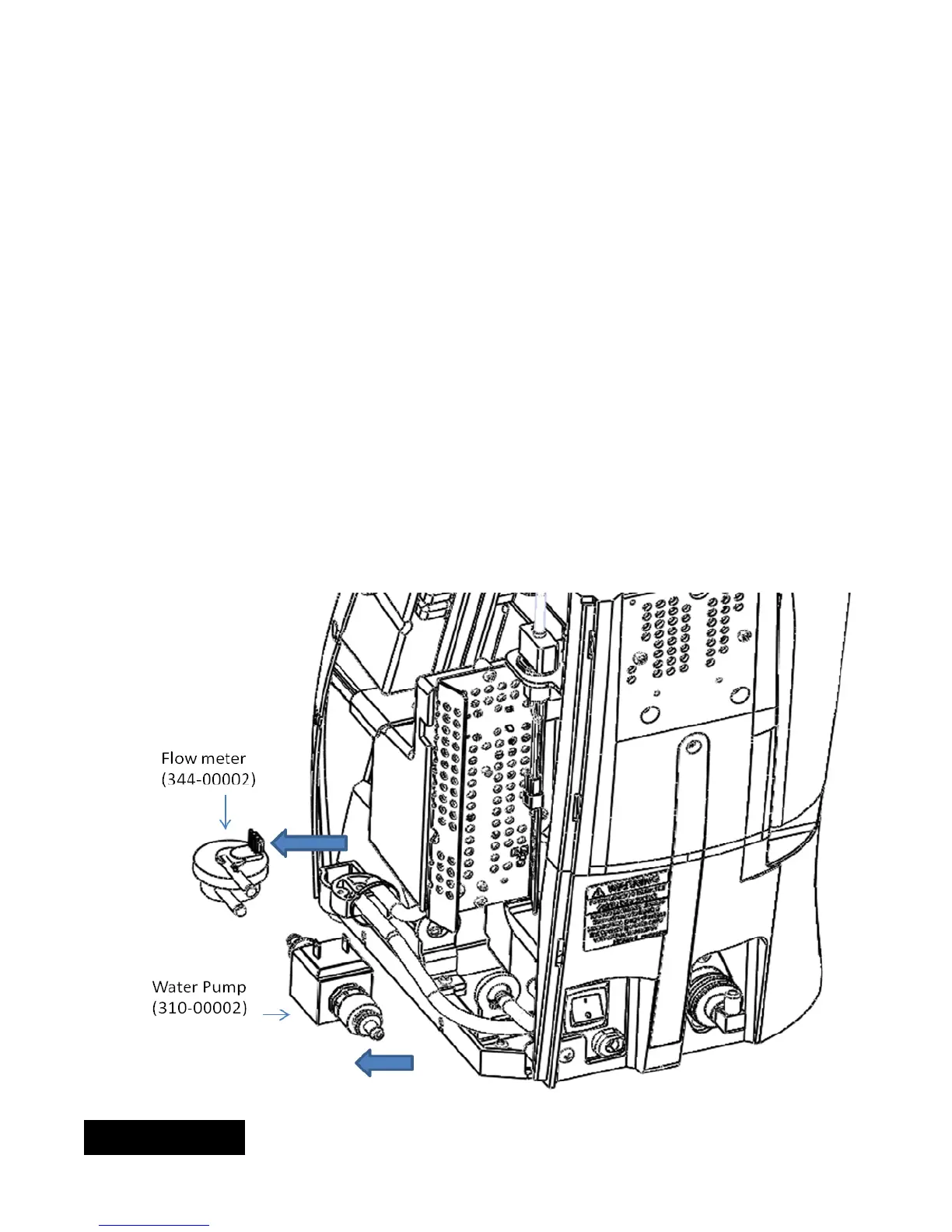
5c) Servicing flow meter and water pump. These two components are located on the lower left area of the brewer
when viewed from rear.
To replace the flow meter:
1. Disconnect wire connector on the top of the flow meter.
2. Cut the strain reliefs on both inlet and outlet of flow meter.
3. Disconnect the tubing from both inlet and outlet ports.
4. Pull up on flow meter to remove from cradle.
Follow the sequence in reverse when replacing. Make sure tubing is secured and new straps are installed.
Check for leaks.
To replace the water pump:
1. Disconnect wire connector on the top of the water pump.
2. Cut the strain reliefs on both inlet and outlet of water pump.
3. Disconnect the tubing from both inlet and outlet ports.
4. Remove water pump.
Follow the same sequence in reverse to reassemble. Please make sure new strain relief straps are
installed. Check for leaks by running the brewer.
ENGLISH


 To Next Page