EasyManua.ls Logo

Realistic HTX-100 - Troubleshooting Hints; Transmitter Section Troubleshooting

Realistic HTX-100
59 pages
Print Icon
To Next Page IconTo Next Page
To Previous Page IconTo Previous Page
Loading...
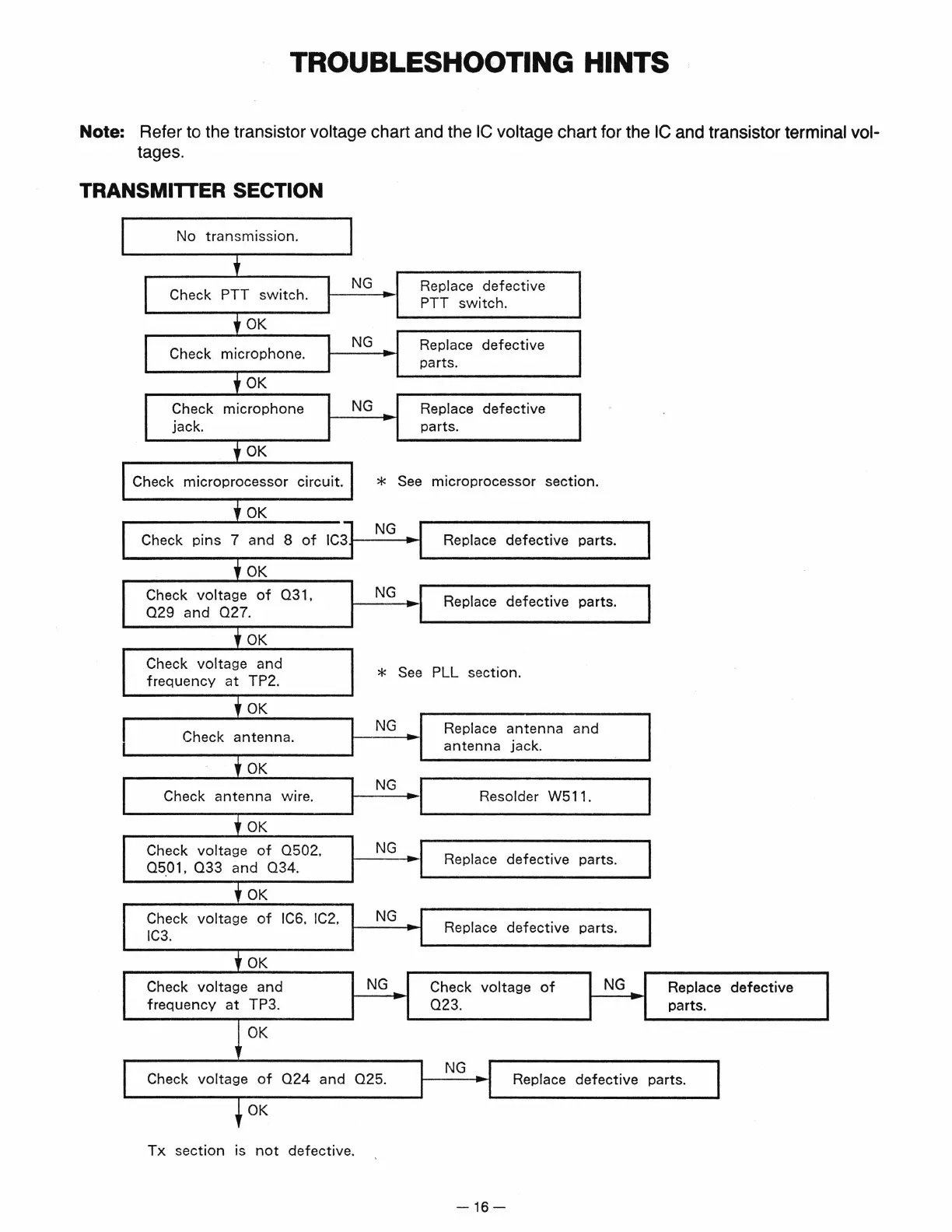
TROUBLESHOOTING HINTS
Note: Refer to the transistor voltage chart and the
IC
voltage chart for the
IC
and transistor terminal vol-
tages.
TRANSMITTER SECTION
No
transmission.
'
NG
Replace
defective
Check PTT
switch.
PTT
switch.
f
OK
NG
Replace
defective
Check
microphone.
parts.
f
OK
Check
microphone
NG
Replace
defective
jack.
parts.
f
OK
Check
microprocessor
circuit.
*
See
microprocessor
section.
l
OK
Check
pins
7
and
8
of
IC3
NG
Replace
defective
parts.
f
OK
Check
voltage
of
031,
NG
Replace
defective
parts.
029
and
027.
f
OK
Check
voltage
and
*
See
PLL
section.
frequency
at
TP2.
l
OK
NG
Replace
antenna
and
Check
antenna.
antenna
jack.
f
OK
Check
antenna
wire.
NG
I I
Resolder W511.
f
OK
I
I
Check
voltage
of
0502,
NG
05.0
1,
033
and
034.
Replace
defective
parts.
f
OK
Check
voltage
of
IC6, IC2,
NG
..
Replace
defective
parts
.
IC3.
f
OK
Check
voltage
and
NG
Check
voltage
of
NG
Replace
defective
frequency
at
TP3.
023.
parts.
!
OK
NG
I
I
Check
voltage
of
024
and
025.
I
Replace
defective
parts.
t
OK
Tx
section
is
not
defective.
-16-