EasyManua.ls Logo

Realistic HTX-100 - Microprocessor Section Troubleshooting; PCB Views and Parts Lists; PCB (Top and Bottom) VIEWS

Realistic HTX-100
59 pages
Print Icon
To Next Page IconTo Next Page
To Previous Page IconTo Previous Page
Loading...
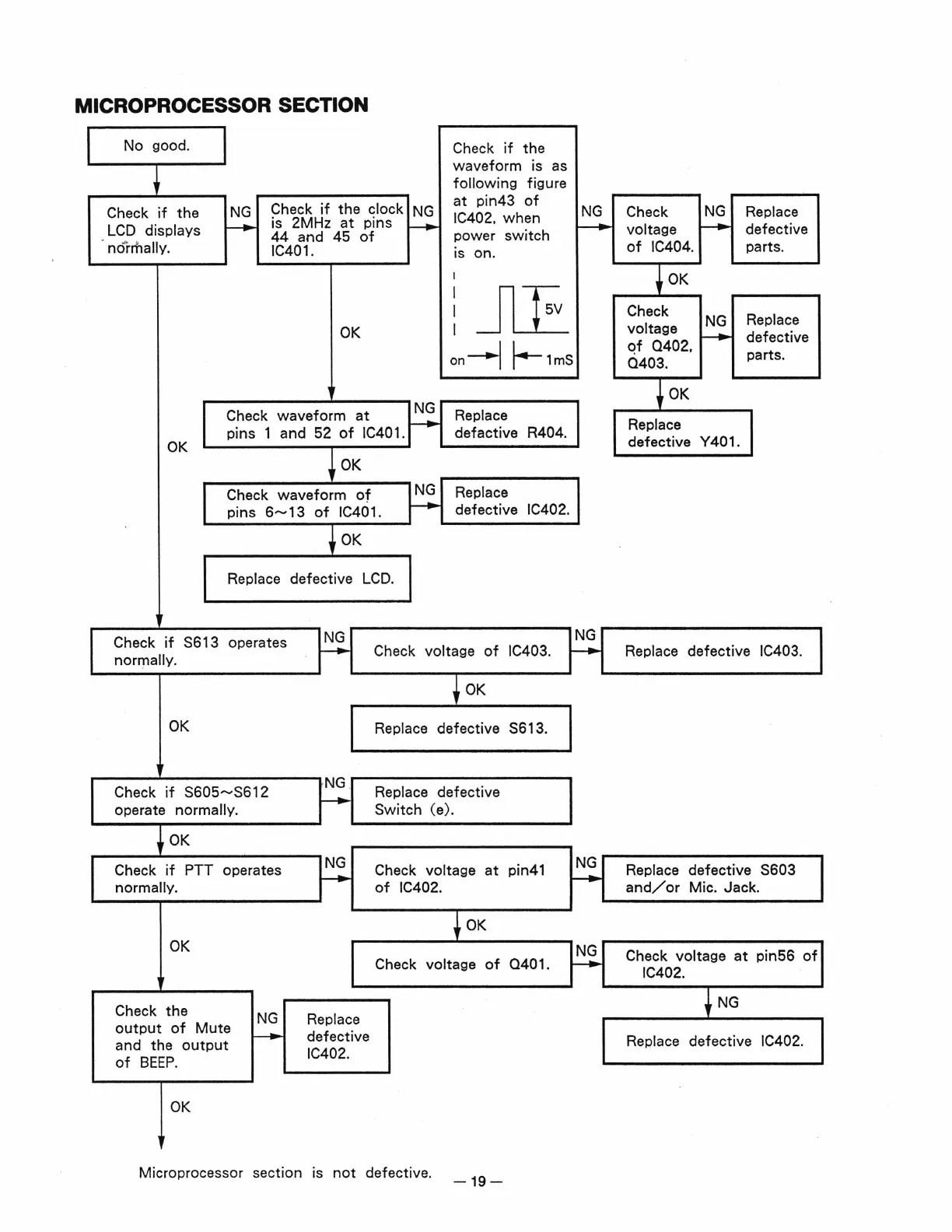
MICROPROCESSOR SECTION
No good.
Check
if
the
LCD
displays
normally.
NG
_____.
Check
if
the clock
is 2MHz
at
pins
44
and 45
of
IC401.
OK
NG
_____.
Check
if
the
waveform is
as
following
figure
at
pin43
of
NG
IC402, when
f-+-
power
switch
is on.
I
I
JLE
I
I
on_..l
~1mS
OK
Check waveform
at
~
Replace
pins 1 and 52
of
IC40
1.
defactive R404.
OK
Check waveform
of
I
N~
Replace
defective
IC402.
pins 6
.......
13
of
IC401. (
~----------~-------
~------------~
OK
Replace defective
LCD.
Check
if
S613
operates
NG
NG
normally.
_......
Check voltage
of
IC403.
_____.
•
OK
OK
Replace
defective S613.
NG
.
Check
if
S605
.......
S612 Replace defective
operate normally.
~
Switch (e).
OK
Check
if
PTT
operates
NG
Check voltage
at
pin41
NG
normally.
~
of
IC402.
~
~OK
OK
NG
Check
voltage
of
0401.
~
Check the
NG
Replace
output
of
Mute
and the
output
_____.
defective
of
BEEP.
IC402.
OK
Microprocessor section is
not
defective.
-19-
Check
NG
Replace
voltage
~
defective
of
IC404. parts.
Check
voltage
NG
Replace
qf
0402
•
~
defective
0403.
parts.
Replace
defective Y
40
1.
Replace defective IC403.
Replace defective S603
and/
or
Mic. Jack.
Check voltage
at
pin56
of
IC402.
t
NG
Replace
defective
IC402.