PREPARATION FOR
USE
Remove
the screw
from the
Battery
Compartment Cover and remove
Cover;
then
snap in a
9-volt
battery.
(We
recommend
a
Radio
Shack
long-life
alkaline battery,
23-553
or
equivalent.)
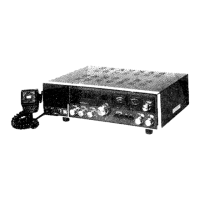
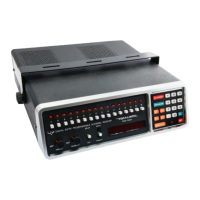
Your
PR0-2001
contains
an electronic
memory to
preserve
the
16
programmed
scanner
channels and
the latest
search
range
entered.
The
battery
protects
this memory
during AC
or
DC
power
failure, or when
you
have the
set unplugged.
BATTERY
COMPARTMENT
BATTERY
COI\,1PAFTM
ENT
COVEB
9v
BaTTeRv
/
NOTE: To
avoid
loss
of
programmed
memory,
do
not unplug AC or
DC
power
cable
when
replacing battery.
Replace
battery
at
least
every
six months.
CAUTION-Never
leave a
weak or
dead battery
in
your
PRO-2001;
even
"leakproof"
types
can
leak
damaging chemicals.
Now
you
only
need
to
do
three things
to
be able
to tune in on those
exciting
"monitor"
frequencies:
1.
Connect to a
source
of
power-120
volts AC or
12 volts DC
(see
INSTALLATION,
Page 1 1
).
2.
Connect
an Antenna to the UHF
and/or VHF Antenna
jacks.
3. Program
one or
more
frequencies
into
the
scanner channel(s).
(See
Getting
Started,
Page 7.)
CONTROLS
AND THEIR FUNCTIONS
A short description of
the
Controls
is
given
here;
for actual
Operating
Instructions, refer to Operation
section,
Page
7.
Channel
Switches let
you
enable
or disable each
channel
individually.
When the
button
is in, Scanner will check that
channel
for
activity.
When
the button
is out, that channel
is locked out and
will be skipped
during
automatic or
manual scan.
LED Indicators
show which
channel
is being
checked
at
any
given
moment.
During scanning,
LEDs
will light
up
in sequence
as each
respective
channel is checked
for
message
activity.
LE
Ds
above
locked-out
channels
will
not
light up.
OFF-VOLUME
is
the
power
switch and
Volume
control. When
set is
not in
use,
rotate this control
counter-clockwise
to turn
it
off.
SOUELCH control
eliminates
annoying background
noise
between
signal
transmissions.
When
properly
set,
SOUELCH
will
keep the
PRO-2001
silent
until a
signal
comes in
on the
channel(s)
you
are
listening to-then,
the
Squelch
circuit
will
"open"
and
you'll
hear the
sign a
l.
DELAY
Switch holds
the Scanner
on
an
active channel for two
seconds after
a transmission has ended. lf tlrere
is no reply
within
that time, scanning resumes. With switch in OFF
position,
scanning
resumes as soon
as
message has
ended.
Scanning
Switch
determines
the Scanner
function. In AUTO
position,
Scanner automatically
checks
each
enabled
channel
for
activity. In
stop
(middle)
position,
Scanner remains on one channel,
whether or
not
there
is
a
message coming in
on
that channel.
Press
the switch
momentarily to
MANUAL
position
to advance Scanner
to
next
enabled
channel.
Frequency Display
shows
exactly
which
frecluency
is
being
scanned,
monitored
or
programmed
into
memory.
-4-


 To Next Page