EasyManua.ls Logo

Realistic PRO-2024 - Understanding Your Scanner Features; A Look at the Display Indicators; Connecting Headphones; Hearing Comfort and Health Advice

Realistic PRO-2024
14 pages
Print Icon
To Next Page IconTo Next Page
To Previous Page IconTo Previous Page
Loading...
CONNECTING
HEADPHONES
For
private
listening
or
in
a
noisy
envi¬
ronment,
you
can
connect
head¬
phones
(not
supplied)
to
the
Vs-inch
jack
on
the
front
of
your
scanner.
We
recommend
a
mono
headset,
avail¬
able
at
your
local
Radio
Shack
store.
You
automatically
disconnect
the
in¬
ternal
speaker
when
you
plug
in
the
headphones.
HEARING
CONFORT
AND
YOUR
HEALTH
Do
not
listen
(especially
using
head¬
phones)
at
extremely
high
volume
lev¬
els.
Extended,
high-volume
listening
can
lead
to
permanent
hearing
loss.
6
UNDERSTANDING
YOUR
SCANNER
A
LOOK
AT
THE
DISPLAY
AT
SRCH
SCAN
MAN
PGM
PRI
DLY
L/OLfT
OO
,
OOOOOOn
me
!
U
U
ch
U
U
U
U
U
U
hi
mz
so
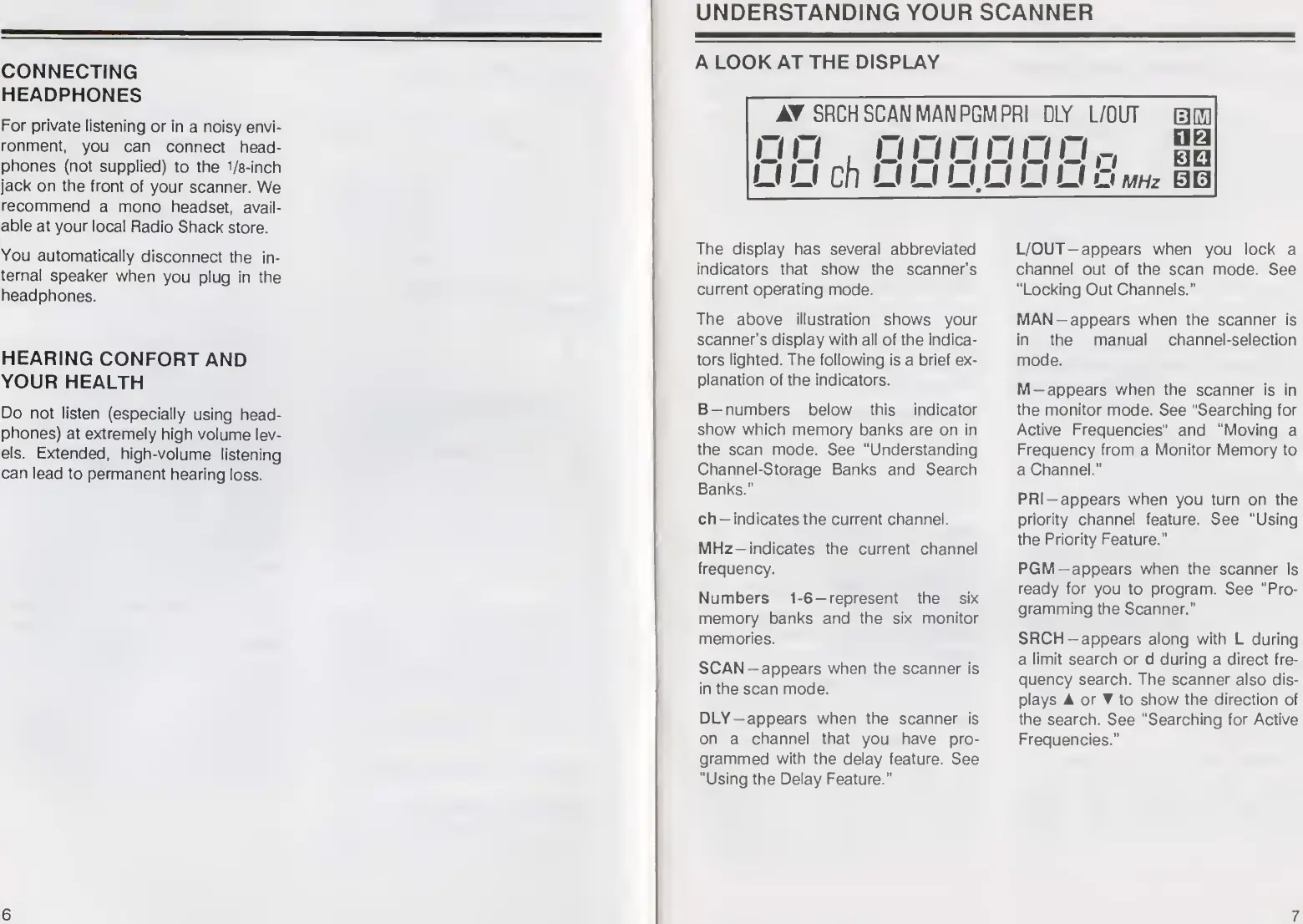
The
display
has
several
abbreviated
indicators
that
show
the
scanner’s
current
operating
mode.
The
above
illustration
shows
your
scanner’s
display
with
all
of
the
indica¬
tors
lighted.
The
following
is
a
brief
ex¬
planation
of
the
indicators.
B
—numbers
below
this
indicator
show
which
memory
banks
are
on
in
the
scan
mode.
See
"Understanding
Channel-Storage
Banks
and
Search
Banks.”
ch
-
indicates
the
current
channel.
MHz-
i
ndicates
the
current
channel
frequency.
Numbers
1-6-represent
the
six
memory
banks
and
the
six
monitor
memories.
SCAN
-
a
ppears
when
the
scanner
is
in
the
scan
mode.
DLY-appears
when
the
scanner
is
on
a
channel
that
you
have
pro¬
grammed
with
the
delay
feature.
See
“Using
the
Delay
Feature.”
L/OUT-appears
when
you
lock
a
channel
out
of
the
scan
mode.
See
“Locking
Out
Channels."
MAN-appears
when
the
scanner
is
in
the
manual
channel-selection
mode.
M-appears
when
the
scanner
is
in
the
monitor
mode.
See
"Searching
for
Active
Frequencies"
and
“Moving
a
Frequency
from
a
Monitor
Memory
to
a
Channel.”
PRI-appears
when
you
turn
on
the
priority
channel
feature.
See
“Using
the
Priority
Feature.”
PGM-appears
when
the
scanner
is
ready
for
you
to
program.
See
“Pro¬
gramming
the
Scanner."
SRCH-appears
along
with
L
during
a
limit
search
or
d
during
a
direct
fre¬
quency
search.
The
scanner
also
dis¬
plays
A
or
T
to
show
the
direction
of
the
search.
See
“Searching
for
Active
Frequencies.”
7

Related product manuals