EasyManua.ls Logo

Realistic PRO-2024 - Turning Banks On and Off; Using the Priority Feature; Manually Selecting a Channel; General Scanning Guide

Realistic PRO-2024
14 pages
Print Icon
To Next Page IconTo Next Page
To Previous Page IconTo Previous Page
Loading...
TURNING
BANKS
ON
AND
OFF
To
turn
banks
on
and
off,
you
must
be
in
the
scan
mode.
Press
[SCAN],
The
bank
numbers
ap¬
pear
on
the
display
and
your
scanner
begins
to
scan.
To
turn
off
a
bank,
press
the
number
key
that
corresponds
to
that
bank.
The
bank
number
disappears.
The
scanner
does
not
scan
any
of
the
channels
within
that
bank,
but
you
can
still
manually
select
any
channel
in
that
bank.
Note:
You
can
turn
all
but
one
bank
off.
To
turn
on
a
bank,
press
the
number
key
that
corresponds
to
that
bank.
The
bank
number
appears
on
the
dis¬
play.
The
scanner
scans
all
the
channels
within
that
bank
(except
the
ones
that
you
have
locked
out.)
USING
THE
PRIORITY
FEATURE
Channel
1
is
designated
as
your
scanner’s
priority
channel.
You
can
turn
on
the
priority
feature
so
that
you
do
not
miss
transmissions
on
Channel
1
,
even
if
you
are
monitoring
another
channel.
Press
[PRIORITY]
so
that
PRI
appears
on
the
display.
Now
your
scanner
checks
Channel
1
every
2
seconds,
and
stays
on
the
channel
if
there
is
any
activity.
MANUALLY
SELECTING
A
CHANNEL
You
can
continuously
monitor
a
single
channel
without
scanning.
This
is
use¬
ful
if
you
hear
an
emergency
broad¬
cast
on
a
channel
and
do
not
want
to
miss
any
of
the
details-even
though
there
might
be
periods
of
silence-or,
if
you
want
to
monitor
a
channel
that
you
have
locked
out.
To
select
a
channel
to
monitor,
press
[MANUAL],
enter
the
channel
number,
and
then
press
[MANUAL]
again.
Or,
if
your
scanner
is
scanning
and
has
stopped
at
the
desired
channel,
sim¬
ply
press
[MANUAL]
one
time.
Press¬
ing
[MANUAL]
additional
times
causes
your
scanner
to
step
through
the
channels
one
at
a
time.
16
A
GENERAL
GUIDE
TO
SCANNING
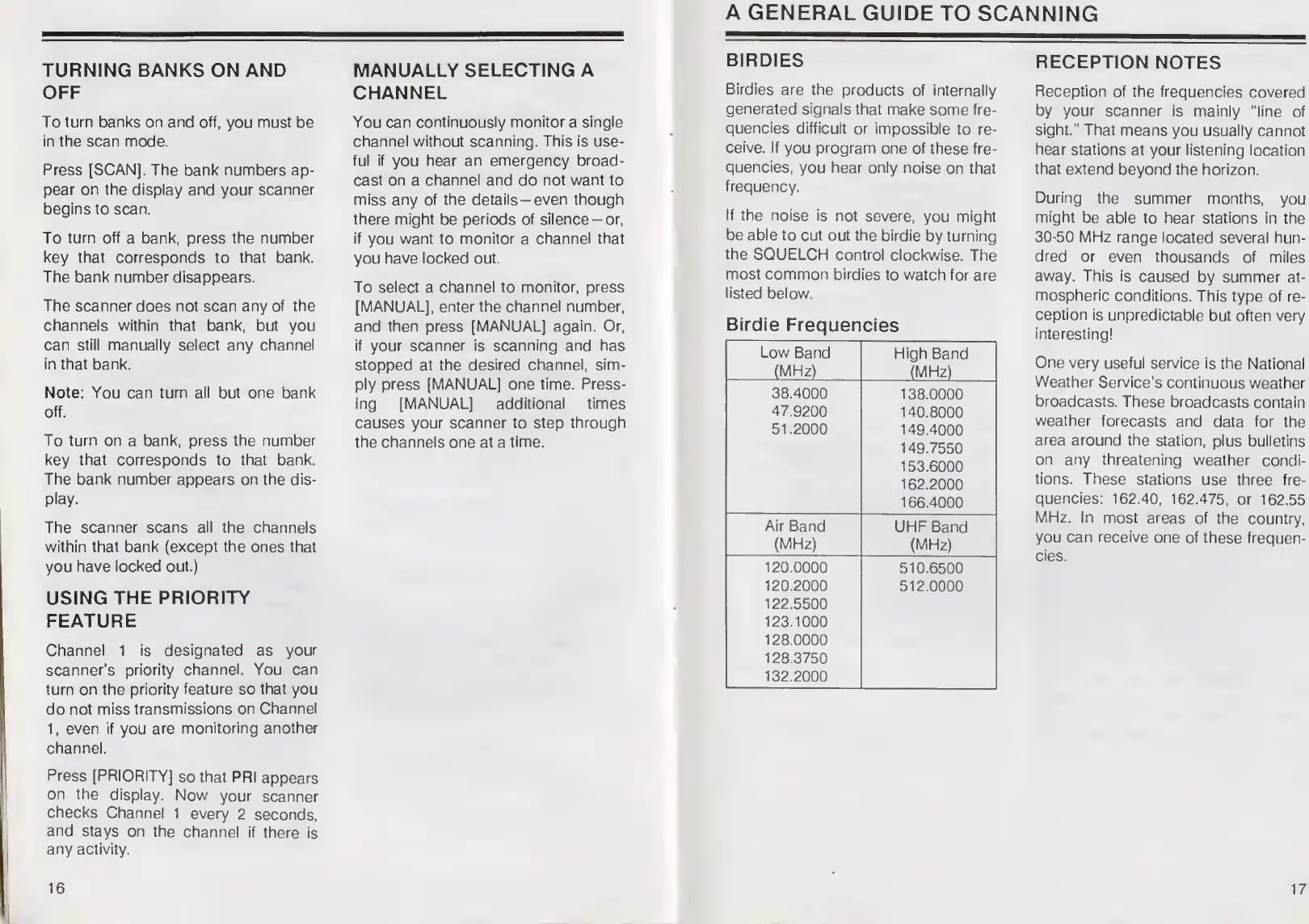
BIRDIES
Birdies
are
the
products
of
internally
generated
signals
that
make
some
fre¬
quencies
difficult
or
impossible
to
re¬
ceive.
If
you
program
one
of
these
fre¬
quencies,
you
hear
only
noise
on
that
frequency.
If
the
noise
is
not
severe,
you
might
be
able
to
cut
out
the
birdie
by
turning
the
SQUELCH
control
clockwise.
The
most
common
birdies
to
watch
for
are
listed
below.
Birdie
Frequencies
Low
Band
(MHz)
High
Band
(MHz)
38.4000
47.9200
51.2000
138.0000
140.8000
149.4000
149.7550
153.6000
162.2000
166.4000
Air
Band
(MHz)
UHF
Band
(MHz)
120.0000
120.2000
122.5500
123.1000
128.0000
128.3750
132.2000
510.6500
512.0000
RECEPTION
NOTES
Reception
of
the
frequencies
covered
by
your
scanner
is
mainly
“line
of
sight.”
That
means
you
usually
cannot
hear
stations
at
your
listening
location
that
extend
beyond
the
horizon.
During
the
summer
months,
you
might
be
able
to
hear
stations
in
the
30-50
MHz
range
located
several
hun¬
dred
or
even
thousands
of
miles
away.
This
is
caused
by
summer
at¬
mospheric
conditions.
This
type
of
re¬
ception
is
unpredictable
but
often
very
interesting!
One
very
useful
service
is
the
National
Weather
Service’s
continuous
weather
broadcasts.
These
broadcasts
contain
weather
forecasts
and
data
for
the
area
around
the
station,
plus
bulletins
on
any
threatening
weather
condi¬
tions.
These
stations
use
three
fre¬
quencies:
162.40,
162.475,
or
162.55
MHz.
In
most
areas
of
the
country,
you
can
receive
one
of
these
frequen¬
cies.
17

Related product manuals