EasyManua.ls Logo

Realistic PRO-2024 - Scanner Operation Procedures; Programming the Scanner; Limited Frequency Search

Realistic PRO-2024
14 pages
Print Icon
To Next Page IconTo Next Page
To Previous Page IconTo Previous Page
Loading...
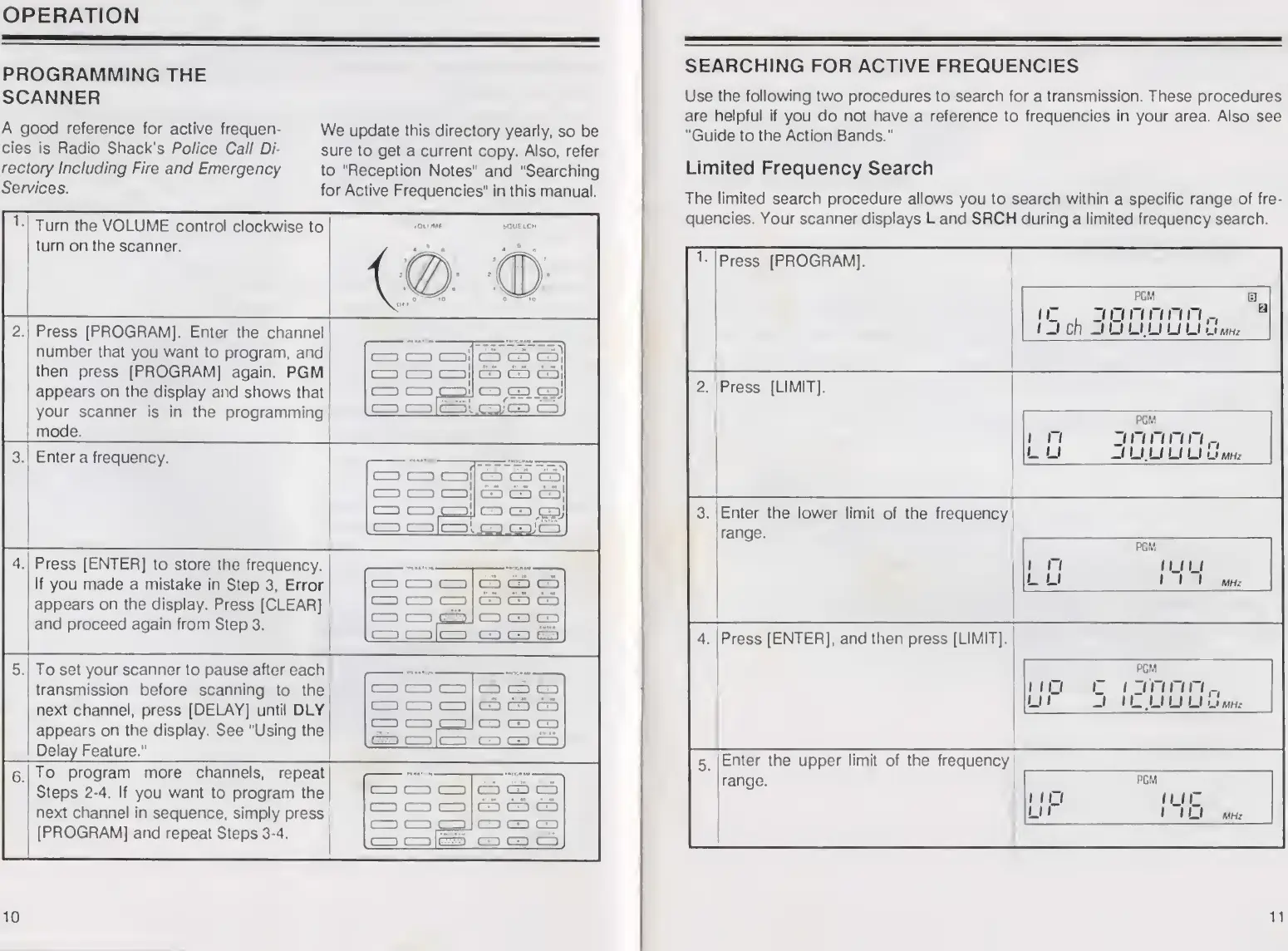
OPERATION
PROGRAMMING
THE
SCANNER
A
good
reference
for
active
frequen¬
cies
is
Radio
Shack's
Police
Call
Di¬
rectory
Including
Fire
and
Emergency
Services.
We
update
this
directory
yearly,
so
be
sure
to
get
a
current
copy.
Also,
refer
to
Reception
Notes"
and
"Searching
for
Active
Frequencies"
in
this
manual.
1
Turn
the
VOLUME
control
clockwise
to
turn
on
the
scanner.
2.
Press
[PROGRAM],
Enter
the
channel
number
that
you
want
to
program,
and
then
press
[PROGRAM]
again.
PGM
appears
on
the
display
and
shows
that
your
scanner
is
in
the
programming
mode.
CZO
cc
col
CD
CD
CE)|
cc
CD
a!
CD
CD
GDi
co
i—I
I—ll
CD
CD
CDJ
i—11—>lr-p
!
.
CD.
3.
Enter
a
frequency.
C
1
CO
(-11
1—1
1—11—1[
t-
1
l-
1
col
CD
CD
CZDj
CD
CD
CD)]
CD
CO
CD!
CD
CO
colj-3
caJ
co
4
Press
[ENTER]
to
store
the
frequency.
If
you
made
a
mistake
in
Step
3,
Error
appears
on
the
display.
Press
[CLEAR]
and
proceed
again
from
Step
3.
CO
CD
CD
CD
CD
CO
CD
CD
CID
t
1
L
lJ
l-
.1
5
To
set
your
scanner
to
pause
after
each
transmission
before
scanning
to
the
next
channel,
press
[DELAY]
until
DLY
appears
on
the
display.
See
"Using
the
Delay
Feature."
i
CO
CO
CCD
CD
CO
CO
CO
CO
CD
CD
CO
CO
CD
CJp|
CO
C-)l(-1
CD
CO
CO
CD
CO
CD
6
.
To
program
more
channels,
repeat
Steps
2-4.
If
you
want
to
program
the
next
channel
in
sequence,
simply
press
[PROGRAM]
and
repeat
Steps
3-4.
CD
CZO
CD
CD
CD
CD
CZD
CD
CD
I
CZO
Cl
fr-|
f—l
10
SEARCHING
FOR
ACTIVE
FREQUENCIES
Use
the
following
two
procedures
to
search
for
a
transmission.
These
procedures
are
helpful
if
you
do
not
have
a
reference
to
frequencies
in
your
area.
Also
see
“Guide
to
the
Action
Bands."
Limited
Frequency
Search
The
limited
search
procedure
allows
you
to
search
within
a
specific
range
of
fre¬
quencies.
Your
scanner
displays
L
and
SRCFI
during
a
limited
frequency
search.
Press
[PROGRAM],
pcm
a
iC
,
3
n
n
ri
n
n
a
1
J
ch
JUU.UUUuMNr
2.
Press
[LIMIT],
PGM
i
n
i
rinnn,-,
LU
JU.UUUu
MH/
3.
Enter
the
lower
limit
of
the
frequency
range.
PGM
i
n
nju
L
U
III
MHz
4.
Press
[ENTER],
and
then
press
[LIMIT],
PGM
no
c
n'nnn„
LU
3
ILUUULImhz
5.
Enter
the
upper
limit
of
the
frequency
range.
PGM
inj
mr
LU
1
1
U
MHz
11

Related product manuals