EasyManua.ls Logo

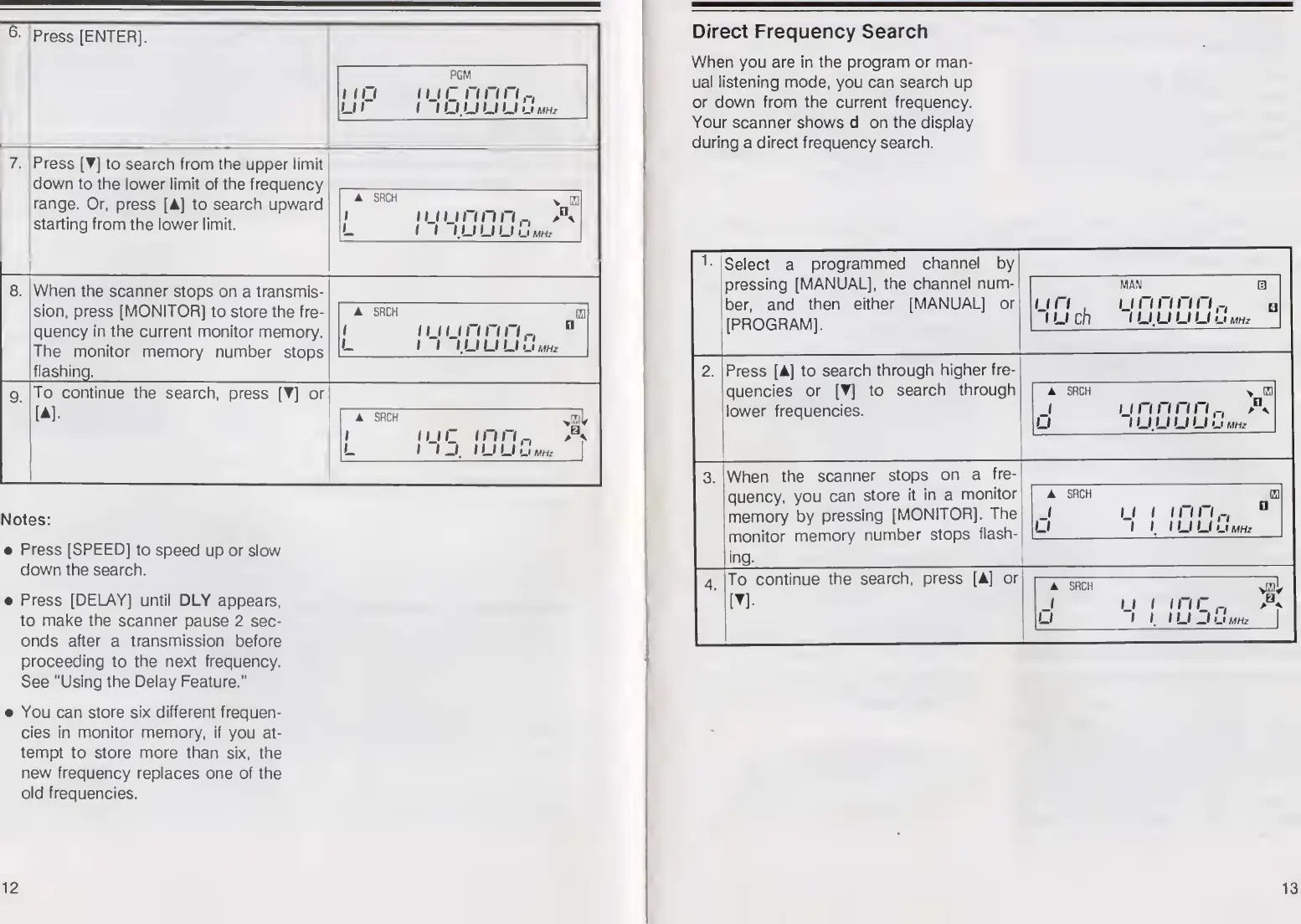
Realistic PRO-2024 - Direct Frequency Search

Realistic PRO-2024
14 pages
Print Icon
To Next Page IconTo Next Page
To Previous Page IconTo Previous Page
Loading...
6
-
'Press
[ENTER],
PGM
1
111
ii
ir
n
nn
U1
1
IUUUUJmhz
7.
Press
[T]
to
search
from
the
upper
limit
down
to
the
lower
limit
of
the
frequency
range.
Or,
press
[A]
to
search
upward
starting
from
the
lower
limit.
A
SRCH
v
m
i
ij
ij
n
n
n
A
I
I
I.UUU
UMHz
When
the
scanner
stops
on
a
transmis¬
sion,
press
[MONITOR]
to
store
the
fre¬
quency
in
the
current
monitor
memory.
The
monitor
memory
number
stops
flashing.
SRCH
i
ij
u
n
n
n
ri
(
I
I
U
U
U
U
MHz
To
continue
the
search,
press
[
]
or
A
SRCH
ii
ir
i
i
j
mn
n
A
I
U
U
U
MHz
Notes:
Press
[SPEED]
to
speed
up
or
slow
down
the
search.
Press
[DELAY]
until
DLY
appears,
to
make
the
scanner
pause
2
sec¬
onds
after
a
transmission
before
proceeding
to
the
next
frequency.
See
"Using
the
Delay
Feature."
You
can
store
six
different
frequen¬
cies
in
monitor
memory,
if
you
at¬
tempt
to
store
more
than
six,
the
new
frequency
replaces
one
of
the
old
frequencies.
12
Direct
Frequency
Search
When
you
are
in
the
program
or
man¬
ual
listening
mode,
you
can
search
up
or
down
from
the
current
frequency.
Your
scanner
shows
d
on
the
display
during
a
direct
frequency
search.
Select
a
programmed
channel
by
pressing
[MANUAL],
the
channel
num¬
ber,
and
then
either
[MANUAL]
or
[PROGRAM],
MAN
a
i
in
.
i
u
ch
1
1
n
n
n
n
a
lUUULIu*
2.
Press
[A]
to
search
through
higher
fre¬
quencies
or
1
search
through
lower
frequencies.
SRCH
1
1
1
n
n
n
n._.
IJ
lUUUUU
MHz
3.
When
the
scanner
stops
on
a
fre¬
quency,
you
can
store
it
in
a
monitor
memory
by
pressing
[MONITOR].
The
monitor
memory
number
stops
flash¬
ing.
4
To
continue
the
search,
press
[A]
or
A
I
o
SRCH
I
I
I
I
n
c
n
I
U
—f
U
MHz
"va
1
*
A
13

Related product manuals