Communication between V8BT and a PC
To transfer the contents of the memory you must connect the reader to a PC via the USB cable. You must
then select the “Memory” menu and follow the instructions given on the display (see Block Diagram:
“Memory3”).
If the reader is connected to a PC it will transfer the number of the tag read on each reading. It is not
necessary for the “Memory” function to be activated to carry out this transfer.
Caution: for the reader to communicate with a PC, you must first install the driver and have
software such as Hyperterminal (Windows XP,Window 7), Realtrace Terminal, etc. which enables
the data to be displayed on the computer screen and processed if necessary.
Use of the Windows « Hyperterminal »windows XP or similar on Windows 7, 8, 10
The current version of the V8BT, transmits the read identifiers to the PC it is connected to, either via the
USB cable or its wireless link (Bluetooth). The reader does not wait for any order or acknowledgement
from the PC.
Hardware configuration
The serial port for reading the data is configured as follows:
- 9600 bauds, 8 bits, 1 start bit, 1 stop bit, non-parity, and no flow control.
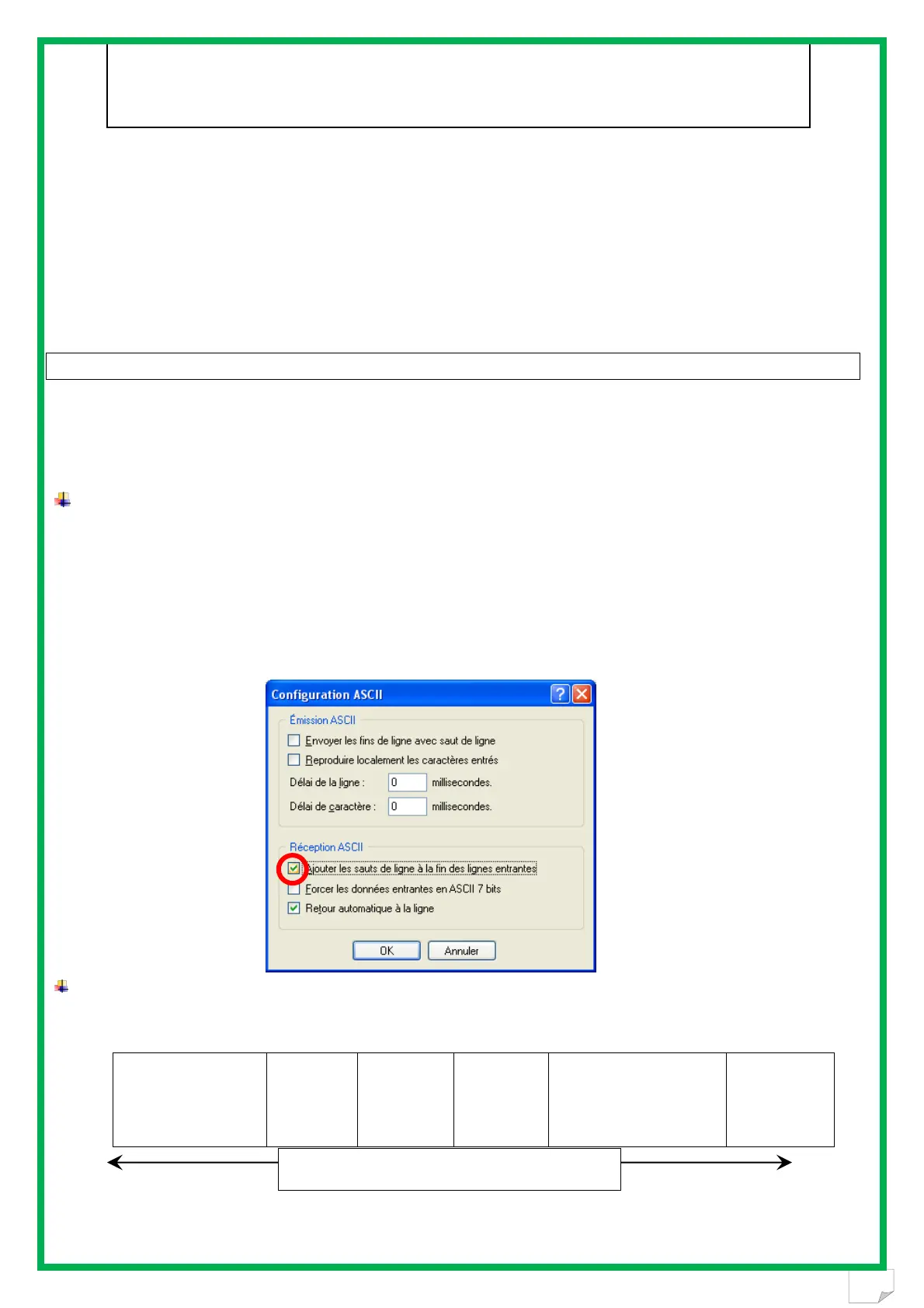
You must authorize line feeds to visualize the frames using the hyperterminal: click on « properties » in
the « file » menu. Go to the « parameters » and then click on « ASCII Configuration… » :
The circled box above must be ticked…
Description of the frame transmitted each time a transponder is read
The PetScan transmits the following frame to the PC after each valid reading :
Octet at the start of
the
frame : ″U″ ″/x55″
Type of 8
character
(or octet)
chip
The 16
character
(or octet)
chip
identifier
Separation
of
octet: ″*″:
CRC-CCITT-control
word, 16 ASCII format
bits on 4 characters
Carriage
Return
octet: ″/x0D″
Tips: the developers of software associated with PetScan must use the head and separation characters to separate the
information transmitted by PetScan, calculate a control word with the data received and compare it to the word transmitted by
the PetScan to validate the information (see appendix for the CRC-CCITT-16 bit calculation algorithm)
Data used to calculate the CRC


 To Next Page