To be able to transmit the tag numbers read or the numbers recorded in the memory (maximum 200), via
Bluetooth or using the USB cable, the user needs to have installed the appropriate driver* on his PC. This
driver can be downloaded free of charge from :
http://www.swissplusid.com/downloads/RTDriver.zip
Once the driver is installed on your PC you will need to have application software to view and
potentially record the data sent by the reader.
You can use Hyperterminal if your operating system is XP or Realtrace Terminal with XP or Windows
7/8/10.
With a mobil phone you can use the V8BT after installing “PetScan” from PlayStore or AppStore.
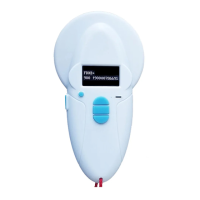
Bluetooth V8BT reader
All readers are delivered with integrated Bluetooth technology. The Bluetooth function consumes energy. It
is therefore recommended to activate this function only for the time necessary for its use.
To stop Bluetooth communication, simply select the “Bluetooth” menu and disable the function.
Communication via Bluetooth is limited to around 10/15 meters and depends on the environment of your
PC. To enable Bluetooth on your PC, please consult your computer user manual. Don’t forget to disable the
security of Bluetooth on your PC because the V8BT don’t ask a security code. If your PC need a code, enter
1234.
Data transmission by Bluetooth or via the USB cable
* A driver is a program enabling an operating system, in this case Windows XP or Windows 7/8/10 on a
PC, to recognise a hardware peripheral and use it.


 To Next Page