24
Surface Planing
Caution: Minimise positioning hands above the cutter block.
It is not necessary to exert feeding pressure directly over the
cutter block.
When surface planing, always feed the workpiece at a slow and
consistent rate. Feeding the workpiece too quickly will reduce
the quality of finish of the planed surface. Fine ridges or marks
across the width of the workpiece are an indication that the
feed rate is too fast.
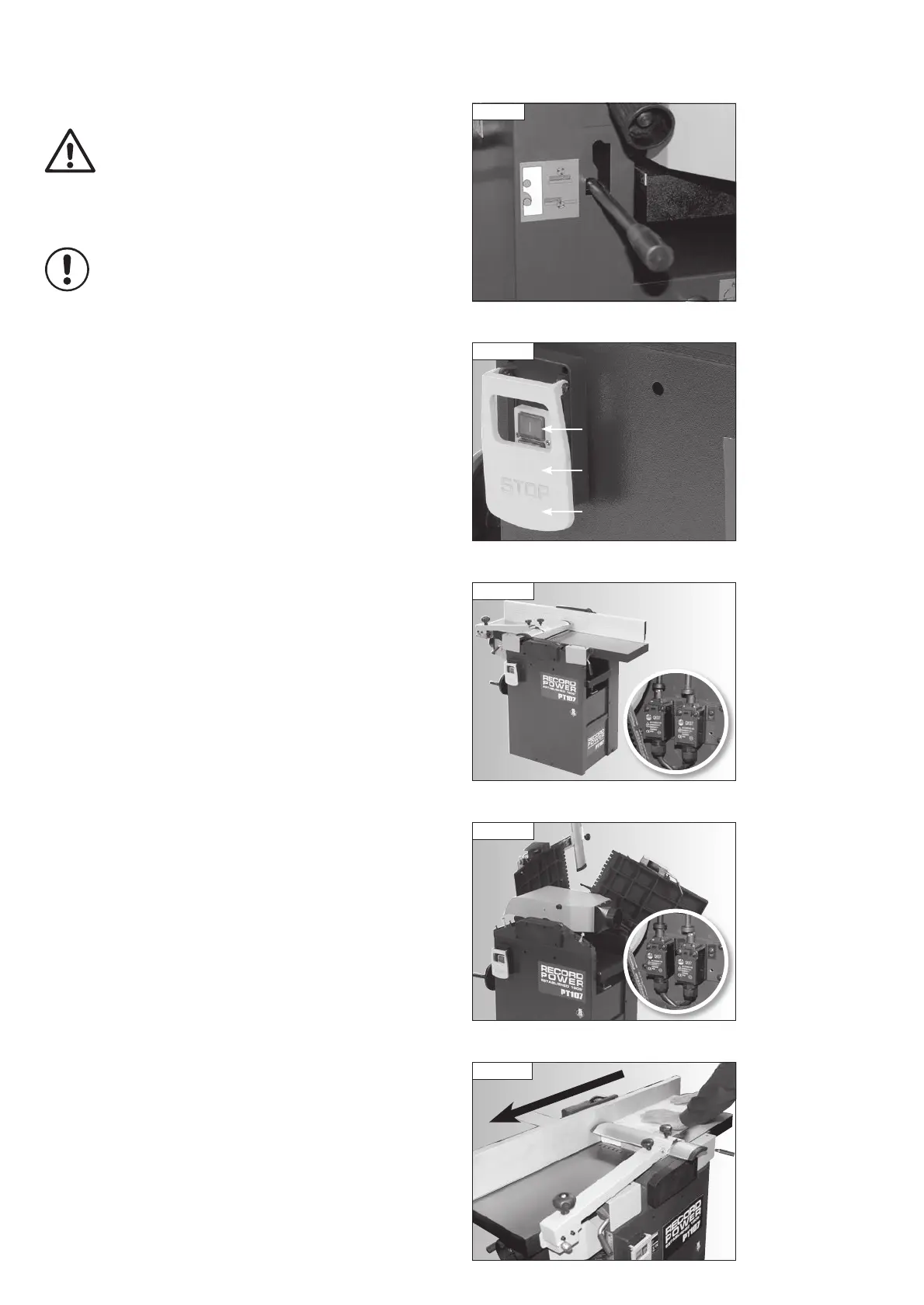
Before switching the machine on, ensure the feed clutch is in the lower
position as shown in Fig. 11.9.
Power Switch
To switch the planer on use the green button, Fig. 11.10.
To switch the planer off use the large red button beneath the emergency
stop flap.
In an emergency the machine can be stopped quickly using the yellow
emergency stop flap.
Safety Limit Switches
The machine is equipped with 2 safety limit switches.
The cutter block can only run when either the planer tables are closed, Fig
11.11, or the extractor hood is positioned over the cutterblock when the
tables are raised for thicknessing operations, Fig 11.12.
Correct hand placement when surface planing is important for good results
and safe operation. Stand at the front of the machine, at approximately 45º
to the table. Hold the timber down on the infeed table with the left hand
and apply feed pressure with the right hand, Fig. 11.13. As soon as there is
enough timber on the outfeed table to accommodate the left hand, it should
be moved over the bridge guard and onto the timber. Feed pressure should
then be applied with the left hand onto the timber on the outfeed table, with
the right hand following to complete the feeding operation, Fig. 11.14.
11. Operation
Fig 11.13
Fig 11.9
Fig 11.10
Green on button
Yellow emergency
stop flap
Red off button
(beneath flap)
Fig 11.11
Fig 11.12
PT107 Manual 3.2.indd 24PT107 Manual 3.2.indd 24 25/04/2022 14:43:0725/04/2022 14:43:07


 To Next Page