27
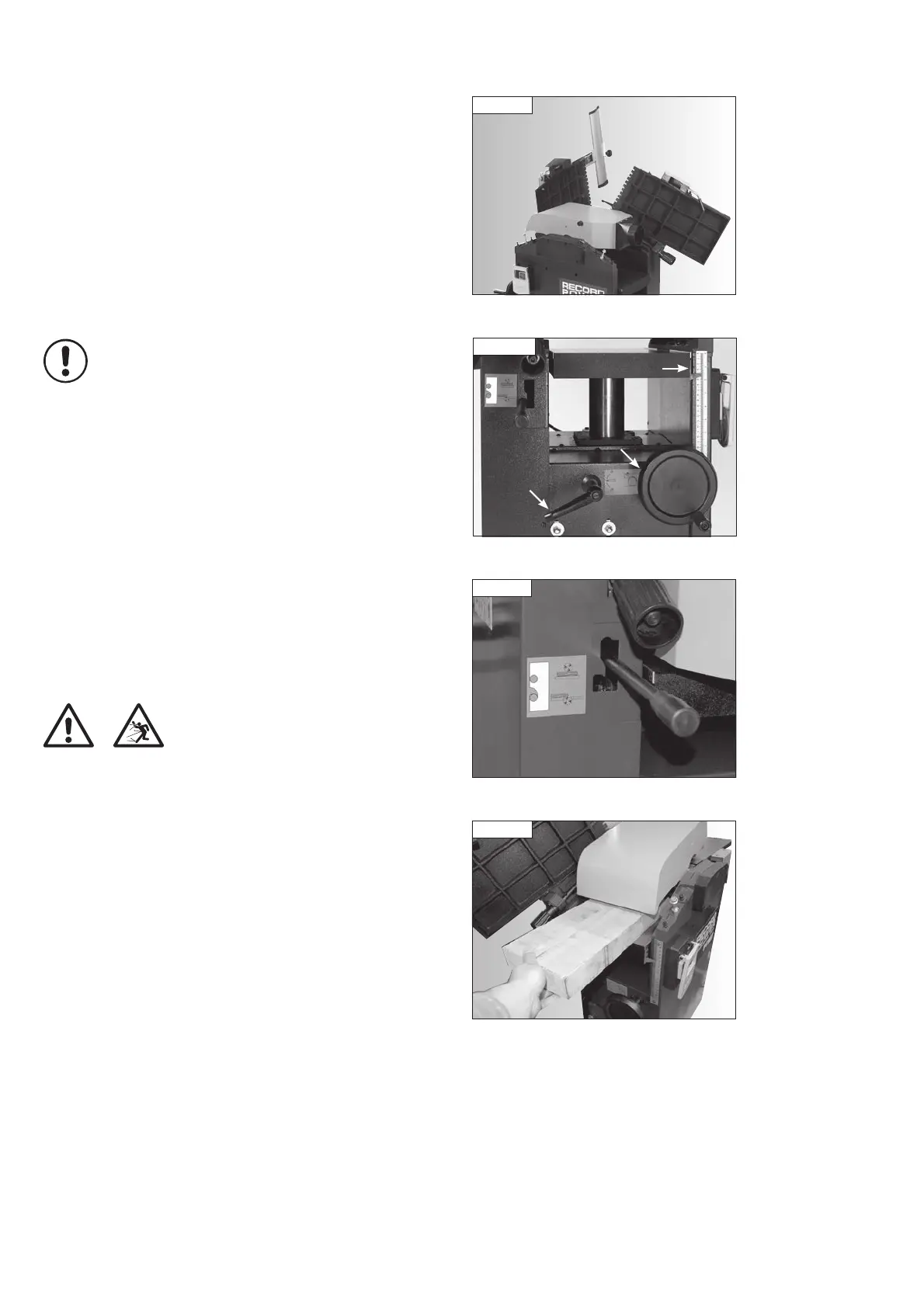
Fig 11.23
Fig 11.24
Lock
lever
Depth scale and
pointer
hand wheel
Thicknessing
Adjust the thicknessing table height to that of the workpiece height, minus
the depth of cut required.
Ensure the feed clutch is in the upper position as shown in Fig 11.25.
Turn the machine on and carefully slide the work-piece onto the thicknesser
table until it is drawn in by the feed rollers, Fig. 11.26. Keep hands as far
away from the cutter block as possible.
Warning: If the workpiece becomes trapped when feeding
into the thicknesser, immediately switch the machine off and
disconnect from the power before attempting to free the
workpiece. To release the workpiece, lower the
thicknessing table.
Restarting
In the Event of a Blockage or if the Machine Stalls
If the machine stalls due to the work piece becoming trapped in the cutter
block, switch it off immediately by pressing the emergency stop button (Red
button marked ‘O’) and wait for the machine to come to a complete stop
before proceeding further.
If the work piece is trapped between the cutter block and thicknessing table,
it may be necessary to lower the thicknessing table in order to free
the blockage.
To re-start the machine, press the green button marked ‘I’ on the switch.
In the Event of a Power Failure
The machine is fitted with a no volt release (NVR) switch to protect the user
against automatic starting of the machine when power is restored after a
power failure.
In the event of a power failure, first locate and rectify the source of the
failure. If the fault is within the power circuit of the workshop, there may be
an underlying cause (circuit overload etc.) that should be investigated by
a qualified electrician, before attempting to restore the power source. If a
cutting operation was taking place when the power supply was interrupted,
then it may be necessary to free the work piece from the cutter before
attempting to re-start the machine.
Once the power is restored, the machine can be re-started by pressing the
'on' switch.
11. Operation
Fig 11.26
Fig 11.25
Be sure the outfeed table is fully raised and tilted, Fig. 11.23.
Now raise the infeed table in the same manner.
Finally, raise the extraction hood to cover the cutter block, Fig 11.23.
To return the machine to planing mode follow the above instructions in
reverse order.
Adjusting the Height for Thicknessing
Unscrew the lock lever that clamps the thicknessing table, Fig 11.24.
Now adjust the thicknessing table to the required height using the hand
wheel, Fig 11.24. The depth scale and pointer to the right of the hand wheel
indicate the table height.
Retighten the lock lever to clamp the table in place.
Attention: The depth of cut should be minimised under the following
circumstances:
• The timber is very wide.
• The timber is hard wood.
• The timber is damp.
• The planer blades are in need of sharpening.
PT107 Manual 3.2.indd 27PT107 Manual 3.2.indd 27 25/04/2022 14:43:3225/04/2022 14:43:32


 To Next Page