COPYRIGHT © 2013 RED.COM, INC
RED DSMC OPERATION GUIDE
955-0020_V5.1, REV-D | 43
RED LCD, TOUCHSCREEN LCD, BOMB EVF, EXTERNAL MONITORS
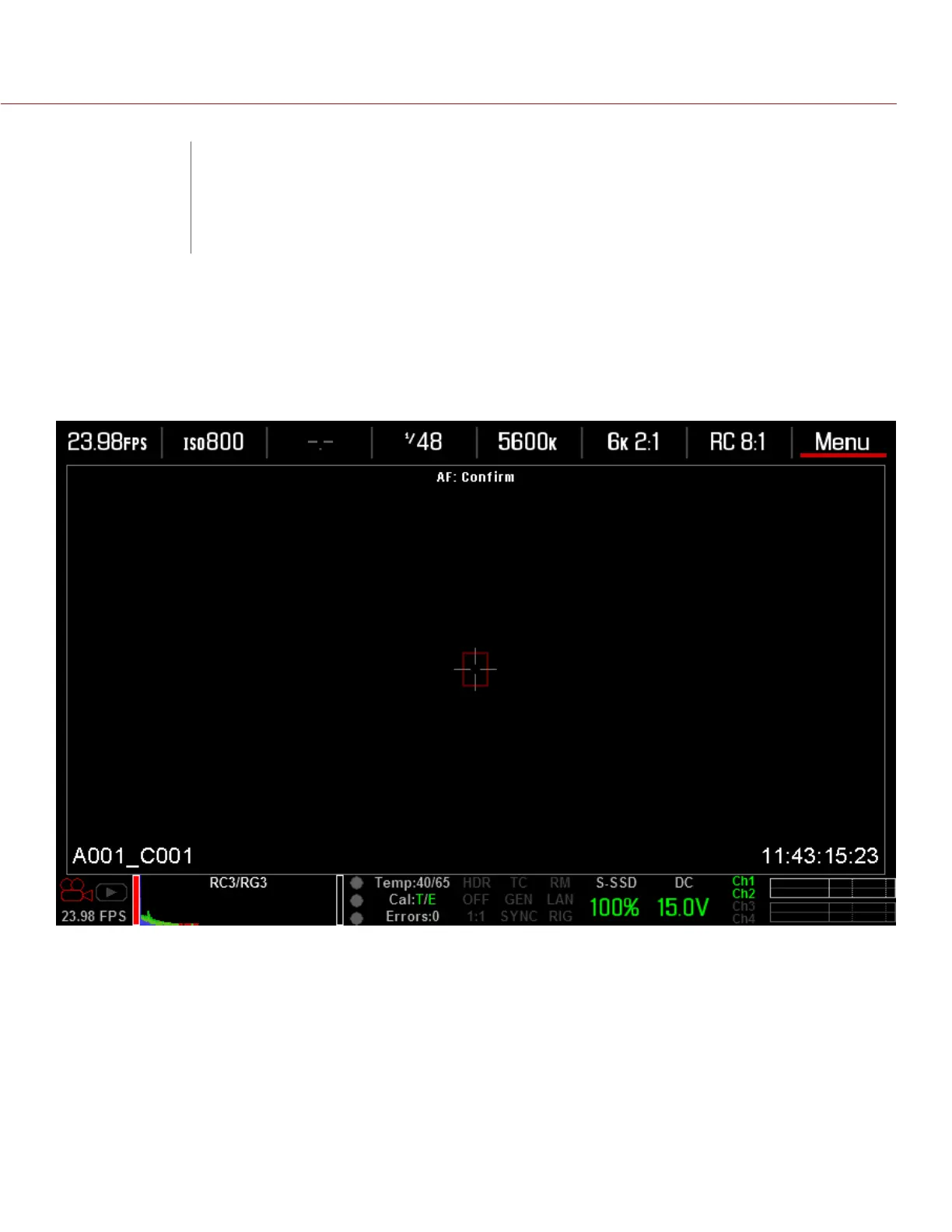
The following is a general description of the structure of the camera’s graphical user interface that overlays the
video monitor signal on the Viewfinder outputs of the camera.
The display elements include:
Audio Meter: Audio input selection and levels
Cal: T/E: Indicator of relative change in sensor temperature and exposure since your last calibration
Clip Level Bar: Relative number of RAW pixels near clip
Clip Meter: RGB sensor RAW clipping status
Cursors: Reference cursors – Safe Action/Safe Title, Picture Center, Grid Overlay
Drop: Indicates if any frames were dropped during recording of the clip
F Stop: Functional when optional mount and lens are installed
False Color Mode: Displays false color overlay mode
Frame Guide: Record or Projection area
04
GRAPHICAL USER
INTERFACE


 To Next Page