RED DSMC OPERATION GUIDE
COPYRIGHT © 2013 RED.COM, INC
955-0020_V5.1, REV-D | 93
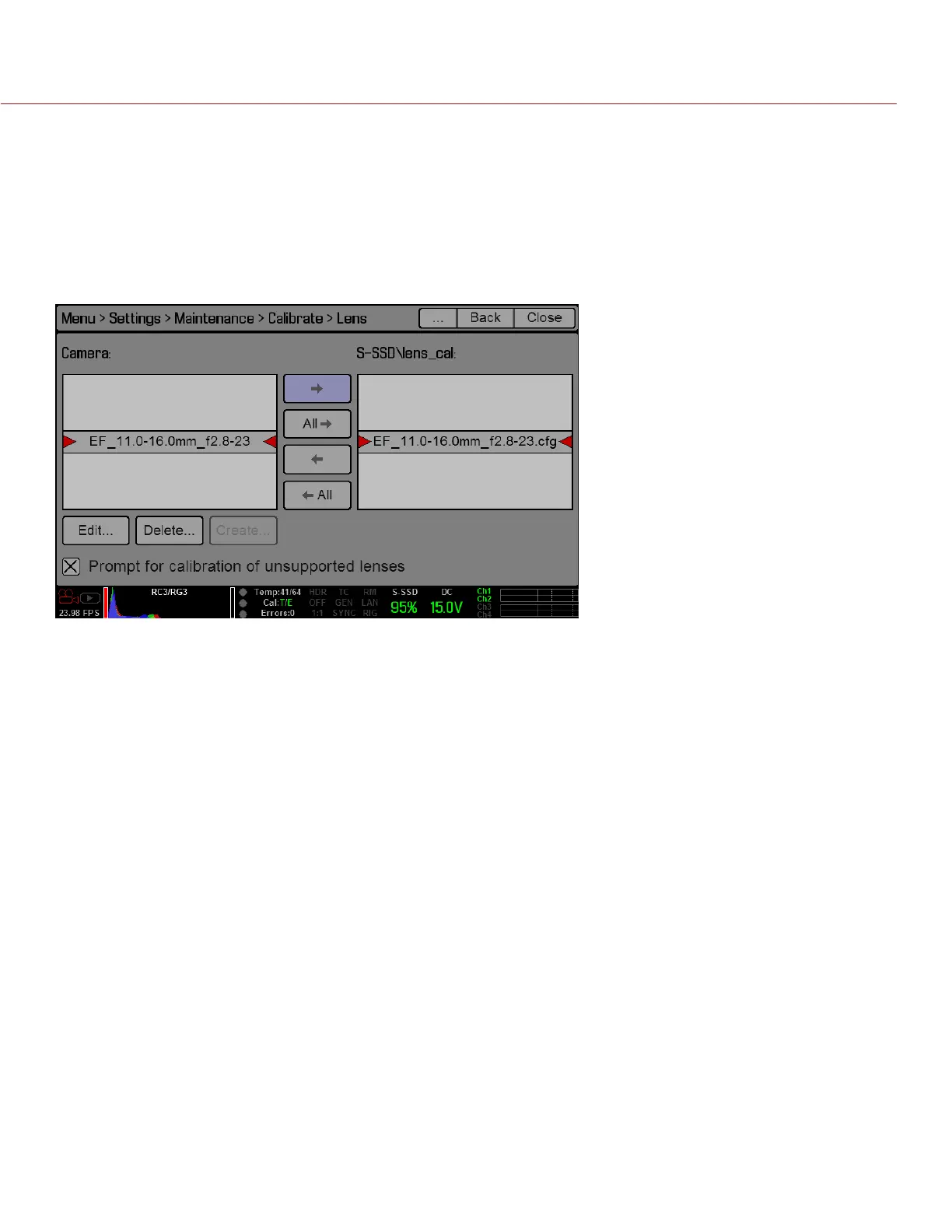
LENS CALIBRATION ACTIONS
Edit...: View and edit the selected calibration file.
Delete...: Delete the selected calibration file.
Create...: Create a new calibration file. This option is disabled if you already have a calibration file for the
attached lens.
Prompt for calibration of unsupported lenses: Select this check box to ensure that the “Unsupported Lens
Found” dialog box displays every time the camera detects an unsupported electronic lens at boot-up. De-
select this check box to disable the “Unsupported Lens Found” dialog box.
SELF TEST
When selected, allows you to perform a self-test for the sensor and LCD Touchscreen.
ENABLE/DISABLE SENSOR TEST PATTERN
When selected, enables/disables the sensor test pattern (White Screen). To turn on, select Enable Sensor Test
Pattern.
To turn off, select Disable Sensor Test Pattern.
ENABLE/DISABLE SENSOR TEST PATTERN
This feature is currently only used during the manufacturing process.
TOUCHSCREEN
When selected allows you to perform a touchscreen self-test.
When the touchscreen self-test is on, you can verify all areas of the touchscreen respond to touch. Simply


 To Next Page