EasyManua.ls Logo

Red Technology MAGIC-2 - Page 22

Red Technology MAGIC-2
37 pages
Print Icon
To Next Page IconTo Next Page
To Previous Page IconTo Previous Page
Loading...
21
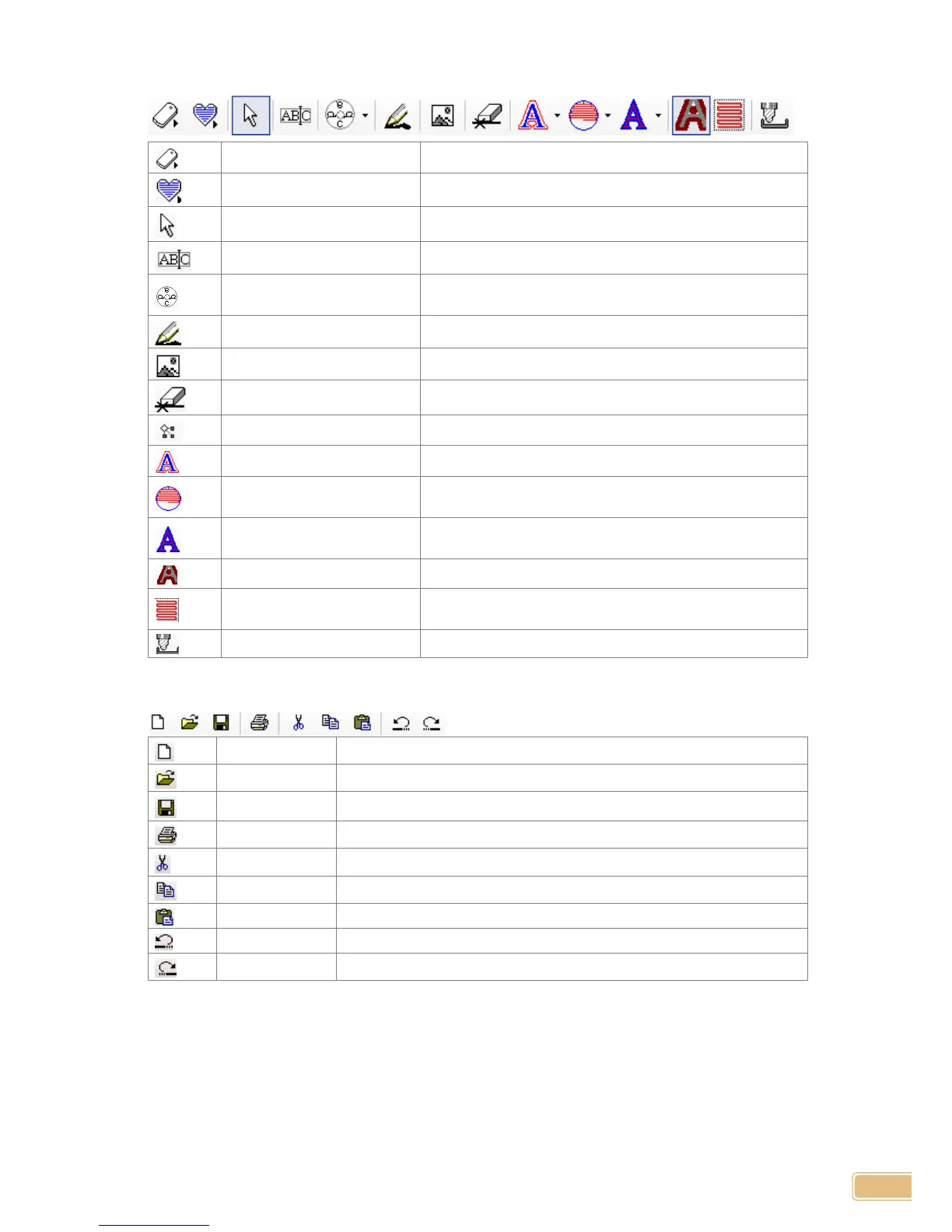
Object Tool
Open template
Open design sample
Selection
Select object
Input/edit character
Input or edit character
Circular deposition
character
Input round character
Brush line
Free drawing
Image
Insert picture
Erase line
Erase line from selected object
Node edit
Edit circle, rectangle, polygon, etc.
Cutting tool path generation
Generate tool path by object’s frame
Hatching tool path
generation
Generate tool path by object’s side
Single line tool path
generation
Generate tool path to the center line of object
Tool path process simulation
Shown as tool path process simulation
See only tool path
Show only tool path with working area window content
disappeared
Engraving
Engrave selected object
Basic Tool
New Document
Open new work
Open
Open saved file
Save
Save page
Print
Print selected object and page
Cut
Cut selected object
Copy
Copy selected object
Paste
Paste copied file
Cancel
Cancel recent work
Redo
Redo canceled work