• DC IN: (prior to s/n 22057 9 to 12V @250mA), from s/n 22057, 24V negative center and at least
with a current output of 300mA.
INPUT SECTION and CALIBRATION ( !!! VERY IMPORTANT – READ THIS AT LEAST COUPLE TIMES!!! )
The very first thing we recommend to do when you start using Amp Central is to set the proper input
level in order to achieve the best signal to noise ratio possibile without any clipping.
To make this happen, we highly suggest to use the most dynamic sound at your disposal, which
usually happens to be your clean channel, or at least the most clean sound you have at your disposal.
The very first big suggestion is to keep your amp’s volume
COMPARABLE
as you were using a real
cabinet. Do not try to push both preamp and master volume higher, just because you don’t hear any
sound or just too little volume from yours monitors. That’s a step we will cover later.
If you don’t remember how much loud you’re in the real world (with real cabinets), please, wire a cab
very quick and make a test. Then don’t move preamp/master volumes.
Once you reached your desired clean-ish sound, you can follow these few steps:
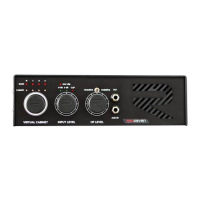
• Connect your amp’s output to Amp Central and hit standby switch;
• Start with INPUT LEVEL of Amp Central at 0;
• Increase Amp Central’s INPUT LEVEL, while heavily strumming your guitar on your clean
channel, until LED METER starts to blink. There’s three LEDs, indicating 0dB, +6dB and CLIP. The
goal is to have your maximum dynamic level by having +6dB led blinking. You don’t want to
hear more volume incoming at this point, since you will likely experience some very
unpleasant clipping.
What to do with crunch or distorted sounds? By nature, a distorted sound is WAY more compressed,
so audio peaks are already smaller than a much cleaner sound, at the same SPL.
If you follow this procedure step by step using the cleanest sound at your disposal, without
experiencing any clipping, you will have absolutely no problem with your dirty sounds. You still hear
clipping when you hit strings very hard? Turn INPUT volume on A.C. a little back again.
What to do if I have all my sounds set without any clipping but I don’t have enough volume out
of my speakers?
Amp Central is a substitute for your
guitar cabinet and microphone
. You still need a microphone
preamplifier, or that knob with “GAIN” written on your audio interface. Raise it up. You also still have
your “MONITOR VOLUME”, always on your audio interface or “VOLUME” knob on your amplifier/active
speakers. Raise it up. Those are all the places where you need to look for more output volumes if you
feel you need more. Even from your DAW’s channel/master volumes.
Do not look for output volume on A.C., while you have only control on input volume.


 To Next Page