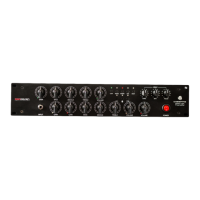
REACTIVE LOAD SECTION
Amp Central is supported by a
100W RMS / 8 ohm
reactive/resistive load.
This means you can plug amps rated up to 100W RMS of total output. We choose the best
inductors/capacitors/resistors in the market (audiophile quality), to ensure unsurpassed audio quality.
You need to connect your amp’s output into “
FROM AMP OUTPUT
” jack in order to use the Load
section of Amp Central.
“TO SPEAKER”
is where you want to connect your cabinet, in case you wanted to use one, but of course
it’s not mandatory. When a cabinet is used, internal Reactive Load will be fully bypassed, and the
amplifier will only see the cabinet as its load. Be sure to use a power cable and not an instrumental
cable to connect a speaker cabinet with amp central.
WHAT IMPEDANCE DO I NEED TO SET MY AMPLIFIER IF I USE A CABINET ALONG WITH A.C.?
In case you wanted to use a cabinet WITH Amp Central, A.C.’s internal load will be automatically
bypassed and you need to match cabinet load to amp load. Amp Central impedance, in this case, is
out of the picture.
LINE OUTPUT
Line output is reduced in amplitude signal from amp’s speaker output.
Line out level on back panel allow you to set line out volume, and it’s total independent from INPUT
knob. Line out is also fully isolated thru an isolation transformer, in order to avoid ground loops of any
kind, by using main outs (filtered by I.R.) and line out at same time.
IMPULSE RESPONSE SECTION
Amp Central will only read “.WAV”, MONO, 24bit, 48kHz type I.R.'s.
Please, before writing or ask, be sure to check your IR 100% respect these requests.
Any other attempt to load I.R.'s with different fratures than this, will simply not be recognized and
sound will not processed. You can place only one I.R. in each of the sixteen available files when you
connect the Amp Central to your PC/MAC, and you have to delete previous one. Please read USB
chapter on the next pages for more information on this process.
Amp Central will cut the length of any I.R. to the total length of 20ms, which is the maximum ability of
the internal DSP's calculations.
If you do some basic math, those 20ms will guarantee you a full frequency spectrum response,
including the super low frequencies, even at 40-50hz.
There’s extreme cases where extra long I.R. (i.e. 4-500ms) are not recognized, even if 48/24 and MONO.
Try to cut them around 100ms, A.C. will do the rest of the job for you.


 To Next Page