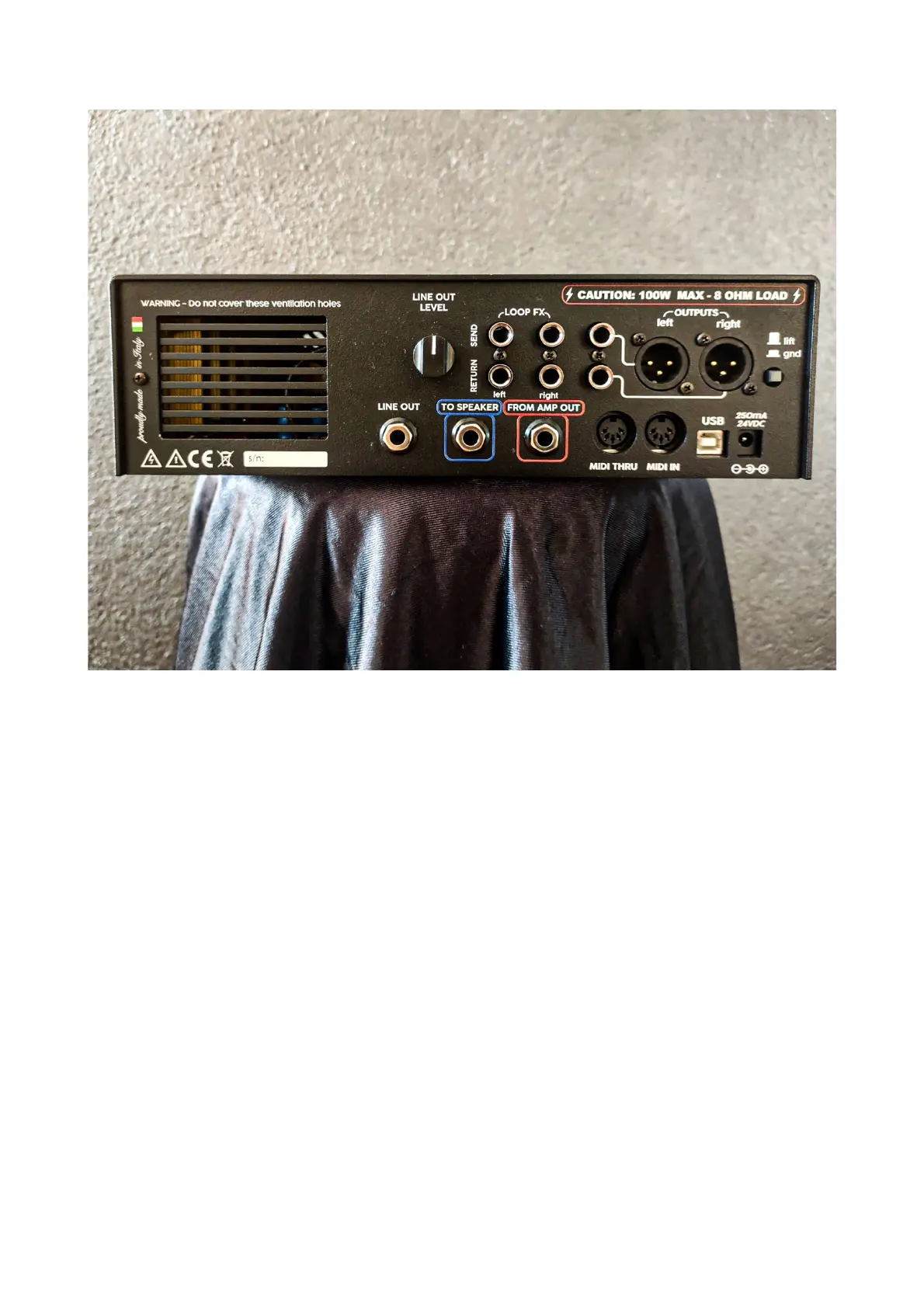
BACK PANEL
(from left to right)
• LOOP FX: Stereo fx loop placed between the I.R. and the final outputs. Connect your favorite
outboard effevts like delays, reverbs, etc. here.
• TO SPEAKER: this is the "through" jack for if you want to use a real cabinet. When the TO
SPEAKER output is used, the internal load is bypassed, the amplifier will see only the real
connected cabinet as the load. Be sure to match the impedance of the amplifier with your
cabinet
• LINE OUT: the line level signal coming from the reactive load, without the I.R. processing
applied.
• LINE OUT LEVEL: the volume control of the line out.
• FROM AMP OUT: this is where you must connect the output of your amplifier.
• MIDI INPUT/THRU: Midi input and thru ports for midi connection. Switch between the I.R. by
sending Midi CC's to the Amp Central.
• MAIN OUTPUT (XLR and jacks output): main output from Amp Central. Both set of outputs are
fully balanced and the only difference between the two are format.
A balanced signal is a stronger and less prone to noise signal, but if you want to use a standard
mono instrument cable, you just need to plug into jack outs, A.C. will work in unbalanced
mode too.
• USB: connect to your PC/MAC for uploading your own favorite I.R.'s.


 To Next Page