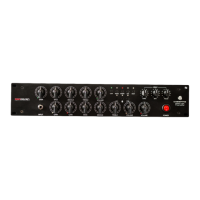
Need help?
Do you have a question about the RedSeven Amplification AMP CENTRAL and is the answer not in the manual?
Introduction of a 24V power supply for improved headroom and headphone amplification.
Control over high frequencies on main outputs, offering flat or a gentle low-pass filter.
Update to fully balanced 6.3mm output jacks, improving signal integrity.
Defines Amp Central as a hub for connecting tube amplifiers for silent stages or studio use.
Explains the use of Dummy Load (Reactive Load) and Impulse Response technology for amp simulation.
Allows selection of one of sixteen preloaded Impulse Responses (IRs).
Sets the amplifier's output attenuation to achieve optimal signal without clipping.
Master volume control for the headphone output.
Choice between a pure resistive or a completely reactive load.
Applies a gentle slope around 10KHz to the IR output, affecting high frequencies.
Connects external line-level audio sources for monitoring with headphones.
Stereo effects loop placed after the IR loader for external time-based effects.
Jack for connecting a real cabinet, bypassing the internal load.
Provides isolated line-level signal from the reactive load, with adjustable volume.
Primary input jack for connecting the amplifier's output.
For remote IR selection using MIDI CC messages.
Balanced main outputs, offering flexibility for connection formats.
For uploading custom Impulse Responses (IRs) to the device.
Guidance on setting input level for optimal signal-to-noise ratio without clipping.
Advice on managing compressed sounds to avoid clipping.
Troubleshooting steps for low output volume, directing users to other gain controls.
Details the 100W RMS / 8 ohm reactive/resistive load and connection requirements.
Explains the isolated line output for avoiding ground loops.
Defines supported IR file types (.WAV, MONO, 24bit, 48kHz) and length limits.
Information on using preloaded and custom IRs, including USB upload.
Details on headphone monitoring and connecting external audio sources.
Describes the stereo FX loop placement and benefits for time-based effects.
Step-by-step guide for connecting Amp Central to a computer via USB for IR management.
Explains the folder structure for IRs and firmware update changes.
Instructions on replacing existing IRs by copying/pasting files.
Specifies that only 48Khz, 24bit, MONO .WAV files are read.
Advice on handling very long IR files (4-500ms) for compatibility.
Details on balanced XLR and 6.3mm jack outputs and their evolution.
Procedure to change the MIDI channel for remote IR selection.
Table showing MIDI channel assignments for selecting IR banks and cabinets.
List of Control Change numbers corresponding to IR banks and cabinets.
Checks for power supply voltage, polarity, and cord connection issues.
Steps to resolve no sound issues, checking amp standby, volume, and connections.
Information on warranty terms, voiding conditions, and contact details.
 General
| Brand | RedSeven Amplification |
|---|---|
| Model | AMP CENTRAL |
| Category | Amplifier |
| Language | English |

 To Next Page