OUTPUTS
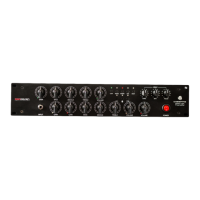
On the back of Amp Central there are two sets of outputs: XLR and 6.3mm jacks.
-
Until s/n 22056
6.3mm jacks were unbalanced, while XLR were fully balanced;
-
From unit 22057
and on, both set of outputs are fully balanced, with the only difference in form
factor, out of ease of connection. You can still connect an unbalanced instrument jack to one
or both jack outputs and run the unit with an unbalanced signal.
There’s no global output volume since the INPUT knob will act as the one and only volume for the
entire system.
Both jack and XLR outputs are separated from the line out thru an isolation transformer. You can for
example use XLR for live monitoring and record line out (to have any IR applied in a second time),
everything thru your audio interface at same time, without any ground loop or wired noise.
MIDI
Amp Central has a MIDI IN and MIDI THRU port, to remotely select any of 16 available I.R..
The first operation, is to select desired midi channel on Amp Central.
A.C. is shipped with default midi channel #1 as the default.
To change it you need to:
• press “Virtual Cabinet” knob for three seconds until BANK/CABINET leds blinks and immediately
release it;
• select your desired midi channel, by following next page’s instructions and by moving “Virtual
Cabinet” knob to left or right;
• press “Virtual Cabinet” knob again to store desired midi channel.


 To Next Page