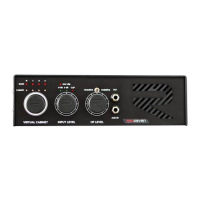
VIRTUAL CABINETS (I.R.)
You have sixteen different Impulse Responses at your disposal to choose from. Impulse Response
section comes pre-loaded with original RedSeven Pro Cab series 4x12 I.R.'s, but of course you can
upload your personal favorites, by connecting Amp Central to your PC/MAC through the back panel’s
USB port. Please read the USB chapter on next page for more information on how to do.
HEADPHONES AND AUX INPUT
To maximize the experience with Amp Central, we decide to add a comprehensive input/output
section for monitoring. AUX IN is intended for your backing track/click track or whatever line level
source you want to hear through headphones output, along with the sound of your amplifier.
Volume control for your source, it on the source itself.
This is a great feature to improve your skills at late night for example, without connecting Amp Central
and your amplifier to any audio interface. Just put your phone output into Amp Central, and open
YouTube to play along with your favorite tunes!
Everything coming out from H.P. output will be affect by H.P. LEVEL pot. This is a “master volume” for
your headphones.
NOTE: since s/n 22057 (mid May 2022 – 24v powered units) we added an audiophile grade headphone
amplifier, to be able to drive virtually any HP on the planet. Before serial 22057 (on units powered at
9-12v) you may need an external HP amplifier in order to properly drive low impedance headphone.
NOTE: You could use the headphone output at gigs to send a copy of your guitar sound to your
personal IEM mix, in order to have total control of your personal volume. Most of personal IEM system
let you to have two inputs: your instrument (that should be carried by Amp Central) and the band,
usually carried by FOH or stage mix personnel.
LOOP FX
An effects loop is usually placed between your amp’s preamp and power amp, and it’s the place where
you usually want to insert your time-based effects. Older amps (like vintage Fender or Marshall for
example) don’t have one. We also took care of this.
We decided to place a stereo FX loop inside AMP CENTRAL to let you insert your favorite external
effects in the audio chain. FX loop is placed between IR LOADER section and A.C.’s main outputs, this
means you’re sending the already I.R. processed signal to your external effects.
To the most experts out there but also according to us, this is the best place to insert your effects,
especially time based one. Why?
If you think at a traditional setup, with a standard loop fx between pre and power amp, and a standard
guitar cabinet, your time based effect placed into amp’s loop fx are heavly band passed and equalized
by guitar speakers themselves, who are notorious to be way far from flat, in terms of frequencies
spectrum.
By placing those time based effects AFTER speakers (in this case after I.R.), they will processed a full
48Khz audio signal, which is way superior from a normal guitar speaker frequencies response.


 To Next Page
 Loading...