reedinstruments
w ww
c om
7
Pantone 534 Blue
Pantone 123 Yellow
Pantone 485 Red
Pantone 123 Yellow
Pantone 534 Blue
Black
Rich Black -
20/20/20/100
Blue - 100/80/30/5
Yellow - 0/27/100/0
Red - 10/100/100/5
Yellow - 0/27/100/0
Blue - 100/80/30/5
Only if you REALLY need them:
Pantone 534 Blue - 100/80/30/5
Pantone 485 Red - 10/100/100/5
Pantone 123 Yellow - 0/27/100/
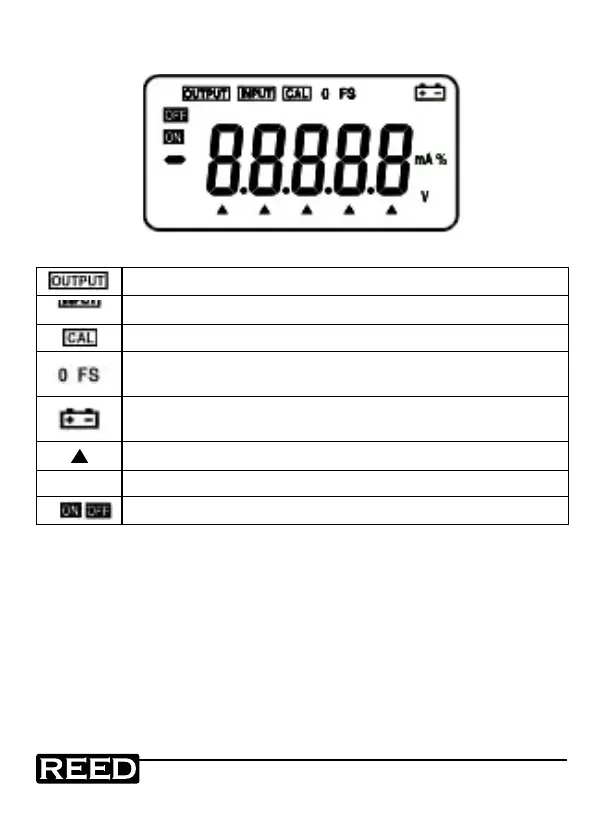
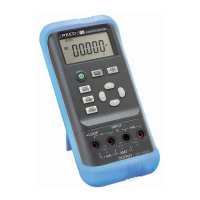
Display Description
Indicates that the instrument is in an output state
Indicates that the instrument is in a input state
Indicates that the instrument is in a calibration state
Indicates that the instrument is in a calibration state, denoting
that the zero point or the full scale point is now in calibration
Indicates that the battery power is low and needs to be
replaced
Indicates that the output digits need to be set
V. mA. % Indicates the current output value (unit of measure)
Indicates that the output signal is on or off
Operating Instructions
Power ON/OFF
Press the Power button to turn the instrument on. Press this button again,
holding for one second to turn the instrument off. When the instrument is
on, it will begin an internal self-diagnosis at which time the full screen will
be displayed. Once complete, the instrument is ready to be used.
1.800.868.7495info@REED-Direct.ca
REED-Direct.ca


 To Next Page