reedinstruments
w ww
c om
9
Pantone 534 Blue
Pantone 123 Yellow
Pantone 485 Red
Pantone 123 Yellow
Pantone 534 Blue
Black
Rich Black -
20/20/20/100
Blue - 100/80/30/5
Yellow - 0/27/100/0
Red - 10/100/100/5
Yellow - 0/27/100/0
Blue - 100/80/30/5
Only if you REALLY need them:
Pantone 534 Blue - 100/80/30/5
Pantone 485 Red - 10/100/100/5
Pantone 123 Yellow - 0/27/100/
Current Output
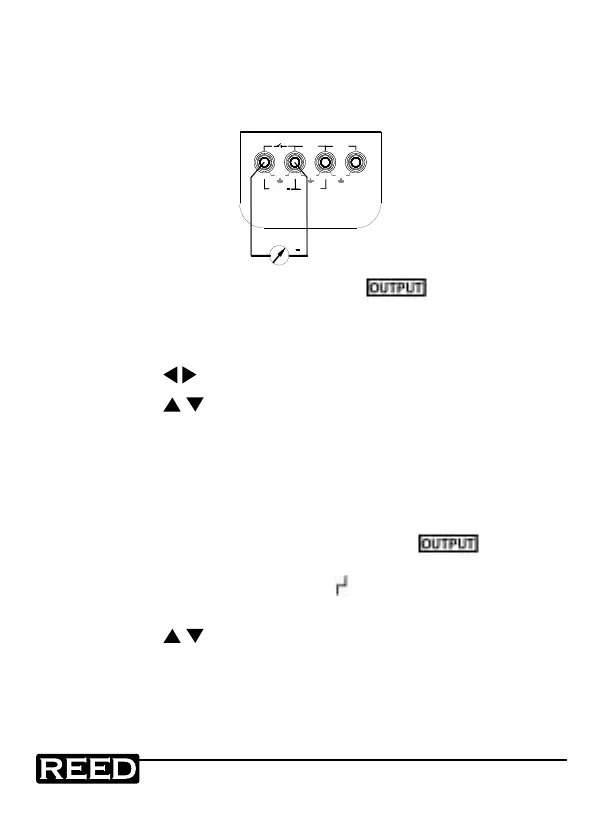
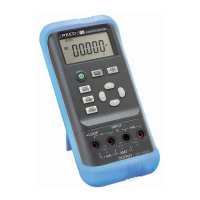
1. Insert one end of the test leads into the +mA output jack and
connect the other end to the input of the meter, as shown in the
diagram below.
+
+LOOP
30V MAX
OUTPUT
+
mA
XMT
30V
MAX
mA
30V
MAX
30V
MAX
V
INPUT
2. Press the OUTPUT/IN/SW button and
will
appear on the
display indicating that the calibrator is in an output state.
3. Press the mA%/V button to select the output to be either mA or
%, in which 0% indicates 4mA and 100% indicates 20mA.
4. Press the
buttons to select the output digits.
5. Press the button to change the numerical value of the set
digits. Hold the button and the value will keep varying.
25% Step Current Output
1. Connect the test leads to the meter as stated in the Current
Output procedures.
2. When the OUTPUT/IN/SW button is pressed,
will appear
in the display it indicating the calibrator is in an output state.
3. Press the 25%/RAMP button and
will appear on the LCD.
4. Press the mA%/V button to select the set output to mA or %
5. Press the button to change the output in a value of 25%,
in which 0% indicates 4mA and 100% indicates 20mA.
6. Press the 25%/RAMP button again to exit.
1.800.868.7495info@REED-Direct.ca
REED-Direct.ca


 To Next Page