EasyManua.ls Logo

Reef Factory Thermo control - User Manual

Reef Factory Thermo control
21 pages
Print Icon
To Next Page IconTo Next Page
Loading...
ver. 2.0.1
Thermo control
User Manual
Dear customer, thank you for your purchase.
English
www.reeffactory.com

Other manuals for Reef Factory Thermo control

Question and Answer IconNeed help?

Do you have a question about the Reef Factory Thermo control and is the answer not in the manual?

Summary

Assembly of the Device

Mount the Device

Mount the device in a safe place away from water and vapors using the holes on the back.

Install Temperature Sensor

Install the temperature sensor in the water at least 5cm from water surfaces and heat sources.

Connect Heating and Cooling Devices

Connect heating and cooling devices to the marked sockets, respecting maximum load limits.

Initial Configuration

Log in to Smart Reef App

Log in or create an account in the Smart Reef app on your mobile device.

Create Aquarium in App

Create your aquarium profile in the Smart Reef app, providing necessary details.

Add Device to Smart Reef Account

Add the Thermo control device to your Smart Reef account via the mobile app.

Set up Wi-Fi Connection

Set up the Wi-Fi connection for the device by entering network name and password.

Confirm Device Connection

Confirm the device has been successfully added to your Smart Reef account.

Device Operation Configuration

Set Operating Range

Set the heating and cooling operating ranges using the orange points on the temperature scale.

Set Alarm Range

Set the alarm range using red points, triggering alerts for temperature deviations.

Configure Temperature Unit and Alarm

Select the temperature unit (°C/°F) and configure the audible alarm settings.

Temperature Calibration

Calibrate Temperature Reading

Calibrate the device’s temperature reading to match an external meter via the Smart Reef app.

Confirm Calibration Result

Confirm the temperature value and check the calibration difference displayed after the process.

Resetting the Device

Reset to Factory Settings

Reset the device to factory settings by applying a magnet to the designated area.

Changing the Device Access Password

Change Wi-Fi Password

Change the device's Wi-Fi access password for enhanced security through the app.

Replacing the Fuses

Fuse Replacement Procedure

Replace fuses on the device's back to protect against system failures, using correct fuse types.

Updating the Device

Update Device Software

Update the device software via the Smart Reef app to ensure latest features and fixes.

Information and Warnings

Safety and Handling Warnings

Warnings about water resistance, electrical shock, and safe packaging disposal for the device.

Proper Waste Disposal

Guidelines for disposing of the device as electronic waste in compliance with environmental regulations.

Manufacturer and Compliance Information

Details about the manufacturer, product compliance with EU directives, standards, and FCC statement.

Warranty Conditions

Warranty Coverage and Period

Details on warranty duration for devices and accessories, and what technical issues are covered.

Warranty Claim Requirements

Requirements for warranty claims, including proof of purchase and conditions for replacement or repair.

Exclusions from Warranty

List of conditions and damages not covered by the warranty, such as wear, misuse, or unauthorized alterations.

Guarantor Liability Limitations

Limitations on the guarantor's liability for incidental, consequential, or indirect damages.

Technical Information

Device Specifications

Technical specifications including device name, model, accuracy, power, dimensions, and weight.

Overview

The Reef Factory Thermo Control is a user-friendly device designed for precise temperature management in aquariums, ensuring optimal conditions for marine life. This manual provides comprehensive instructions for assembly, initial configuration, operation, calibration, and maintenance.

Function Description

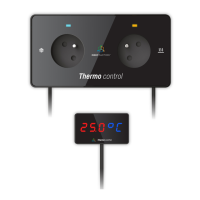
The Thermo Control device allows users to accurately monitor and regulate water temperature in their aquariums. It features two power sockets: one for a heating device (marked with a heating symbol) and another for a cooling device (marked with a snowflake). The device activates the heating system when the temperature drops below a user-defined set point and the cooling system when the temperature rises above it.

A key feature is its integration with the Smart Reef app, which enables remote monitoring and control. Users can configure the operating temperature range, set audible alarms, and receive email and push notifications on their mobile devices if the temperature deviates from the set range. The device also supports temperature calibration to ensure consistency with other temperature meters, and allows for changing the device access password for enhanced security.

Important Technical Specifications

  • Device Name: Thermo control
  • Device Model: RFTC01
  • Temperature Measurement Accuracy / Range: +/- 0.1°C / min. -10°C max +85°C
  • Operating Temperature / Humidity: 10°C - 50°C / 0 - 99%
  • Power Consumption: 2.5 W
  • Output Power: 1000 W (for both heating and cooling sockets)
  • Power Supply: 100V-230V AC 50-60 Hz
  • Dimensions (mm): 160x85x50
  • Weight: 690 g
  • Wi-Fi Network Support: Only 2.4 GHz Wi-Fi band
  • Fuses:
    • Heating system: F5A type tubular glass fuse
    • Cooling system: F5A type tubular glass fuse
    • Thermo control device protection: F400mA type tubular glass fuse
  • FCC Compliance: Part 15 of FCC rules, with RF Module ESP12F (FCC ID: 2AHMR-ESP12F). Requires a 20 cm (8 inch) spacing from the product for compliance.

Usage Features

Assembly and Installation: The device should be mounted in a safe place, away from water and vapors, using the holes on its back. It connects to the mains socket via the included power cord, which should be inserted tightly. The temperature sensor must be installed in the water, in a stable temperature area, away from water surfaces and heat sources like heaters, with a minimum immersion of 5cm. Heating and cooling devices are connected to their respective marked sockets. The maximum load for each socket is 1000 W. If multiple heaters are used, an appropriately rated power strip is required.

Initial Configuration with Smart Reef App:

  1. Download and Log In: Open the Smart Reef app (available on Play Store and App Store) on your mobile device and log in. New users can create a free account.
  2. Create Aquarium: If you don't have an aquarium set up in the app, use the "Add an aquarium" option and provide the necessary information.
  3. Add Device: From the aquarium or device list, select "add device." Allow the app to access your location for easier Wi-Fi connection. Choose "Thermo control" from the device list and press "NEXT."
  4. Wi-Fi Connection: Enter the exact 2.4 GHz Wi-Fi network name and password for your home router. Pay attention to case sensitivity and avoid special characters if your router doesn't support them. Select "SCANNING" to scan the QR code on the device or manually enter the serial number (found on the device, packaging, or generated Wi-Fi network) and select "CONNECT." The serial number starts with "RF."
  5. Device Connection: The app will temporarily connect to the device to set up the Wi-Fi network. Once connected, the device will be added to your Smart Reef account and appear in the device list within 60 seconds.

Device Operation Configuration: After successful connection, users can configure the device's operation:

  • Temperature Range: Adjust the orange points on the temperature scale in the app to set the desired operating range. The heating system activates below the set point, and the cooling system activates above it.
  • Alarm Range: Adjust the red points on the temperature scale to set the alarm range. If the temperature drops below or rises above this range, an audible alarm will sound, and an email/push notification will be sent.
  • Units: Select between Celsius (°C) or Fahrenheit (°F).
  • Audible Alarm: Enable or disable the audible alarm (it is recommended to keep it on for safety).

Temperature Calibration: To calibrate the device:

  1. Access Calibration: Log into the Smart Reef app or www.reeffactory.com, select the Thermo control device, press "SETTINGS," and then "TEMPERATURE CALIBRATION."
  2. Disconnect Devices: It is recommended to disconnect heating and cooling devices during calibration.
  3. Immerse Sensor: Immerse the sensor in water of a known temperature, wait 60 seconds, and press "OK."
  4. Enter Value: Enter the correct water temperature value and confirm.
  5. Reconnect Devices: After calibration, return the temperature sensor to the aquarium and reconnect heating and cooling devices. The device will then display the corrected temperature, and the settings menu will show the measurement difference after calibration.

Resetting the Device: If the device malfunctions or cannot connect, it can be restored to factory settings by applying the magnet (included in the set) to the "RESET" mark on the device housing. Reconfiguration and calibration will be required after a reset.

Changing Device Access Password: For security, it's recommended to change the default password ("reeffactory"). Connect directly to the device's Wi-Fi network (as in step 4 of initial setup), expand the menu (3 bars in the upper right corner), go to Wi-Fi network settings, enter the current password, then enter and confirm the new password.

Updating the Device: To update the device's software:

  1. Access Updates: Log into the Smart Reef app or www.reeffactory.com.
  2. Check for Updates: Press the "Edit" button next to the device name (a red indicator shows an available update).
  3. Confirm Update: A message will appear about the new software version. Press "OK" to start the update.
  4. Do Not Disconnect: Do not disconnect the device from power during the update. If the update doesn't complete within 30 minutes, reset the device.
  5. Check Settings: After an update, verify device settings, as some may change or revert to factory settings.

Maintenance Features

Replacing Fuses: The device has fuses on the back to protect against damage from heating or cooling system failures. If the heating or cooling system isn't working despite correct device operation, a fuse may need replacement.

  1. Disconnect Power: Always disconnect the Thermo control from the mains power supply before replacing fuses to avoid electric shock.
  2. Remove Fuse Holder: Turn the fuse holder as indicated to remove it.
  3. Replace Fuse: Replace the fuse with a new one of the same rating.
    • The left fuse is for the heating system (F5A tubular glass fuse).
    • The right fuse is for the cooling system (F5A tubular glass fuse).
    • The middle fuse, placed slightly higher, protects the Thermo control device itself (F400mA tubular glass fuse) and cannot be interchanged with the others.
  4. Seek Professional Help: If unsure about fuse assessment or replacement, contact an electrical service center.

Warranty Conditions: Reef Factory provides a warranty for technical hardware problems under normal use:

  • Consumer Products: 24 months for individual and business customers.
  • Demo Products: 12 months for business customers.
  • Accessories and Spare Parts: 6 months.
  • Proof of Warranty: A bill or invoice of purchase with the date and device name.
  • Repair Time: Technical defects will be removed free of charge within 14 days of delivery to an Authorized Service Point.
  • Product Replacement: The user can request a new, defect-free product if five repairs requiring component replacement have been made and defects persist, or if the Authorized Service Center states the defect is impossible to remove.
  • Warranty Repair Conditions: Delivery in original packaging, proof of purchase, and a description of the fault.
  • Exclusions: Normal wear and tear (probes, sensors, hoses), mechanical damage, improper use, unauthorized repairs, damages from natural wear, and force majeure events.
  • Data Loss: Repair or replacement may involve data loss (configuration, measurement history).
  • Compatibility: The guarantor is not responsible for compatibility issues with accessories or devices from other manufacturers.

Important Warnings:

  • The Thermo control is not watertight; avoid immersion, splashing, and high humidity to prevent permanent damage.
  • The device operates under mains voltage, posing a risk of electric shock.
  • Packaging materials should be kept away from children due to the risk of swallowing, aspiration, and suffocation. Dispose of packaging environmentally.
  • The device is marked with the crossed-out waste container symbol, indicating it should not be disposed of with household waste. Users must hand it over to waste electrical and electronic equipment collection centers.

Reef Factory Thermo control Specifications

General IconGeneral
BrandReef Factory
ModelThermo control
CategoryThermostat
LanguageEnglish